

Language Weaver Maintenance Activity - Saturday June 6th, 2026 between 06:00 AM UTC and 10:00 AM UTC

Target file not correct with PO file type definition

Hi,

we have an issue with the PO file type definition from the AppStore (PO file type 3.1.0.0).

First, this is great to translate monolingual PO files, where the text to translate is in the target column.

To lock some variables, we have refined the settings in the embedded content section of the data type:
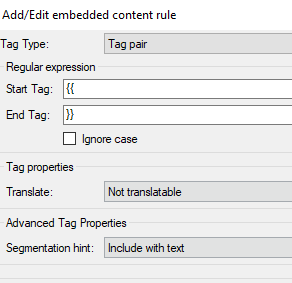
Dialog box showing 'AddEdit embedded content rule' with fields for Tag Type set to 'Tag pair', Start Tag as '', End Tag as '', and Translate set to 'Not translatable'.

We have this text in the PO file:

#. >> [NXIS_AP1-2207] - Alarms / AP1
msgid ""
"ALARM:Appl Manager\n"
"General error:\n"
"{{message}}"
msgstr ""
"Application Manager\n"
"Allgemeiner Fehler:\n"
"{{message}}"

#. >> [NXIS_AP1-2207] - Alarms / AP1
msgid ""
"ALARM:Print\n"
"General error:\n"
"{{message}}"
msgstr ""
"Drucken\n"
"Allgemeiner Fehler:\n"
"{{message}}"

The results in the Studio file looks good, the variables are well noticed and locked for editing.
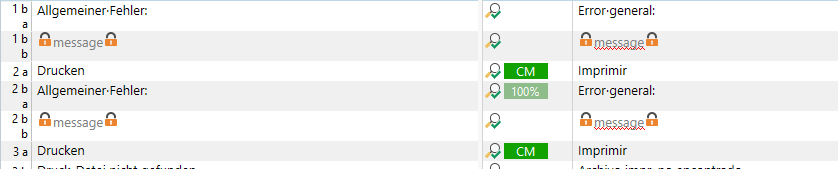
Table view showing translation segments with locked variables marked by orange padlock icons. Columns include source text, target text, and translation status.

But after saving the file to target, all previously locked content is been missing in the file, it simply is not saved to the target file:
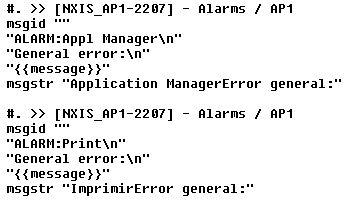
Code snippet showing PO file content with msgid and msgstr fields. Variables are enclosed in double curly braces and include text like 'General error' and 'message'.

The same issue of course occurs to "\n", which also has been added to the file type definity.

And it does not matter, if the tag pair is used within a text or not.

We use Studio 2024, but made the same experience with Studio 2022 already.

Does anyone in the community know about this error and how to avoid it?

Many thanks,

Johannes


Generated Image Alt-Text
[edited by: RWS Community AI at 7:09 PM (GMT 1) on 17 Jun 2025]
emoji
  • Probability score: 0.6  

    Question improvement suggestion: Provide specific details about the settings you adjusted in the embedded content section and any error messages received during the process.  

    In the meantime, based on the information you have provided, here is a suggested answer to your question:  

    Hello Johannes,  

    Thank you for reaching out regarding the issue with the PO file type definition in Trados Studio. It sounds like you've done a great job refining the settings, but I understand the frustration of having locked content missing in the target file. Here are some steps you can take to troubleshoot and potentially resolve the issue:  

    **Step 1:** Verify the Embedded Content Settings  

    - Double-check the settings you adjusted in the embedded content section of the PO file type definition. Ensure that the variables you want to lock are correctly defined and that there are no conflicting settings.  

    **Step 2:** Test with a Simplified PO File  

    - Create a simplified version of your PO file with minimal content and only a few variables. This can help determine if the issue is related to the complexity of the original file.  

    **Step 3:** Check for Updates  

    - Ensure that you are using the latest version of Trados Studio 2024. Sometimes, issues are resolved in newer updates, so checking for updates within the application can be beneficial.  

    **Step 4:** Review the Output File  

    - After saving the target file, open it in a text editor to see if the locked content is present but perhaps not displaying correctly. This can help identify if the issue is with the saving process or the display of the content.  

    **Step 5:** Consider Alternative File Type Definitions  

    - If the problem persists, you might want to explore using a different file type definition for PO files, such as creating a custom file type using Regular Expression Delimited Text, as suggested in the context.  

    If these steps do not resolve the issue, please provide any specific error messages or additional details about the settings you adjusted, and I would be happy to assist further.  

    I hope this answer addressed your question. If not, please reject the answer, add the question improvement suggestion information, and click the RWS Community AI checkbox on the right to try again.  

    RWS Community AI

    emoji
  •  

    I can reproduce the problem with the app, but it works fine with the default PO filetype so you may want to use that?

    If not, your best bet is to contact the developer: https://appstore.rws.com/Plugin/259?tab=support

    Paul Filkin | RWS

    Design your own training!
    You've done the courses and still need to go a little further, or still not clear? 
    Tell us what you need in our Community Solutions Hub

    emoji
  • Hi Paul,

    thanks a lot for the reply. I will check with the tool developer.

    We use the file type definition, because it enables us to translate a single PO language file, where the text to translate is in the target column. In the source column is the strign ID.

    The regular PO file type definition does not support that.

    Regards,

    Johannes

    emoji
  •  

    Interesting - so the screenshot you provided is something different to the way you use it in practice?  Probably I got confused or didn't understand what you are actually doing.

    Paul Filkin | RWS

    Design your own training!
    You've done the courses and still need to go a little further, or still not clear? 
    Tell us what you need in our Community Solutions Hub

    emoji
  • Hi Paul,

    no, this is the screenshot from PO file type definition 3.1.

    The standard PO file type definition is 1.0, but cannot be used with that structure of the file.

    Version 3.1 offers the option to have the target text translated, not the source text.

    This option is not available in version 1.

    So we have to use version 3.1 for this kind of file (string ID in the source column and text to translate in the target column).

    See example below, we want to translate the German text, as the source in only a string ID, which cannot be translated, or at least it does not make sense.

    Screenshot showing a table with two columns: 'Quelltext - Englisch' and ' bersetzung - Deutsch'. The left column contains string IDs and English text, while the right column contains German translations.

    Hope this helps to understand the issue.

    Thanks,

    Johannes

    emoji


    Generated Image Alt-Text
    [edited by: RWS Community AI at 7:02 AM (GMT 1) on 19 Jun 2025]