


The Trados cloud platform will be undergoing maintenance on Saturday, 9th May 2026 between 05:00 to 17:00 UTC. During this time, you will not be able to log in to the Trados platform.

Target segments not populated with NMT >> Trados Studio 2024 + "OpenAI" or/and "DeepL" plugins

Hello,
Can you please advise what I can do to solve the issue?

Issue:
Quite a few target segments are left blank and not populated with NMT.
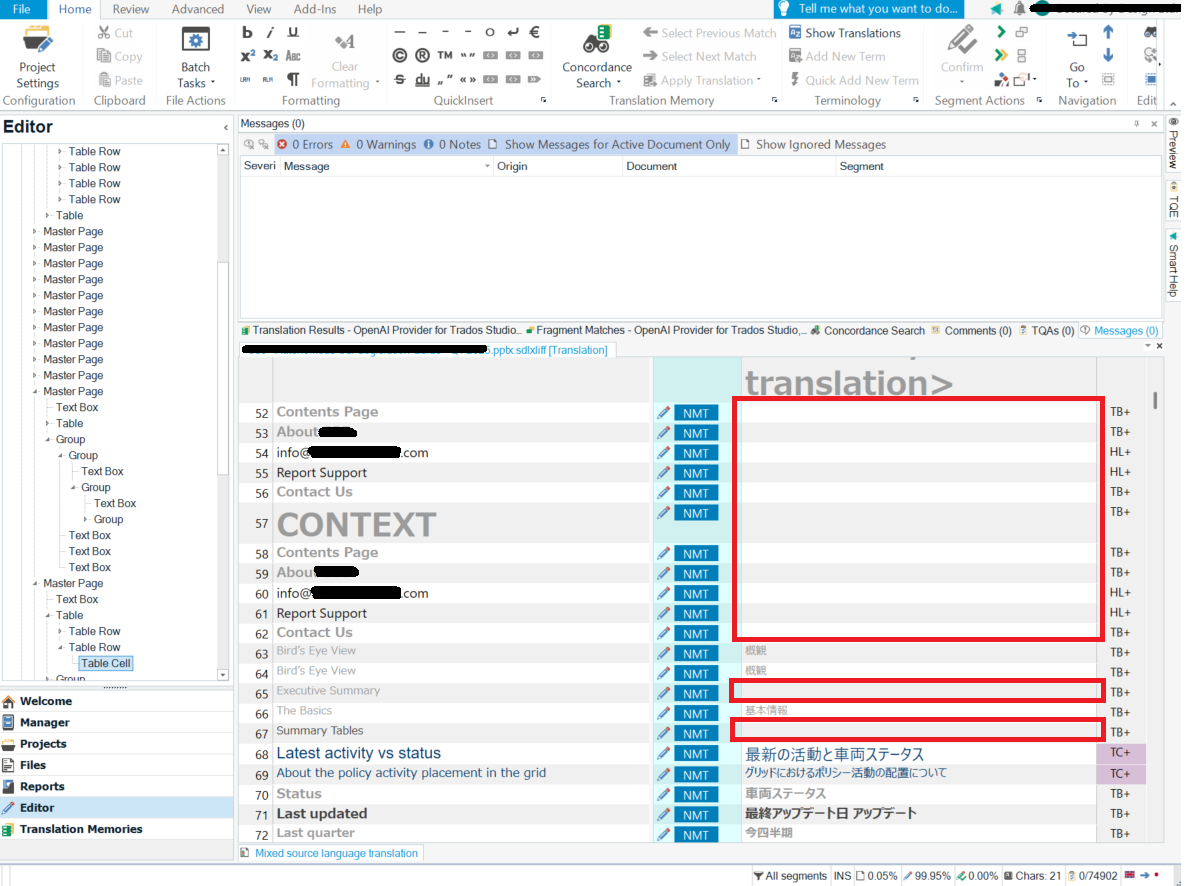
Screenshot of Trados Studio 2024 Editor view showing a list of segments with some target segments left blank despite NMT being applied. Red boxes highlight the blank target segments.  

Conditions:
- Trados Studio 2024 Professional (Trados Studio 2024 SR1 - 18.1.2.6370)
- 'OpenAI Provider for Trados Studio' (The version for Trados Studio 2024 (SR1), 1.2.14.0)
- 'DeepL Translation provider' (The version for Trados Studio 2024 (SR1), 7.1.1.1)
- No TMs are used.

1. What I am trying to achieve: 
- I want to have all the target segments populated with the AI translation.

2. What I have already checked:
- OpenAI Model connection is successful.
- OpenAI's API usage is being paid and current tokens are within limits (Tier2).

3. What I have tried:
- I tried AI translation with the following three Project Settings (No TMs applied).  All three cases have the same issue.
 (1) 'OpenAI Provider for Trados Studio' only.
 (2) 'DeepL Translation provider' only.
 (3) 'OpenAI Provider for Trados Studio' and 'DeepL Translation provider'

Looking forward to hearing from you.

Chiaki


Generated Image Alt-Text
[edited by: RWS Community AI at 11:31 AM (GMT 1) on 2 Sep 2025]

emoji
  • Probability score: 0.8  

    Question improvement suggestion: Provide specific details about the project settings you are using and any error messages you may have encountered.  

    In the meantime, based on the information you have provided, here is a suggested answer to your question:  

    Hello Chiaki,  

    To address the issue of target segments not being populated with NMT in Trados Studio 2024, please follow these steps:  

    **Step 1:** Verify that both the 'OpenAI Provider for Trados Studio' and 'DeepL Translation provider' plugins are correctly installed and updated to their latest versions.  

    **Step 2:** Ensure that you have a stable internet connection, as both plugins require internet access to function properly.  

    **Step 3:** Check your project settings:  

    - Go to **File > Options > Language Pairs > All Language Pairs > Translation Memory and Automated Translation**.  

    - Ensure that the option **'Apply automatic translation when no matches exist in the translation memory'** is enabled.  

    **Step 4:** Since you mentioned that no TMs are used, make sure that the project is set up to allow NMT to fill in the target segments. You can do this by creating a new project and ensuring that the NMT providers are selected as the primary translation sources.  

    **Step 5:** If the issue persists, try disabling one of the NMT providers (either OpenAI or DeepL) and test the other one individually to see if one of them is causing the problem.  

    **Step 6:** Restart Trados Studio after making these changes to ensure that all settings are applied correctly.  

    **Step 7:** If you still encounter issues, consider reinstalling the plugins for both OpenAI and DeepL to ensure they are functioning correctly.  

    If you follow these steps and the problem continues, please provide any specific error messages or additional details about your project settings, as this will help in diagnosing the issue further.  

    I hope this answer addressed your question. If not, please reject the answer, add the question improvement suggestion information, and click the RWS Community AI checkbox on the right to try again.  

    RWS Community AI

    emoji
  • All the Steps suggested by RWS Community AI (Steps 1 to 7 above) had been done before I posted the issue.  Please provide a human advisor's comment.  If you are currently fixing (or planning to fix) the bug in the OpenAI/DeepL plugins, please inform us of that.  Thanks.

    emoji
  • Hi  ,

    We're aware of the issue reported and working on the fix for OpenAI( internal reference DET-299).  Once it's resolved, I'll update the post.

    For DeepLwe will check and log accordingly.

    Thank you!

    Regards,

    Oana

    Oana Nagy | QA Engineer | RWS Group

    emoji