The Trados cloud platform will be undergoing maintenance on Saturday, 9th May 2026 between 05:00 to 17:00 UTC. During this time, you will not be able to log in to the Trados platform.

Google Cloud Translation Provider plugin v1.2.2 - Trados Studio 2022 SR2 - empty MT translations

The Google Cloud Translation provider plugin is used with HR and MT languages. We use the Advanced model with glossary for these two languages using a JSON file.

Screenshot showing the Google Cloud TP - V3 Advanced Translation plugin selected in a dropdown menu.

However, we noticed the same behaviour earlier this year with the Standard version of the plugin without glossary.

In all casecs, the segments processed with the Google MT provider appear in Draft status.

However, some of the segments appear empty and there is no way to force MT to be applied.

The following examples refer to HR language but the same happens with the MT language.
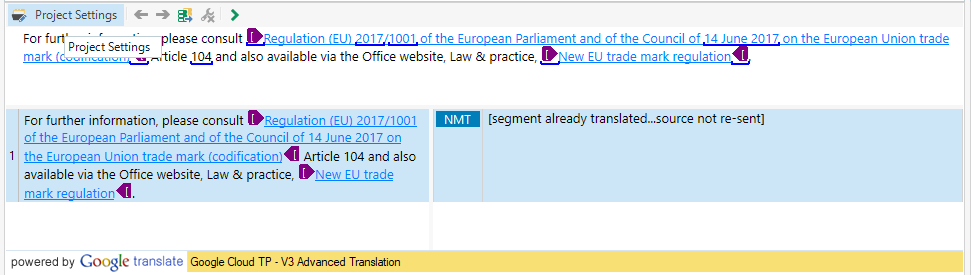
Screenshot of a translation interface with a segment containing EU regulation text, marked as 'segment already translated...source not re-sent'.

Screenshot of a translation interface with a segment containing EU regulation text, showing an empty translation field.

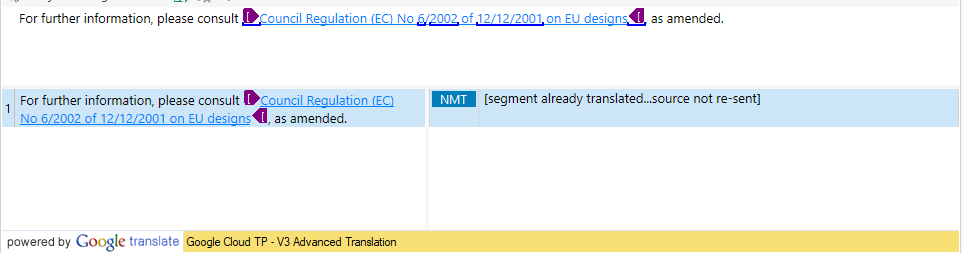
Another example

Screenshot of a translation interface with a segment referencing Council Regulation (EC) No 62002, marked as 'segment already translated...source not re-sent'.

Screenshot of a translation interface with a segment referencing Council Regulation (EC) No 62002, showing an empty translation field.

Have someone experienced this issue? Are there any workarounds available? and is there a way to fix it?

Thanks for sharing your feedback


Generated Image Alt-Text
[edited by: RWS Community AI at 10:19 AM (GMT 1) on 4 Sep 2025]

emoji