
 Translate



Hi!
Suddenly in the middle of a project I get the error: 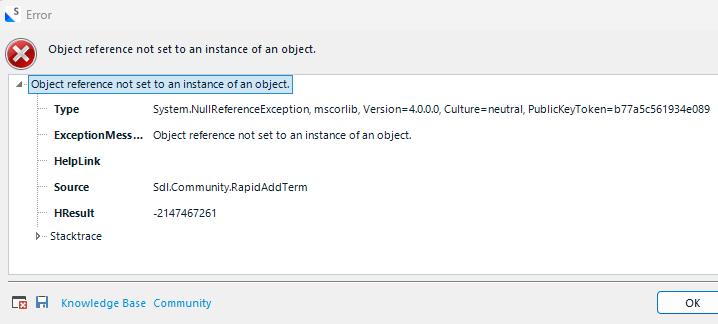 .
.
After adding terms via RAT icon located at Quick Access Toolbar successfully, I received this error and I am unable to use RAT further in this project. In a new project, RAT works perfectly for a while until shows me the same error.
Error file:
<SDLErrorDetails time="11/21/2025 5:55:57 PM">
<ErrorMessage>Object reference not set to an instance of an object.</ErrorMessage>
<Exception>
<Type>System.NullReferenceException, mscorlib, Version=4.0.0.0, Culture=neutral, PublicKeyToken=b77a5c561934e089</Type>
<ExceptionMessage>Object reference not set to an instance of an object.</ExceptionMessage>
<HelpLink />
<Source>Sdl.Community.RapidAddTerm</Source>
<HResult>-2147467261</HResult>
<StackTrace><
at Sdl.Community.RapidAddTerm.TermbaseService.GetTermbaseIndex(Termbase termbase, List`1 projectTermbaseIndexes, Language currentLanguage)
at Sdl.Community.RapidAddTerm.TermbaseService.AddNewTerm()
at Sdl.Community.RapidAddTerm.RapidAddTermRibbonAction.Execute()
at Sdl.Desktop.IntegrationApi.AbstractAction.Sdl.Desktop.IntegrationApi.Extensions.Internal.IAction.Execute()
at Sdl.Desktop.IntegrationApi.Internal.Adaptors.InternalActionAdaptor.Execute()
at Sdl.Desktop.Platform.Implementation.CommandBars.SimpleActionExecuter.Execute(ActionData actionData)
at Sdl.Desktop.Platform.Implementation.ResourceLoggingInternalCommandExecuter`1.ExecuteWithResourceLogging(TCommandData commandData, String message)
at Sdl.Desktop.Platform.Implementation.CommandBars.ActionService.ExecuteAction(IAction action, ActionOrigin origin, Boolean allowToggle)
at Sdl.Platform.UI.IgCommandBarAction.Execute()
at Sdl.Platform.UI.IgCommandBarAction._lazyButtonTool_ToolClick(Object sender, ToolClickEventArgs e)
at Infragistics.Win.UltraWinToolbars.ToolBase.OnToolClick(ToolClickEventArgs e)
at Infragistics.Win.UltraWinToolbars.UltraToolbarsManager.OnToolClick(ToolClickEventArgs e)
at Infragistics.Win.UltraWinToolbars.UltraToolbarsManager.FireEvent(ToolbarEventIds id, EventArgs e)
at Infragistics.Win.UltraWinToolbars.ToolBase.OnToolClick()
at Infragistics.Win.UltraWinToolbars.ButtonToolUIElement.DoClickProcessing(MouseEventArgs e)
at Infragistics.Win.UltraWinToolbars.ButtonToolUIElement.OnMouseUp(MouseEventArgs e)
at Infragistics.Win.ControlUIElementBase.ProcessMouseUpHelper(Object sender, MouseEventArgs e)
at Infragistics.Win.ControlUIElementBase.ProcessMouseUp(Object sender, MouseEventArgs e)
at Infragistics.Win.Utilities.ProcessEvent(Control control, ProcessEvent eventToProcess, EventArgs e)
at Infragistics.Win.UltraWinToolbars.UltraToolbarsDockArea.OnMouseUp(MouseEventArgs e)
at System.Windows.Forms.Control.WmMouseUp(Message& m, MouseButtons button, Int32 clicks)
at System.Windows.Forms.Control.WndProc(Message& m)
at System.Windows.Forms.Control.ControlNativeWindow.OnMessage(Message& m)
at System.Windows.Forms.Control.ControlNativeWindow.WndProc(Message& m)
at System.Windows.Forms.NativeWindow.Callback(IntPtr hWnd, Int32 msg, IntPtr wparam, IntPtr lparam)]]></StackTrace>
</Exception>
<Environment>
<ProductName>Trados Studio</ProductName>
<ProductVersion>Studio18</ProductVersion>
<EntryAssemblyFileVersion>18.1.3.6657</EntryAssemblyFileVersion>
<OperatingSystem>Microsoft Windows 11 Pro</OperatingSystem>
<ServicePack>NULL</ServicePack>
<OperatingSystemLanguage>1033</OperatingSystemLanguage>
<CodePage>1252</CodePage>
<LoggedOnUser>XXX</LoggedOnUser>
<DotNetFrameWork>4.0.30319.42000</DotNetFrameWork>
<ComputerName>XXX</ComputerName>
<ConnectedToNetwork>True</ConnectedToNetwork>
<PhysicalMemory>16207036 MB</PhysicalMemory>
</Environment>
</SDLErrorDetails>
Added new evidence.
[edited by: Olav at 4:27 PM (GMT 0) on 21 Nov 2025]




