


Problem in converting xlsx file to sdltb file for term base in glossy converter

Dear, all

As indicated in the subject above, I got a problem in converting xlsx file to sdltb file for term base in glossy converter.

When I downloaded the glossy converter and executed it, I ran into this message.
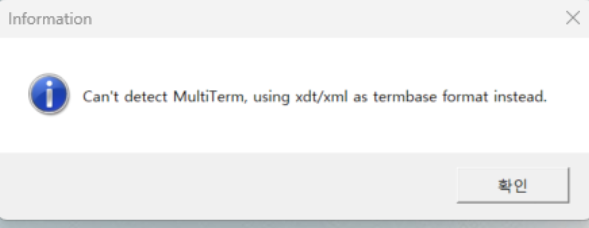
Information dialog box with the message: Can't detect MultiTerm, using xdtxml as termbase format instead. A button with Korean text is visible.

So I can not see the option of multiterm base in the format option. I think this is why I can not convert it to sdltb file.

How can I solve this problem?
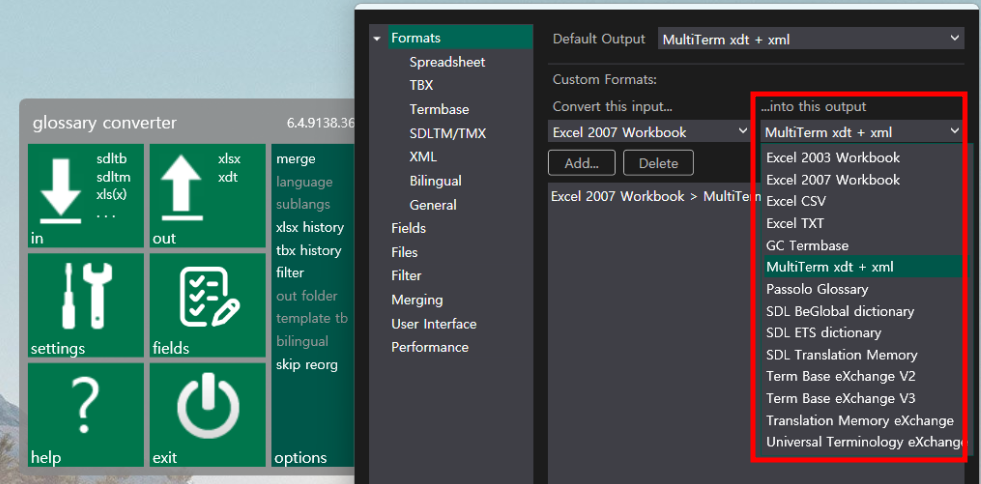
Glossary converter interface showing input and output options. The output format dropdown is expanded, highlighting MultiTerm xdt + xml and other format options.

Looking forward to hearing back from you soon

Best regards

KT Ahn


Generated Image Alt-Text
[edited by: RWS Community AI at 2:00 AM (GMT 0) on 19 Dec 2025]
emoji
  •  

    Perhaps try the troubleshooting section of the help:

    This is an intermittent error, which affects only some machines. It has become much more frequent since the release of Trados Studio 2019 SR1 and MultiTerm 2019 CU1. A number of events come together to cause it, and the easiest way to attempt a fix is to run the repair tool that is available on the Glossary Converter website.

    Since the causes are still not exactly clear, there is no guarantee it will work, but a good number of errors were fixed. This handles the known 2017/2019 problems, it's not suitable for other versions. 

    Another fix was reported that helped particularly when older versions of MultiTerm/Trados were used: try the older Glossary Converter, build 5.1. It is still available on the Glossary Converter website

    If you can't fix it, there is a workaround:

    • Use the Glossary Converter to create an xdt/xml file pair
    • In MultiTerm, create a new termbase based on the xdt
    • In MultiTerm, import the xml file

    Paul Filkin | RWS Group

    ________________________
    Design your own training!

    You've done the courses and still need to go a little further, or still not clear? 
    Tell us what you need in our Community Solutions Hub

    emoji
