Trados Studio 2024 trial – Coexistence with 2017/2019 and plugins

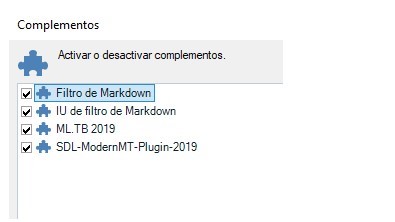
Screenshot showing the 'Complementos' section with a list of plugins, including 'Filtro de Markdown,' 'IU de filtro de Markdown,' 'ML.TB 2019,' and 'SDL-ModernMT-Plugin-2019.'

Hello everyone,

We are a company currently working with Trados Studio 2017 and 2019, and we are planning an internal pilot with **Trados Studio 2024 (trial)** on one of our production machines. Before installing the trial, we would like to confirm two points:

  1. Coexistence with Studio 2017/2019 - Can we safely install the **Studio 2024 trial** on a computer that already has **Studio 2017 and/or Studio 2019** installed? - Will this affect the existing versions in any way (settings, projects, file associations), or is there any recommended precaution?
  2. Plugins (Apps) with Studio 2024 trial- Can the **Studio 2024 trial** use the same plugins as the full Studio 2024 edition? - Where is the best place to download **Studio 2024–compatible plugins** (RWS AppStore link)? - Do we need to reinstall the plugins specifically for 2024, instead of using those from 2017/2019? Any guidance or link to official documentation would be very helpful.

Thank you in advance


Generated Image Alt-Text
[edited by: RWS Community AI at 12:03 PM (GMT 0) on 30 Dec 2025]
emoji
Parents
  •  

    Can we safely install the **Studio 2024 trial** on a computer that already has **Studio 2017 and/or Studio 2019** installed?

    Yes.

    Will this affect the existing versions in any way (settings, projects, file associations)

    No.

    is there any recommended precaution?

    Best to complete any ongoing projects in the older version and only start new projects in 2024.  If you had maintained the product more regularly this might not be a problem but with this much of a difference it's better to start afresh and don't try to migrate ongoing projects.

    Also note that if you use project templates you should recreate them and don't use them in 2024.  If you do that you will introduce old unsupported versions into 2024, and you might even introduce bugs that have been fixed in newer versions.

    Can the **Studio 2024 trial** use the same plugins as the full Studio 2024 edition?

    Yes.

    Where is the best place to download **Studio 2024–compatible plugins** (RWS AppStore link)

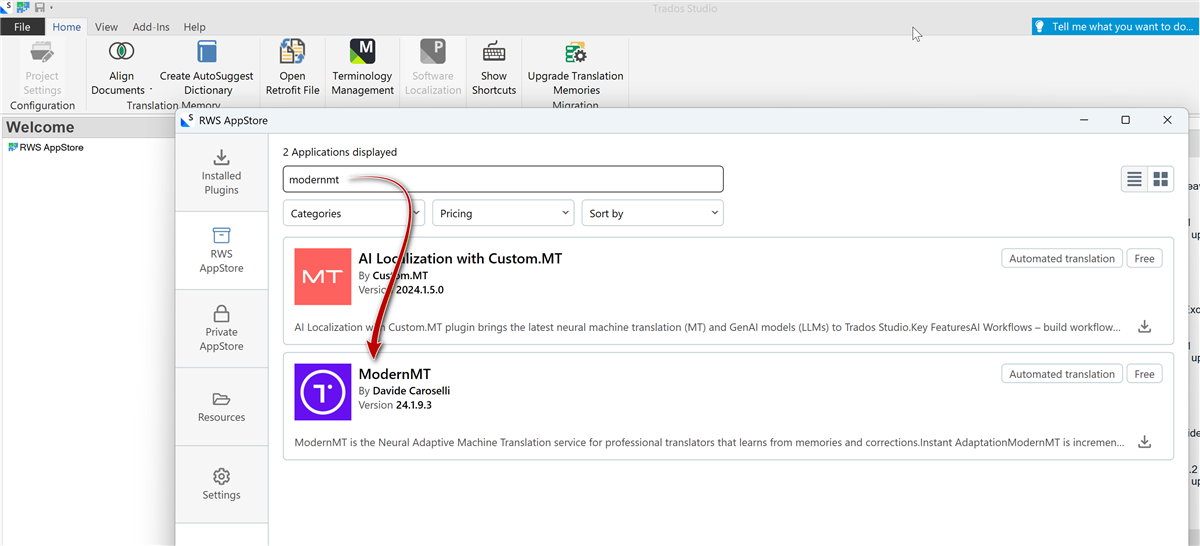
    Each app, when you download, will ask for the version.  But the very best way is to use the integrated appstore that is built into the product (this will be new to you as it wasn't there with your older versions).  The integrated appstore controls versioning better and the only apps you will see available to you will be the ones that are compatible with 2024.

    Do we need to reinstall the plugins specifically for 2024, instead of using those from 2017/2019?

    Yes.  Older plugins will not work in 2024.

    Paul Filkin | RWS Group

    ________________________
    Design your own training!

    You've done the courses and still need to go a little further, or still not clear? 
    Tell us what you need in our Community Solutions Hub

    emoji
Reply
  •  

    Can we safely install the **Studio 2024 trial** on a computer that already has **Studio 2017 and/or Studio 2019** installed?

    Yes.

    Will this affect the existing versions in any way (settings, projects, file associations)

    No.

    is there any recommended precaution?

    Best to complete any ongoing projects in the older version and only start new projects in 2024.  If you had maintained the product more regularly this might not be a problem but with this much of a difference it's better to start afresh and don't try to migrate ongoing projects.

    Also note that if you use project templates you should recreate them and don't use them in 2024.  If you do that you will introduce old unsupported versions into 2024, and you might even introduce bugs that have been fixed in newer versions.

    Can the **Studio 2024 trial** use the same plugins as the full Studio 2024 edition?

    Yes.

    Where is the best place to download **Studio 2024–compatible plugins** (RWS AppStore link)

    Each app, when you download, will ask for the version.  But the very best way is to use the integrated appstore that is built into the product (this will be new to you as it wasn't there with your older versions).  The integrated appstore controls versioning better and the only apps you will see available to you will be the ones that are compatible with 2024.

    Do we need to reinstall the plugins specifically for 2024, instead of using those from 2017/2019?

    Yes.  Older plugins will not work in 2024.

    Paul Filkin | RWS Group

    ________________________
    Design your own training!

    You've done the courses and still need to go a little further, or still not clear? 
    Tell us what you need in our Community Solutions Hub

    emoji
Children
No Data