DeepL no longer working after update.

Hi,

I've been having major issues after updating Trados Studio 2024 and DeepL. I now have the latest versions of both, but DeepL does not work. I get a message saying that there was a problem while translating.

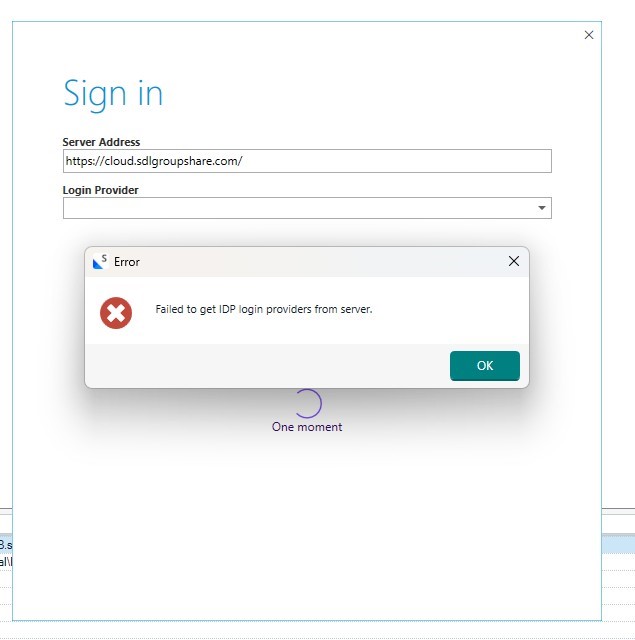
Also, when I open a new file in Trados Studio 2024, a Groupshare window appears automatically along with a message about non-recognition of IDP service providers. I have never had Groupshare. One of my customers used to have it, so I have used Groupshare in the past but not recently, and the customer concerned no longer uses it either.

Can you help me sort out the problem?

The versions I am using are:

Trados Studio 2024 SR1 - 18.1.3.6657

DeepL: 7.1.5.0 27 mars 2026

And here are screen shots of the error messages

Error message in Trados Studio 2024 showing 'An error has occurred while using the translation provider DeepL Translator: One or more errors occurred.'

Sign-in window for SDL Groupshare with an error message stating 'Failed to get IDP login providers from server' and an OK button.

Thanks


Generated Image Alt-Text
[edited by: RWS Community AI at 3:57 PM (GMT 1) on 8 Apr 2026]

emoji
  • Probability score: 0.7  

    Question improvement suggestion: Provide specific error messages or codes you are encountering with DeepL, as well as any relevant screenshots of the GroupShare window issue.  

    In the meantime, based on the information you have provided, here is a suggested answer to your question:  

    Hello! Thank you for reaching out regarding the issues you're experiencing with DeepL and Trados Studio 2024. Let's work through some steps to help you resolve these problems.

    **Step 1:** Uninstall the current DeepL Translation Provider.  

    - Go to **Add-Ins** → **RWS AppStore** → **Installed plug-ins** and uninstall the DeepL plugin.

    **Step 2:** Ensure Trados Studio is updated.  

    - Check for updates by going to **Help** → **Check for updates** and install any pending updates.

    **Step 3:** Reinstall the latest DeepL Translation Provider.  

    - After updating Trados Studio, go to **Add-Ins** → **RWS AppStore** → **Plug-ins** and install the latest version of the DeepL Translation Provider.

    **Step 4:** Address the GroupShare window issue.  

    - Since you mentioned that you do not currently use GroupShare, it may be beneficial to check if any project settings or configurations are still referencing GroupShare. If you have any projects linked to GroupShare, try to open them directly and see if that resolves the issue.

    **Step 5:** If the problem persists, consider resetting Trados Studio settings.  

    - Close Trados Studio, navigate to the settings folder (e.g., `C:\Users\%USERNAME%\AppData\Roaming\Trados\Trados Studio\Studio17`), and rename the relevant XML files (like `Base Settings.xml` and `User Settings.xml`) to reset your settings.

    If you continue to experience issues, please provide any specific error messages or codes you receive, as well as screenshots of the errors, to help further diagnose the problem.

    I hope this answer addressed your question. If not, please reject the answer, add the question improvement suggestion information, and click the RWS Community AI checkbox on the right to try again.  

    RWS Community AI

    emoji
  • Hi 

    For DeepL - you are not showing what error you are getting.

    Since DeepL changed to a new authentication method, please make sure you have set up the app correctly and that you have added it again to your project as provider. This is what else to check with DeepL

    - You have a DeepL API Pro subscription, as a normal DeepL Pro/desktop subscription is not enough for the API plugin.

    - The API key is current and active If needed, generate a new API key in your DeepL account and use that one.

    - No extra spaces when pasting the key into Trados, make sure there are no leading/trailing spaces.

    - Check that you have not exceed your limits with DeepL

    As for GroupShare - you can make sure there is no server saved in servers and if you have it, please remove it: Go to File > Setup - Select Servers - and there you can see whether the server is still added (you may not have used it recently but perhaps it was not deleted from there)

    Next, proceed with what was indicated by the Community AI, which is the reset Trados:

    https://gateway.rws.com/csm?sys_kb_id=792c79773b81e6d093afd79704e45af0&id=kb_article_view&sysparm_rank=12&sysparm_tsqueryId=d0ea902a831e2290396947426daad3d2

    And kindly do not make new posts, wait until somebody answers you.

    Best regards,

    Anca

    Anca Stoian RWS Group

    emoji
  • Hi

    I just thought it might be useful to post on both forums.

    I have tried your suggestions and they do not work, unfortunately. I have deinstalled and reinstalled both Trados and DeepL several times. I have the right subscription. I have a valid key.

    I have specified the errors I am getting, as requested. I have provided two screen shots (above).

    There are no servers listed in the settings, so that's not the problem with Groupshare.

    I tried renaming the files as suggested.  That doesn't work either.

    Regards

    emoji
  • We will be pleased to help you with this problem so have logged a support case on your behalf. We do prioritise customers who have a support contract so please keep in mind it could take up to 48 hours, especially over a weekend, but rest assured we will contact you as soon as we can. You will be contacted at the email address used for this Community. Support Case Id : CS0045508.

    Anca Stoian RWS Group

    emoji