
 Translate



In the multilingual excel file type, Trados splits sentences by sentence ending characters, not by cells. With the batch task "import multilingual translations" the target text is not correctly taken as the source segment is split and the whole translation is taken for the first sentence. Is there a solution to this?
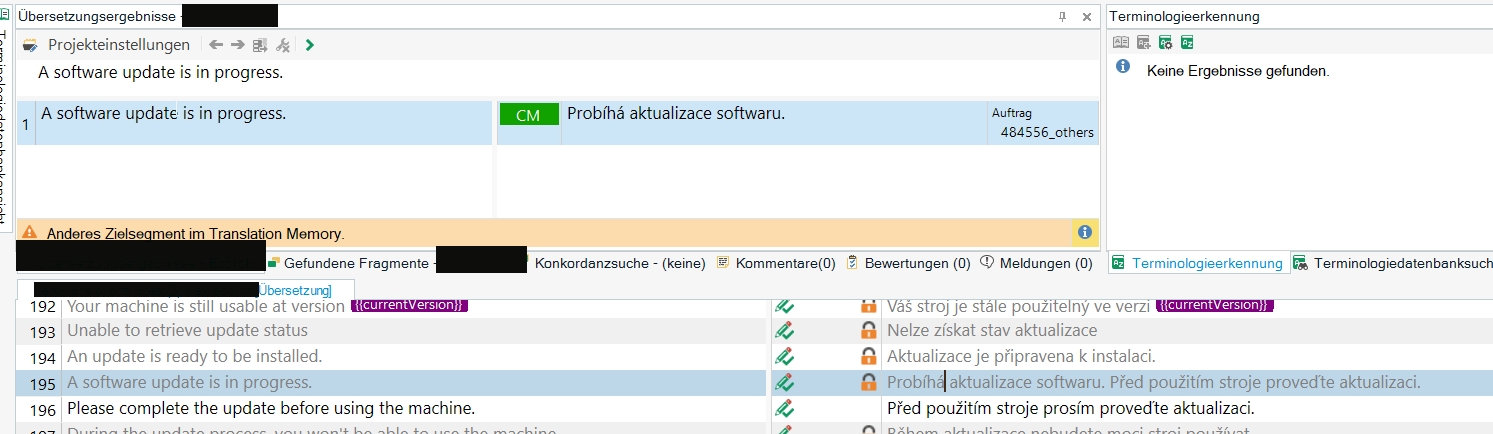
Example, see screenshot: Segments 195 and 196 were in one cell, got split in Trados and the whole translation in the translation cell was taken for the first segment, 195. So I locked all the content that was already translated and didn't notice, and we translated 196 as it was empty and in the target file the sentence was exported twice.
Thank you!
Removed AI Suggestion
[edited by: Barbara Zobrist at 2:20 PM (GMT 1) on 20 Apr 2026]



