Hi! When I try to use Web Lookup with my SDL Trados 2014 I get the following error [Unable to cast object of type 'Systems.Windows.Forms.TabPage' to type 'StudioIntegrationApiWebLookup.WebBrowserTabPage']. Can you please help?

Hi Danilo,
When the error appears, you should see a floppy disk in the bottom left corner.
If you could click that and post the contents it can help track down the issue.
Also, from your description, perhaps try resetting the window layout to see if that helps.
Thanks, Jesse. I appreciate your help. This is the contents of the message. I also tried to reset the window layout but that didn't seem to help.
<?xml version="1.0"?> <SDLErrorDetails time="29/11/2016 14:37:14"> <ErrorMessage>Method not found: 'IntPtr System.Runtime.InteropServices.Marshal.CreateAggregatedObject(IntPtr, !!0)'.</ErrorMessage>- <Exception> <Type>System.MissingMethodException, mscorlib, Version=4.0.0.0, Culture=neutral, PublicKeyToken=b77a5c561934e089</Type> <HelpLink /> <Source>StudioIntegrationApiWebLookup</Source>- <StackTrace> <![CDATA[ at StudioIntegrationApiWebLookup.ImprovedWebBrowser.ImprovedWebBrowserSite..ctor(WebBrowser host) at StudioIntegrationApiWebLookup.ImprovedWebBrowser.CreateWebBrowserSiteBase() at System.Windows.Forms.WebBrowserBase.TransitionFromLoadedToRunning() at System.Windows.Forms.WebBrowserBase.TransitionUpTo(AXState state) at System.Windows.Forms.WebBrowser.get_AxIWebBrowser2() at System.Windows.Forms.WebBrowser.set_ScriptErrorsSuppressed(Boolean value) at StudioIntegrationApiWebLookup.WebBrowserTabPage..ctor() at StudioIntegrationApiWebLookup.WebLookupResultsViewPartControl.AddTab() at StudioIntegrationApiWebLookup.WebLookupResultsViewPartControl.OpenTabs(String tabsFile) at StudioIntegrationApiWebLookup.WebLookupResultsViewPartControl.OnLoad(EventArgs e) at System.Windows.Forms.UserControl.OnCreateControl() at System.Windows.Forms.Control.CreateControl(Boolean fIgnoreVisible) at System.Windows.Forms.Control.CreateControl() at System.Windows.Forms.Control.OnVisibleChanged(EventArgs e) at System.Windows.Forms.ScrollableControl.OnVisibleChanged(EventArgs e) at System.Windows.Forms.Control.OnParentVisibleChanged(EventArgs e) at System.Windows.Forms.Control.OnVisibleChanged(EventArgs e) at System.Windows.Forms.ScrollableControl.OnVisibleChanged(EventArgs e) at System.Windows.Forms.Control.OnParentVisibleChanged(EventArgs e) at System.Windows.Forms.Control.OnVisibleChanged(EventArgs e) at System.Windows.Forms.ScrollableControl.OnVisibleChanged(EventArgs e) at Infragistics.Win.ManagedContainerControlBase.OnVisibleChanged(EventArgs e) at System.Windows.Forms.Control.OnParentVisibleChanged(EventArgs e) at System.Windows.Forms.Control.OnVisibleChanged(EventArgs e) at System.Windows.Forms.ScrollableControl.OnVisibleChanged(EventArgs e) at Infragistics.Win.ManagedContainerControlBase.OnVisibleChanged(EventArgs e) at System.Windows.Forms.Control.SetVisibleCore(Boolean value) at Infragistics.Win.UltraWinDock.DockControlBase.SetVisibleCore(Boolean value) at System.Windows.Forms.Control.set_Visible(Boolean value) at Infragistics.Win.UltraWinDock.UltraDockManager.SetControlVisibility(Control control, Boolean isVisible) at Infragistics.Win.UltraWinDock.WindowDockingArea.OnSubObjectPropChanged(PropChangeInfo propChange) at Infragistics.Shared.SubObjectPropChangeEventHandler.Invoke(PropChangeInfo propChange) at Infragistics.Shared.SubObjectBase.NotifyPropChange(PropChangeInfo trigger) at Infragistics.Win.UltraWinDock.DockableGroupPane.OnSubObjectPropChanged(PropChangeInfo propChange) at Infragistics.Win.UltraWinDock.DockAreaPane.OnSubObjectPropChanged(PropChangeInfo propChange) at Infragistics.Shared.SubObjectBase.NotifyPropChange(PropChangeInfo trigger) at Infragistics.Win.UltraWinDock.DockablePanesCollection.OnSubObjectPropChanged(PropChangeInfo propChange) at Infragistics.Shared.SubObjectPropChangeEventHandler.Invoke(PropChangeInfo propChange) at Infragistics.Shared.SubObjectBase.NotifyPropChange(PropChangeInfo trigger) at Infragistics.Win.UltraWinDock.DockableControlPane.PropertyChanged(PropertyIds propId) at Infragistics.Win.UltraWinDock.DockablePaneBase.set_Closed(Boolean value) at Infragistics.Win.UltraWinDock.DockablePaneBase.Show() at Sdl.Desktop.Platform.WinForms.DockingViewContentControl.ShowViewPart(IViewPartReference viewPartReference) at Sdl.Desktop.Platform.AbstractViewWithParts.ShowViewPart(IViewPartReference viewPartReference) at Sdl.Desktop.IntegrationApi.AbstractViewPartController.Show() at StudioIntegrationApiWebLookup.WebLookupSearchAction.Execute() at Sdl.Desktop.IntegrationApi.AbstractAction.Sdl.Desktop.IntegrationApi.Extensions.Internal.IAction.Execute() at Sdl.Desktop.IntegrationApi.Internal.Adaptors.InternalActionAdaptor.Execute() at Sdl.Desktop.Platform.Implementation.CommandBars.ActionService.<>c__DisplayClass3.<ExecuteAction>b__2() at Sdl.Desktop.Platform.Implementation.Services.Log.Resources(Object message, Action action) at Sdl.Desktop.Platform.Implementation.CommandBars.ActionService.ExecuteAction(IAction action, ActionOrigin origin, Boolean allowToggle) at Sdl.Desktop.Platform.WinForms.IgCommandBarAction.Execute() at Sdl.Desktop.Platform.WinForms.IgCommandBarAction._lazyButtonTool_ToolClick(Object sender, ToolClickEventArgs e) at Infragistics.Win.UltraWinToolbars.ToolBase.OnToolClick(ToolClickEventArgs e) at Infragistics.Win.UltraWinToolbars.UltraToolbarsManager.OnToolClick(ToolClickEventArgs e) at Infragistics.Win.UltraWinToolbars.UltraToolbarsManager.FireEvent(ToolbarEventIds id, EventArgs e) at Infragistics.Win.UltraWinToolbars.ToolBase.OnToolClick() at Infragistics.Win.UltraWinToolbars.ToolMenuItem.OnClick() at Infragistics.Win.UltraWinToolbars.PopupMenuItemUIElement.DoClickProcessing(MouseEventArgs e) at Infragistics.Win.UltraWinToolbars.PopupMenuItemUIElement.OnMouseUp(MouseEventArgs e) at Infragistics.Win.TextUIElementBase.OnMouseUp(MouseEventArgs e) at Infragistics.Win.ControlUIElementBase.ProcessMouseUpHelper(Object sender, MouseEventArgs e) at Infragistics.Win.ControlUIElementBase.ProcessMouseUp(Object sender, MouseEventArgs e) at Infragistics.Win.Utilities.ProcessEvent(Control control, ProcessEvent eventToProcess, EventArgs e) at Infragistics.Win.UltraWinToolbars.PopupControlBase.OnMouseUp(MouseEventArgs e) at System.Windows.Forms.Control.WmMouseUp(Message& m, MouseButtons button, Int32 clicks) at System.Windows.Forms.Control.WndProc(Message& m) at System.Windows.Forms.Control.ControlNativeWindow.OnMessage(Message& m) at System.Windows.Forms.Control.ControlNativeWindow.WndProc(Message& m) at System.Windows.Forms.NativeWindow.Callback(IntPtr hWnd, Int32 msg, IntPtr wparam, IntPtr lparam)]]> </StackTrace></Exception>- <Environment> <ProductName>SDL Trados Studio</ProductName> <ProductVersion>11.0.0.0</ProductVersion> <EntryAssemblyFileVersion>11.2.4435.12</EntryAssemblyFileVersion> <OperatingSystem>Microsoft Windows 7 Professional</OperatingSystem> <ServicePack>Service Pack 1</ServicePack> <OperatingSystemLanguage>1033</OperatingSystemLanguage> <CodePage>1252</CodePage> <LoggedOnUser>ISMETT\dromeres</LoggedOnUser> <DotNetFrameWork>4.0.30319.1026</DotNetFrameWork> <ComputerName>ISMETTLAP-217</ComputerName> <ConnectedToNetwork>True</ConnectedToNetwork> <PhysicalMemory>3882796 MB</PhysicalMemory> </Environment> </SDLErrorDetails>
Hi,
Perhaps can help with this one? I know there were some recent changes to better support some enhancements users were asking for so maybe it's just not been tested on this older version of Studio?
Regards
Paul
Paul Filkin | RWS Group
________________________
Design your own training!
You've done the courses and still need to go a little further, or still not clear?
Tell us what you need in our Community Solutions Hub
Hi Jesse,
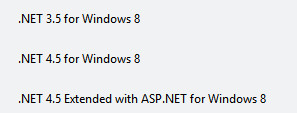
I do have a copy of "a" 2014 MSI installer for weblookup. But I think the developer made quite a lot of changes since then. I also tested the 1.3 plugin in Studio 2014 just now and it works just fine for me. I guess the problem may also be solved by installing the latest .NET Framework. I'm running these together so maybe this is why I have no problems:
What do you think?
Regards
Paul
Paul Filkin | RWS Group
________________________
Design your own training!
You've done the courses and still need to go a little further, or still not clear?
Tell us what you need in our Community Solutions Hub
Hi Paul,
Ah good point, installing the latest version will probably work.
Also, looking at the error messages, this seems to only happen with people that have Windows 7, since Windows 8.1 and above includes .NET Framework 4.5.1, this probably only happens when you have Windows 7 and use Trados Studio 2014.
Jesse