
 Translate


On September 26, 2025, in an isolated test environment, the activation process for Trados Studio 2024 Professional (Network SN) was performed on a test machine. Today, I am experiencing two licensing issues:
- On the one hand, it turns out that all 6 available licenses are listed as being in use, preventing me from licensing any equipment in my actual production environment. (I don't understand why all 6 licenses appear to be in use, when just only 1 license should appear to be in use).
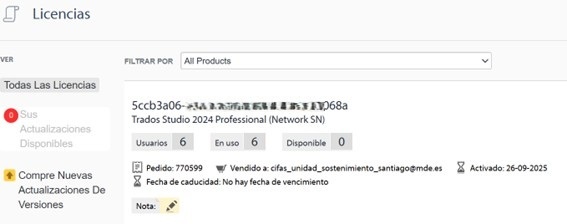
- On the other hand, it is not possible to deactivate the license from the RWS Account page itself, as indicated in the following article:
https://gateway.rws.com/csm?id=kb_article_view&sys_kb_id=f82d5d071b97de54772c0dcad34bcb89
Instead, when I click on the Reset license link, it always takes me to the following link:

https://gateway.rws.com/csm?flow=gateway&q=pnl
Right now, the situation is that I cannot use any of the 6 licenses that I have purchased.
