


RWS Community
RWS Community
  • Site

Trados Go

Trados Studio

Trados Ignite

Trados Team

Trados Accelerate

Trados Enterprise

Trados GroupShare

Passolo

MultiTerm

RWS AppStore

Connectors

Beta Groups

Managed Translation

MultiTrans

TMS

Trados Enterprise

WorldServer

Language Weaver

Language Weaver Edge

Language Weaver Connectors

Language Weaver in Trados Studio


Content Champions

Tridion Docs

Tridion Sites

Contenta

LiveContent

XPP

Trados Cloud

Trados Studio Ideas

Trados GroupShare Ideas

Trados Team Terminology Ideas

MultiTerm Ideas

Passolo Ideas

RWS Appstore Ideas

Tridion Docs Ideas

Tridion Sites Ideas

Language Weaver Ideas

Language Weaver Edge Ideas

Managed Translation - Enterprise Ideas

TMS Ideas

WorldServer Ideas

Trados Enterprise Ideas

XPP Ideas

GroupShare Developers

Language Cloud Developers

MultiTerm Developers

Passolo Developers

Trados Studio Developers

Managed Translation Developers

TMS Developers

WorldServer Developers

Tridion Docs Developers

XPP Developers

Language Combinations by Language Services

RWS Training & Certification

Style Guides

Content Management Partners

LDE Korean Vendor Support

RWS Campus

Trados Approved Trainers

Nordic Tridion Docs User Group

Recognition & Reward System

RWS Community Platform Related Questions

Community Solutions Hub (Trados)

About RWS

Events

RWS Services: Train AI & others

RWS Training & Certification

To RWS Support

  • Search
  • Translate

    Detecting language please wait for.......


    Powered by
  • User
  • Site
  • Search
  • User
  • Partners
  • Partner Groups
  • RWS Campus
  • RWS Campus Students
  • More
  • Cancel
RWS Campus Students

RWS Campus Students > Student Guides

How to uninstall a plugin/app
  • Home
  • Forums
  • Student Guides
  • Student Resources
  • More
  • Cancel
  • New
Show Translation Options

Detecting language please wait for.......


Powered by
RWS Campus Students requires membership for participation - click to join
  • -Student Guides
    • +Trados Studio
    • +MultiTerm
    • -RWS AppStore
      • Academic Partner AppStore - Which apps to consider?
      • How to uninstall a plugin/app
      • RWS AppStore - Create your own Apps
    • +Technical Information
    • Trados Team
  • +Student Resources

How to uninstall a plugin/app

Plugins are normally quite robust, but as with all software, issues can arise.

Many issues can be resolved by simply removing the plugins, ensuring Tradio Studio is up to date and reinstalling the plugin.

Therefore it's always worthwhile knowing where you can find where the plugins are installed.

First- open Windows Explorer and make sure Hidden Items is enabled (this is always disabled by default)

Now navigate to the following folders:

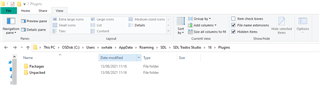
C:\Users\%Username%\AppData\Roaming\Trados\Trados Studio\18\Plugins\Packages (Trados 2024)
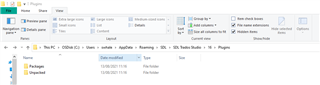
You can delete the folders (or if you know which plugin is causing the issue- the individual plugin from each folder)

***Please ensure Trados Studio is closed before deleting the plugins/folder***
When you reinstall a plugin, please download it either from the integrated Appstore (Welcome view > Add-Ins tab > RWS Appstore > Installed plug-ins) or from the Appstore website: https://appstore.rws.com/ 

The folders will then be recreated and should load correctly when you restart Studio.

For more info please see this article.

Tags:

Plugins
AppStore
  • Share
  • History
  • More
  • Cancel
Related
Recommended
  • Our Terms of Use
  • Copyright
  • Privacy
  • Security
  • Anti-slavery Statement
  • Cookie Notice
  • YouTube