Translate


The Problem: Structural Tags Blocking Segmentation
Standard segmentation rules often rely on a "Full Stop + Space" pattern. However, in files containing dense HTML, CSS, or JSON, sentences often conclude and are immediately followed by a tag or a code block without a trailing space.
-
Result: Trados fails to break the segment, leading to "mega-segments" containing multiple sentences.
-
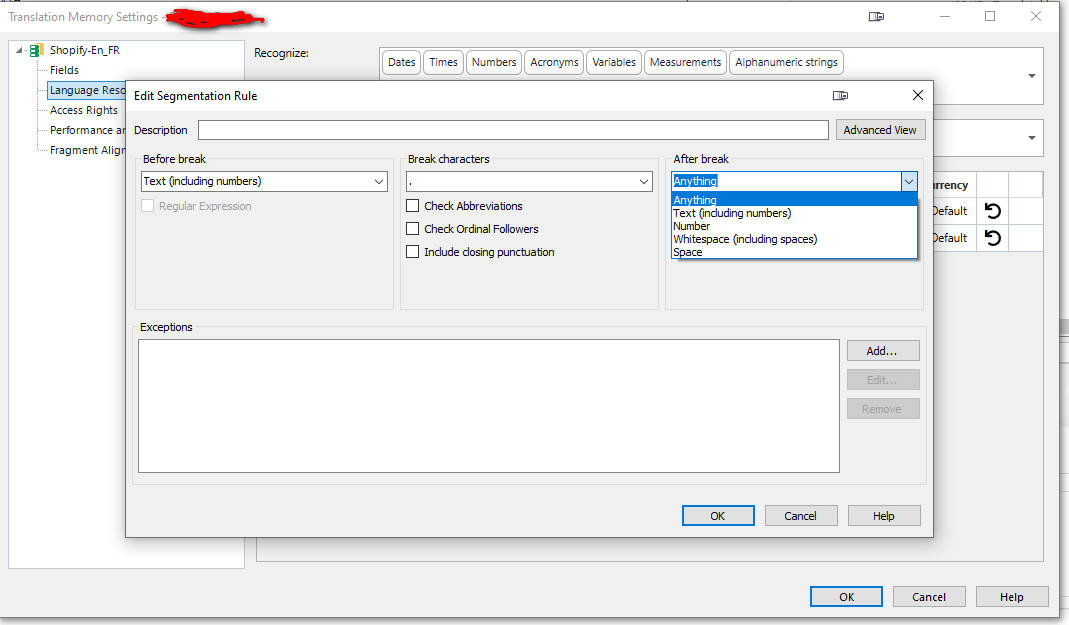
Current Limitation: The "After break" dropdown only allows for general categories like "Anything," "Number," or "Whitespace," but lacks specific logic for tag-based boundaries.
Proposed Solutions
1. Enhanced "After Break" Logic: Support for Tags
The "Edit Segmentation Rule" dialog should be expanded to recognize tags as valid segment boundaries.
-
Feature: Add "Tag" or "Structural Placeholder" as an option in the After break dropdown menu.
-
Technical Logic: If the "Break character" (e.g., a period) is followed immediately by a Tag (Internal or External), the segment should break even if a space is absent.
-
Benefit: Prevents multiple sentences from being trapped in a single segment when separated only by structural code.
2. Segmentation Rule Portability (Import/Export)
Manually recreating complex segmentation rules for every new TM or project template is a significant time-sink for Lead Auditors and Project Managers.
-
Feature: Implement a dedicated Import/Export button for Segmentation Rules.
-
Supported Formats:
.xlsxor.rsx. -
Functionality: Users should be able to export their refined rule sets from one Language Resource and quickly deploy them across other projects or share them with team members.
-
Benefit: Enables instant deployment of "Golden Rules" for specific file types, ensuring consistency across the entire production chain.
Competitive Advantage
By allowing Tag-aware segmentation and Rule Portability, Trados would significantly reduce the manual "Split Segment" workload that currently plagues technical localization projects. It would allow professionals to treat segmentation as a "set and forget" asset rather than a recurring manual task.