


Under Community Review

Advanced Segmentation Control & Rule Portability

The Problem: Structural Tags Blocking Segmentation

Standard segmentation rules often rely on a "Full Stop + Space" pattern. However, in files containing dense HTML, CSS, or JSON, sentences often conclude and are immediately followed by a tag or a code block without a trailing space.

  • Result: Trados fails to break the segment, leading to "mega-segments" containing multiple sentences.

  • Current Limitation: The "After break" dropdown only allows for general categories like "Anything," "Number," or "Whitespace," but lacks specific logic for tag-based boundaries.

Proposed Solutions

1. Enhanced "After Break" Logic: Support for Tags

The "Edit Segmentation Rule" dialog should be expanded to recognize tags as valid segment boundaries.

  • Feature: Add "Tag" or "Structural Placeholder" as an option in the After break dropdown menu.

  • Technical Logic: If the "Break character" (e.g., a period) is followed immediately by a Tag (Internal or External), the segment should break even if a space is absent.

  • Benefit: Prevents multiple sentences from being trapped in a single segment when separated only by structural code.

2. Segmentation Rule Portability (Import/Export)

Manually recreating complex segmentation rules for every new TM or project template is a significant time-sink for Lead Auditors and Project Managers.

  • Feature: Implement a dedicated Import/Export button for Segmentation Rules.

  • Supported Formats: .xlsx or .rsx.

  • Functionality: Users should be able to export their refined rule sets from one Language Resource and quickly deploy them across other projects or share them with team members.

  • Benefit: Enables instant deployment of "Golden Rules" for specific file types, ensuring consistency across the entire production chain.


Competitive Advantage

By allowing Tag-aware segmentation and Rule Portability, Trados would significantly reduce the manual "Split Segment" workload that currently plagues technical localization projects. It would allow professionals to treat segmentation as a "set and forget" asset rather than a recurring manual task.
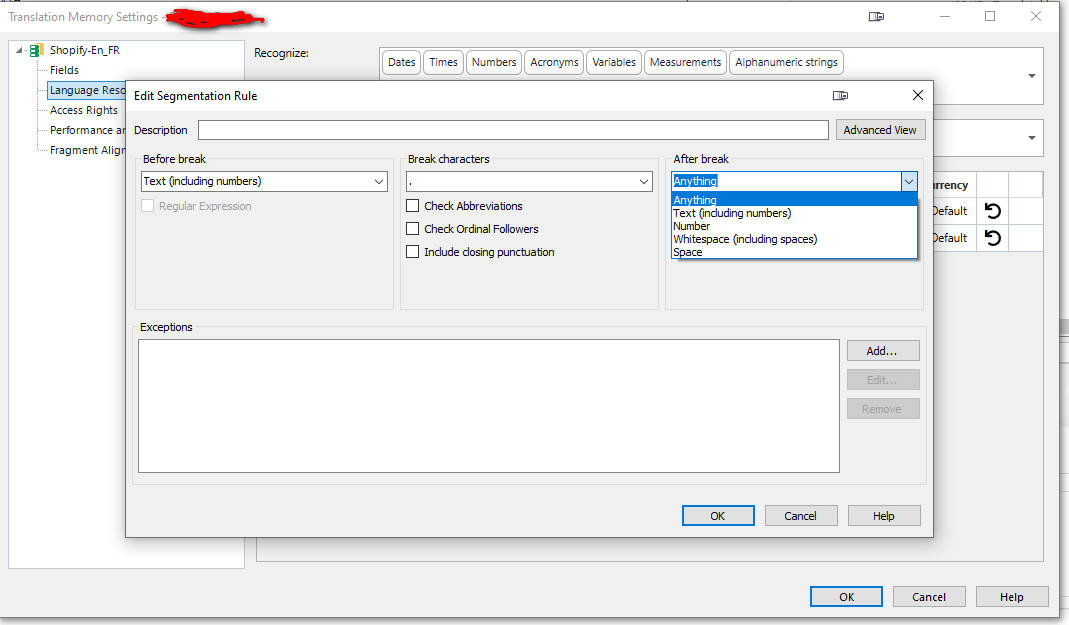
Screenshot of the Trados Translation Memory Settings window showing the Edit Segmentation Rule dialog. The 'After break' dropdown is expanded, displaying options like 'Anything' and 'Text (including numbers)'.

Parents
  •  why wouldn't you manage this at the filetype level?  That is typically the best, and easiest, way to handle segmentation needs of this nature.

  • Hi Paul,
    I hope you are doing well.

    Thank you for the feedback. I understand the perspective of managing this at the filetype level; however, from a production and localization engineering standpoint, there are several reasons why adding Tag-awareness to the Segmentation Rules (maybe through importing an SRX or xlsx file) is a more robust and scalable solution:

    1. Structural vs. Pattern-Based Segmentation
    While filetype settings can sometimes isolate tags, the core issue is that Trados’s segmentation engine currently views tags as "invisible" to the After break logic. When a full stop is followed immediately by a tag sequence (e.g., . <x id="298"/><x id="299"/>), the engine fails to trigger a break because there is no trailing whitespace.

    Expecting a custom file type to handle this surgically is inefficient because:

    Tag Proliferation: In complex files (like the one with <x id="2349"/> sequences, as but one single example, but there are hundreds of scenarios and examples), we would need to create a unique rule for every conceivable tag combination.

    The "Phrase" Comparison: Modern tools like Phrase allow for global Regex filters and support capturing groups. If Trados, as an industry leader wants to maintain its edge, it should allow the segmentation engine to "see" tags as valid boundary markers without forcing the user back into the file-parsing level for every new project.

    2. The Risk of Fragmentation in Custom File Types
    Managing this at the filetype level often requires "converting" inline tags into structure tags to force a break. This is risky because:

    It can compromise the internal integrity of the code if the tags are required to stay inline for the final injection of target translations.

    It prevents the use of Standard Segmentation across different file types. If I have a "Golden" segmentation rule for a specific language pair, I should be able to apply it to any file type (JSON, CSV, HTML) without re-engineering the parser every time.

    3. Real-World Use Case
    In the example ...other issues.<x id="2349"/>We were facing..., a simple SRX improvement—allowing "Tag" as an After break option—would solve this instantly for every file processed by that TM. This is a much cleaner "set-and-forget" approach than creating a bespoke regex-based file type for every complex code-heavy project we encounter.

    I hope this clarifies why a change at the Segmentation Rule level would be a massive efficiency gain for power users managing high-complexity localization workflows.

    Best regards,

Comment
  • Hi Paul,
    I hope you are doing well.

    Thank you for the feedback. I understand the perspective of managing this at the filetype level; however, from a production and localization engineering standpoint, there are several reasons why adding Tag-awareness to the Segmentation Rules (maybe through importing an SRX or xlsx file) is a more robust and scalable solution:

    1. Structural vs. Pattern-Based Segmentation
    While filetype settings can sometimes isolate tags, the core issue is that Trados’s segmentation engine currently views tags as "invisible" to the After break logic. When a full stop is followed immediately by a tag sequence (e.g., . <x id="298"/><x id="299"/>), the engine fails to trigger a break because there is no trailing whitespace.

    Expecting a custom file type to handle this surgically is inefficient because:

    Tag Proliferation: In complex files (like the one with <x id="2349"/> sequences, as but one single example, but there are hundreds of scenarios and examples), we would need to create a unique rule for every conceivable tag combination.

    The "Phrase" Comparison: Modern tools like Phrase allow for global Regex filters and support capturing groups. If Trados, as an industry leader wants to maintain its edge, it should allow the segmentation engine to "see" tags as valid boundary markers without forcing the user back into the file-parsing level for every new project.

    2. The Risk of Fragmentation in Custom File Types
    Managing this at the filetype level often requires "converting" inline tags into structure tags to force a break. This is risky because:

    It can compromise the internal integrity of the code if the tags are required to stay inline for the final injection of target translations.

    It prevents the use of Standard Segmentation across different file types. If I have a "Golden" segmentation rule for a specific language pair, I should be able to apply it to any file type (JSON, CSV, HTML) without re-engineering the parser every time.

    3. Real-World Use Case
    In the example ...other issues.<x id="2349"/>We were facing..., a simple SRX improvement—allowing "Tag" as an After break option—would solve this instantly for every file processed by that TM. This is a much cleaner "set-and-forget" approach than creating a bespoke regex-based file type for every complex code-heavy project we encounter.

    I hope this clarifies why a change at the Segmentation Rule level would be a massive efficiency gain for power users managing high-complexity localization workflows.

    Best regards,

Children
No Data