
 Translate


The Draft Online option does not allow users to select the language to edit the publication content. The Review Online option, however, does allow the language selection option for users to choose a language. The only way content authors can edit translated content in Draft Space is by manually changing the language in the browser URL from en-US. The image below shows the language parameter which has to be changed in the Draft Space URL for editing translated content.

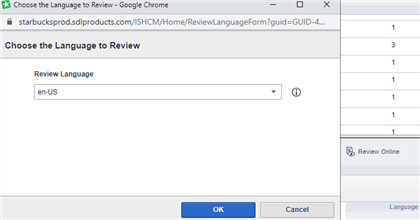
It would be nice to be able to select a language in Draft Space through a dialog similar to the language selection dialog option available in Review Online as shown in the image below. This would allow content authors to easily edit language-specific content without manually having to modify the language in the browser URL.

Top Comments
-

Pia Bäckman
-
Cancel
-
Vote Up
0
Vote Down
-
-
More
-
Cancel
Comment-

Pia Bäckman
-
Cancel
-
Vote Up
0
Vote Down
-
-
More
-
Cancel
Children