Can't deactivate SDL Trados 2017

I need to deactivate my License (SDL Trados Studio 2017), as I've bought a new computer and want to install SDL on it. But I don't have the SDL_License_Server_Manager.exe in my downloads. I can't find suitable info on the forum. Can you please help me and explain me the procedure to deactivate and activate? Thank you

Parents
  • Hello

    As i can see from your account, you are using the FREELANCE version and therefore do NOT need the LSM (License Server manager) which is only required for corporate network licenses.


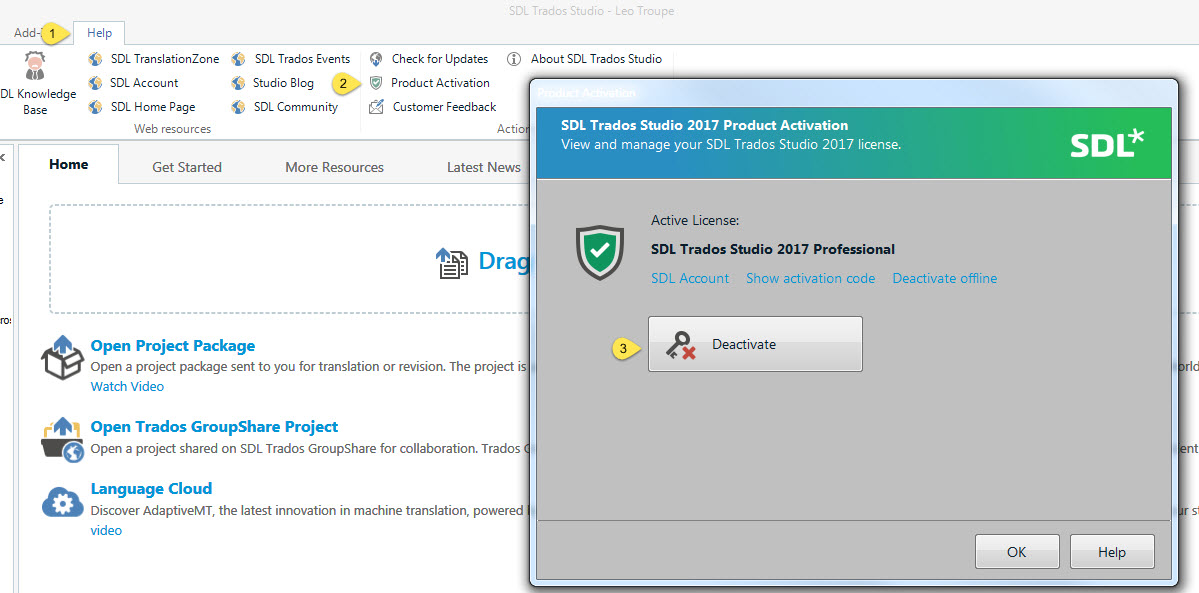
    If you still have access to your old PC, please Start Studio and follow the instructions below to deactivate

    Trados Studio 2017 activation window with an error message indicating the license is deactivated.


    Now access your SDL account (from the NEW PC) and download and install Studio 2017 and MultiTerm 2017.

    When you now start Studio-you will be given the option to activate Studio.

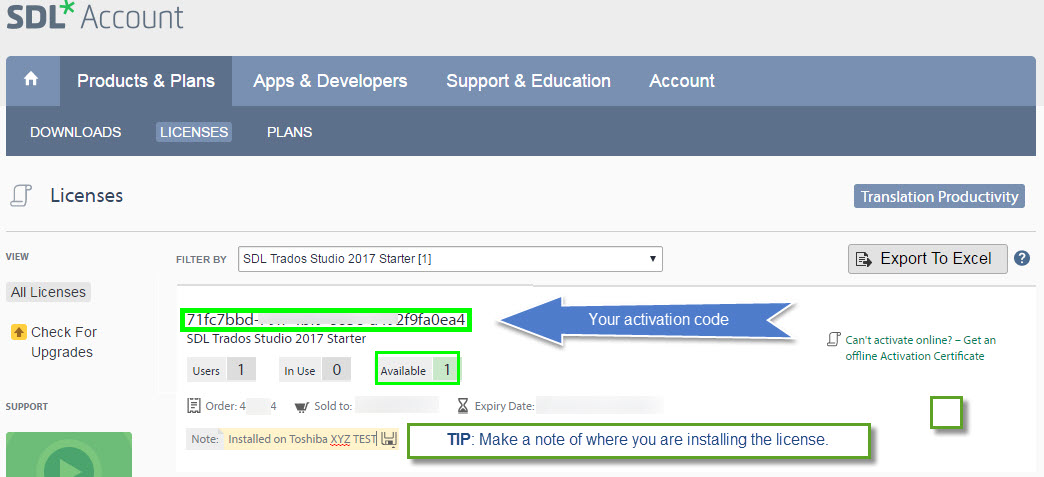
    Simply copy and paste the activation code from your SDL Account....


    SDL Account license page showing an available Trados Studio 2017 Freelance license with the activation code highlighted.


    You can now start using Studio.


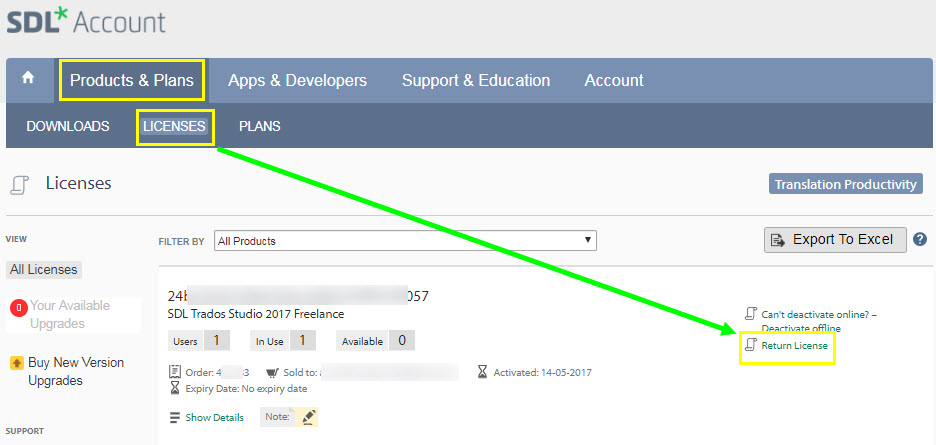
    If you no longer have access to the old PC-you can still self reset your license


    SDL Account license page with an option to 'Return License' for Trados Studio 2017 Freelance highlighted.


    Please let me know if you need further help.


    Oana Nagy | Developer Experience | QA Engineer | RWS Group

    emoji


    Generated Image Alt-Text
    [edited by: Trados AI at 11:23 AM (GMT 0) on 4 Mar 2024]
Reply
  • Hello

    As i can see from your account, you are using the FREELANCE version and therefore do NOT need the LSM (License Server manager) which is only required for corporate network licenses.


    If you still have access to your old PC, please Start Studio and follow the instructions below to deactivate

    Trados Studio 2017 activation window with an error message indicating the license is deactivated.


    Now access your SDL account (from the NEW PC) and download and install Studio 2017 and MultiTerm 2017.

    When you now start Studio-you will be given the option to activate Studio.

    Simply copy and paste the activation code from your SDL Account....


    SDL Account license page showing an available Trados Studio 2017 Freelance license with the activation code highlighted.


    You can now start using Studio.


    If you no longer have access to the old PC-you can still self reset your license


    SDL Account license page with an option to 'Return License' for Trados Studio 2017 Freelance highlighted.


    Please let me know if you need further help.


    Oana Nagy | Developer Experience | QA Engineer | RWS Group

    emoji


    Generated Image Alt-Text
    [edited by: Trados AI at 11:23 AM (GMT 0) on 4 Mar 2024]
Children