


Unable to activate second licence for Trados 2019 Freelance Plus

Hi

I've been able to install and activate one Trados 2019 licence on my laptop. However, I've installed the programme on my PC and when I try to activate it, I get the message: 
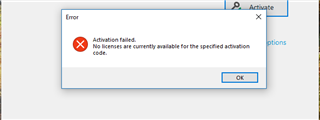
Error message window titled 'Activate' with a red cross symbol, stating 'Activation failed. No licenses are currently available for the specified activation code.' with an OK button.

I figured this might be because I'm still running Trados 2015 on my computer and the second licence is still attached to that. However, that programme won't let me deactivate the licence. I attempted a force return last night, which was reported as successful, however now the Trados 2015 has vanished from my list of licences in my account and Trados 2015 is still showing as activated. When I try to deactivate again, I am asked to enter the 2015 activation code manually and receive this error:
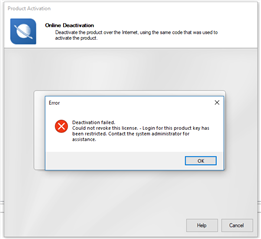
Error message window titled 'Product Activation' with a red cross symbol, stating 'Deactivation failed. Could not revoke this license. - Login for this product key has been restricted. Contact the system administrator for assistance.' with OK, Help, and Cancel buttons.

My licences list is showing as follows:

A section of a software license management interface showing 'SDL Trados Studio 2019 Freelance Plus' with columns indicating 'Users 1', 'In Use 1', 'Available 0', and an 'Extra Activations' information icon.

Help appreciated! :)


Generated Image Alt-Text
[edited by: RWS Community AI at 1:13 AM (GMT 0) on 15 Nov 2024]

emoji
Parents
  • Hi ,

    When you upgrade your license to a higher version, the old license -in your case 2015- becomes inactive so you can no longer activate it and work with it anymore.

    After the upgrade, you should go to your SDL account>Products and Plans>Downloads and from there you download and install Studio 2019 - and Multiterm 2019- and you activate it with the license code that you can find under license tab, next to Downloads tab.

    In your case, from the first screenshot, I reckon you copy/pasted the license code of your 2019 version into the old 2015 program so it got stuck maybe in the system somehow. In the other screenshot it simply states that the activation code for the 2015 is no longer available since you already upgraded your version.

    My recommendation is your case is to contact the licensing team via this following link:

    https://gateway.sdl.com/liveagentlicensing

    Please choose the option on the right "Request license reset" and an agent will help you by resetting the licenses so you can activate Studio 2019 properly.

    Hope this helps!


    Oana Nagy | Developer Experience | QA Engineer | RWS Group

Reply
  • Hi ,

    When you upgrade your license to a higher version, the old license -in your case 2015- becomes inactive so you can no longer activate it and work with it anymore.

    After the upgrade, you should go to your SDL account>Products and Plans>Downloads and from there you download and install Studio 2019 - and Multiterm 2019- and you activate it with the license code that you can find under license tab, next to Downloads tab.

    In your case, from the first screenshot, I reckon you copy/pasted the license code of your 2019 version into the old 2015 program so it got stuck maybe in the system somehow. In the other screenshot it simply states that the activation code for the 2015 is no longer available since you already upgraded your version.

    My recommendation is your case is to contact the licensing team via this following link:

    https://gateway.sdl.com/liveagentlicensing

    Please choose the option on the right "Request license reset" and an agent will help you by resetting the licenses so you can activate Studio 2019 properly.

    Hope this helps!


    Oana Nagy | Developer Experience | QA Engineer | RWS Group

Children