New installation of SDL Trados Studio 2021 SR1 - 16.1.3.4096

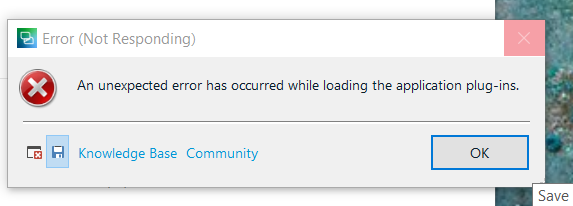
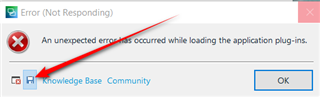
After installing Studio 2021 none of the plugins work, despite having them upgraded to the 2021 version. As a result we are not able to use Deep L MT anymore. I tried everything I found on the Internet and in your Community Help group. I always get the message "An unexpected error has occurred while loading the application plug-ins", and that even after uninstalling all the plugins.

Is there a solution?

Bert

Bays translations

Parents
  • I suggest you remove all of your plugins from all the affected folders and then reinstall them using the AppStore Integration.  To do this follow these steps:

    1. close Studio
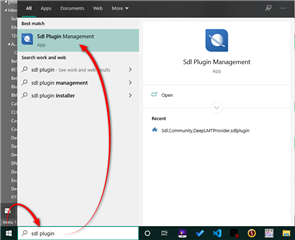
    2. type "sdl plugin management" into the windows run command:
      Windows search bar showing 'sdl plugin management' with the SDL Plugin Management app highlighted and a red arrow pointing to it.
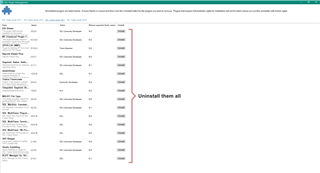
    3. remove all the plugins for 2021
      SDL Trados Studio plugin management window with a list of plugins and a red box highlighting the 'Uninstall them all' button.
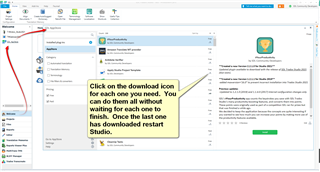
    4. Then restart Studio and install them again using the integrated appstore feature... it'll be quick:
      Screenshot of a file explorer window with a red arrow pointing to the download icon and a text box instructing to click on the download icon for each plugin and restart Studio after the last one has downloaded.

    If for some reason you still get the error message after removing all the plugins you will need to reset Studio.  Rename this folder (just add _old to the end or something, it's not important what you rename it to) and restart Studio:

    c:\Users\[USERNAME]\AppData\Roaming\SDL\SDL Trados Studio\Studio16

    So the path would become this:

    c:\Users\[USERNAME]\AppData\Roaming\SDL\SDL Trados Studio\Studio16_old

    If you can't find this folder then you need to unhide your hidden files/folders:

    www.howtogeek.com/.../

    Paul Filkin | RWS Group

    ________________________
    Design your own training!

    You've done the courses and still need to go a little further, or still not clear? 
    Tell us what you need in our Community Solutions Hub

    emoji


    Generated Image Alt-Text
    [edited by: Trados AI at 12:10 PM (GMT 0) on 4 Mar 2024]
Reply
  • I suggest you remove all of your plugins from all the affected folders and then reinstall them using the AppStore Integration.  To do this follow these steps:

    1. close Studio
    2. type "sdl plugin management" into the windows run command:
      Windows search bar showing 'sdl plugin management' with the SDL Plugin Management app highlighted and a red arrow pointing to it.
    3. remove all the plugins for 2021
      SDL Trados Studio plugin management window with a list of plugins and a red box highlighting the 'Uninstall them all' button.
    4. Then restart Studio and install them again using the integrated appstore feature... it'll be quick:
      Screenshot of a file explorer window with a red arrow pointing to the download icon and a text box instructing to click on the download icon for each plugin and restart Studio after the last one has downloaded.

    If for some reason you still get the error message after removing all the plugins you will need to reset Studio.  Rename this folder (just add _old to the end or something, it's not important what you rename it to) and restart Studio:

    c:\Users\[USERNAME]\AppData\Roaming\SDL\SDL Trados Studio\Studio16

    So the path would become this:

    c:\Users\[USERNAME]\AppData\Roaming\SDL\SDL Trados Studio\Studio16_old

    If you can't find this folder then you need to unhide your hidden files/folders:

    www.howtogeek.com/.../

    Paul Filkin | RWS Group

    ________________________
    Design your own training!

    You've done the courses and still need to go a little further, or still not clear? 
    Tell us what you need in our Community Solutions Hub

    emoji


    Generated Image Alt-Text
    [edited by: Trados AI at 12:10 PM (GMT 0) on 4 Mar 2024]
Children