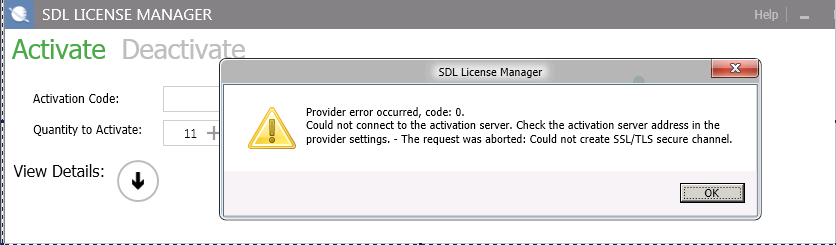
sdl license manager error code 0 could not revoke this license could not connect to the activation server check the activation server address in trhe provider settings the request was aborted : Could not create SSL / TLS

we have new hardware on the server which runs sdl license manager

the license is not activated.

i want to deactivate and activate it it will not work and stops with error decribed in Subject

server is windows 2008, license is studio professiona commuter 2015

What can we do to re activate our 11 licenses??

emoji
Parents
  • We followed the procedure :

    I`ve reset your license. Before reactivating the license on the server please do the following (on the licensing server):

    Ensure that all RWS / SDL products are closed on the server.

    1. Go to: C:\ProgramData\SDL\NetworkLicensingServer\2 and rename the "2" folder to "2_old".


    1. Go to: C:\Program Files (x86)\Common Files\SafeNet Sentinel\Sentinel RMS License Manager\WinNT (or C:\Program Files (x86)\Common Files\Thales\Sentinel RMS License Manager\WinNT) and rename the file lservrc to lservrc_old.


    1. Open SafeNet License Manager (WlmAdmin) and check if the AllowTQA 2015 and ProfessionalEdition 2015 features are still listed under Subnet servers > your server name. If they are, right-click on each of them and select Remove Feature.

    Hi, does nor work for us:

    we  get the message:

    SDL License Manager activation error message stating 'Provider error occurred, code: 0. Could not connect to the activation server. Check the activation server address in the provider settings. - The request was aborted: Could not create SSLTLS secure channel.'

    please help us with this urgent problem

    thx

    emoji


    Generated Image Alt-Text
    [edited by: Trados AI at 1:40 PM (GMT 0) on 4 Mar 2024]
Reply
  • We followed the procedure :

    I`ve reset your license. Before reactivating the license on the server please do the following (on the licensing server):

    Ensure that all RWS / SDL products are closed on the server.

    1. Go to: C:\ProgramData\SDL\NetworkLicensingServer\2 and rename the "2" folder to "2_old".


    1. Go to: C:\Program Files (x86)\Common Files\SafeNet Sentinel\Sentinel RMS License Manager\WinNT (or C:\Program Files (x86)\Common Files\Thales\Sentinel RMS License Manager\WinNT) and rename the file lservrc to lservrc_old.


    1. Open SafeNet License Manager (WlmAdmin) and check if the AllowTQA 2015 and ProfessionalEdition 2015 features are still listed under Subnet servers > your server name. If they are, right-click on each of them and select Remove Feature.

    Hi, does nor work for us:

    we  get the message:

    SDL License Manager activation error message stating 'Provider error occurred, code: 0. Could not connect to the activation server. Check the activation server address in the provider settings. - The request was aborted: Could not create SSLTLS secure channel.'

    please help us with this urgent problem

    thx

    emoji


    Generated Image Alt-Text
    [edited by: Trados AI at 1:40 PM (GMT 0) on 4 Mar 2024]
Children