
 Translate



Hello!
I need to uninstall Trados Studio 2017 from my PC and then to install it again.
So, I followed the first three steps in this article: https://gateway.rws.com/csm?id=kb_article_view&sysparm_article=KB0039271
However, instead of getting the message in step 4 ("Deactivation successful"), I got an error message ("Could not revoke this license"), as you can see in this screenshot:
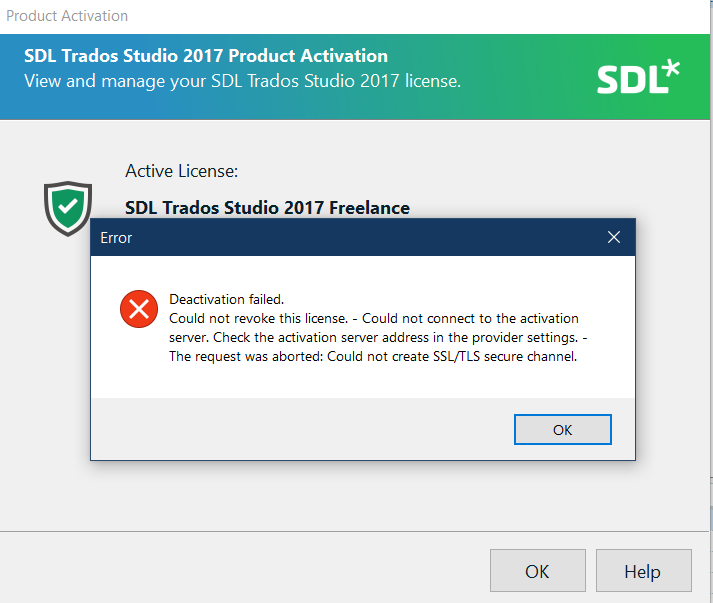
I checked my RWS account and indeed the license is still In Use.
However, the Deactivate button disappeared, as you can see in the following screenshot:
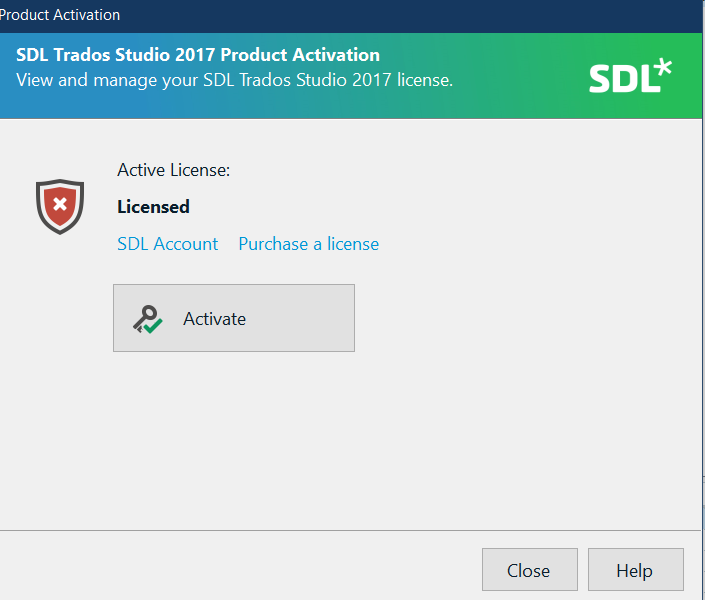
Plus, there is no Deactivate offline button or link within Studio, so I can't follow the instruction in this article: https://gateway.rws.com/csm?id=kb_article_view&sysparm_article=KB0039784
What should I do?
Thank you in advance.
Generated Image Alt-Text
[edited by: RWS Community AI at 11:22 PM (GMT 0) on 14 Nov 2024]

