


Can't activate Studio using license server

Hello,

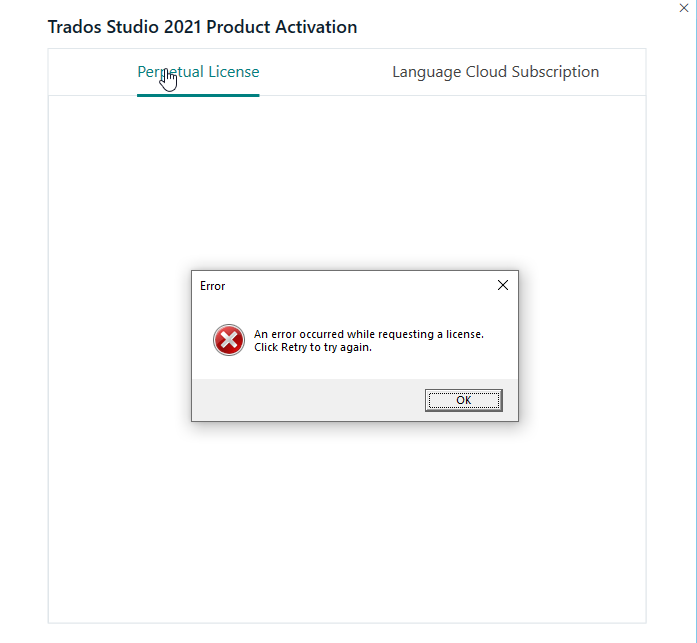
We have a network license and using the licence server activation, but after reinstalling my own computer I can't activate using this method, I always get the message below. I can ping the server and access its shared folders, so there's definitely communication between my computer and the server.

How can I fix this?Screenshot of Trados Studio 2021 Product Activation window with an error dialog box stating 'An error occurred while requesting a license. Click Retry to try again.' with an OK button.


Generated Image Alt-Text
[edited by: RWS Community AI at 2:11 AM (GMT 0) on 15 Nov 2024]

emoji
Parents Reply Children
  • Hi,

    I did that 2nd workaround, but now Studio won't even start, it gets stuck on "Initializing views" and after a couple of minutes I get this error: "Service 'Sdl.TranslationStudio.Api.ProjectManagement.IProjectManagementService' could not be started."

    emoji
  • Here is the full error message: 

    <ErrorMessage>Service 'Sdl.TranslationStudio.Api.ProjectManagement.IProjectManagementService' could not be started.</ErrorMessage>
    <Exception>
    <Type>Sdl.Desktop.Platform.Services.ServiceStartException, Sdl.Desktop.Platform, Version=16.0.0.0, Culture=neutral, PublicKeyToken=c28cdb26c445c888</Type>
    <HelpLink />
    <Source>Sdl.Desktop.Platform</Source>
    <HResult>-2146233088</HResult>
    <StackTrace><![CDATA[ em Sdl.Desktop.Platform.Implementation.Services.ServiceContext.GetLocalService[T]()
    em Sdl.Desktop.Platform.Implementation.Services.ServiceContext.GetService[T]()
    em Sdl.TranslationStudio.Api.ProjectManagement.Conditions.CurrentProjectCondition.OnServiceContextChanged()
    em Sdl.Desktop.Platform.Extensions.AbstractServiceContextAwareCondition.set_ServiceContext(IServiceContext value)
    em Sdl.Desktop.Platform.Extensions.AbstractConditionInitializer.InitializeCondition(ICondition condition)
    em Sdl.Desktop.Platform.Extensions.ConditionHelper.GetCondition(IExtension extension, ConditionResult conditionResult, IConditionInitializer initializer)
    em Sdl.Desktop.Platform.Implementation.ViewReference..ctor(IStudioWindow window, ViewDescriptor descriptor)
    em Sdl.Desktop.Platform.Implementation.StudioWindow.Init(IEventAggregator eventAggregator)
    em Sdl.Desktop.Platform.Implementation.Studio.CreateWindowInternal(Boolean setActive, IEventAggregator eventAggregator)
    em Sdl.Desktop.Platform.Implementation.Studio.Run(ISplashScreen splashScreen, IEventAggregator eventAggregator, IPluginLoaderService pluginLoaderService, ICommandLineParsingService commandLineParsingService)
    em Sdl.TranslationStudio.Application.Launcher.RunApplication()]]></StackTrace>
    <InnerException>
    <Type>Sdl.Common.Licensing.Provider.SafeNetRMS.SafeNetRMSLicensingProviderException, Sdl.Common.Licensing.Provider.SafeNetRMS, Version=16.0.0.0, Culture=neutral, PublicKeyToken=c28cdb26c445c888</Type>
    <ErrorCode>1</ErrorCode>
    <ProviderErrorCode>210005</ProviderErrorCode>
    <ErrorMessage>Could not connect to license server.</ErrorMessage>
    <HelpLink />
    <Source>Sdl.Common.Licensing.Provider.SafeNetRMS</Source>
    <HResult>-2146233088</HResult>
    <StackTrace><![CDATA[ em Sdl.Common.Licensing.Provider.SafeNetRMS.UnifiedAPIProvider.GetFeatures()
    em Sdl.Common.Licensing.Provider.SafeNetRMS.LicensingProvider.GetAvailalbeFeatures()
    em Sdl.Common.Licensing.Provider.SafeNetRMS.LicensingProvider.GetProductLicense()
    em Sdl.Common.Licensing.Provider.Core.ApplicationLicenseManager.GetProductLicense()
    em Sdl.Common.Licensing.Provider.Core.ApplicationLicenseManager.GetCurrentProductLicense()
    em Sdl.ProjectApi.Implementation.Licensing.Perpetual.PerpetualLicense.get_Authorised()
    em Sdl.TranslationStudio.Common.Licencing.LicensingService.get_HasActiveLicense()
    em Sdl.TranslationStudio.Common.Licencing.LicensingService.get_ActiveLicense()
    em Sdl.TranslationStudio.Common.Licencing.LicensingService.IsFeatureActive(String feature)
    em Sdl.TranslationStudio.ProjectManagement.ProjectManagementService.set_CurrentProject(IProject value)
    em Sdl.TranslationStudio.ProjectManagement.ProjectManagementService.RestoreCurrentProject()
    em Sdl.TranslationStudio.ProjectManagement.ProjectManagementService.OnStart()
    em Sdl.Desktop.Platform.Services.AbstractService.Start(IServiceContext context)
    em Sdl.Desktop.Platform.Implementation.Services.ServiceContext.GetLocalService[T]()]]></StackTrace>
    <InnerException>
    <Type>com.sntl.licensing.LicensingException, SentinelLicensing, Version=10.0.0.121, Culture=neutral, PublicKeyToken=dc3af25398b040a3</Type>
    <HelpLink />
    <Source>SentinelLicensing</Source>
    <HResult>-2146233088</HResult>
    <StackTrace><![CDATA[ em com.sntl.licensing.ApplicationContext.getInfo(String scope, String query)
    em Sdl.Common.Licensing.Provider.SafeNetRMS.UnifiedAPIProvider.GetFeatures()]]></StackTrace>
    </InnerException>
    </InnerException>
    </Exception>

    emoji
  • Hello  

    Can you provide the following details? The issue could be caused by a mismatch between the Studio version you`re using and the version of License Manager installed on the server. See this article: https://gateway.rws.com/csm?id=kb_article_view&sysparm_article=KB0039985

    1. Which is the exact version of Studio you have installed on your computer - check in Control Panel?

    2. What version of License Manager is installed on the server? 

    3. Does it work for the other users?

    Thank you,

    Sorin

    emoji
  • Hi again,

    1. I have v16.2.10.9305 

    2. SDL license manager on the server is v2.0.27550.0

    3. Yes, but other users may have slightly older versions of Studio 2021 (I downloaded mine last week)

    If I update the license server to the latest version, it will still work for older versions of Studio 2021, right?

    emoji
  • Hello  

    With the new version of License Manager all users will be able to open Studio.

    The other option is for you to uninstall your current version and install the precious one: https://downloadcentercdn.sdl.com/tp/Trados/T2021/CUs/SR2_CU9/TradosStudio2021SR2_16.2.9.9198.exe

    But I strongly recommend to install the new License Manager on the server in order to avoid this kind of issue on the future. 

    Thank you,

    Sorin

    emoji

