 Translate



Δεν έχι οριστεί αναφορά αντικειμένου


Δεν έχι οριστεί αναφορά αντικειμένου
Please provide the full error stack in the error message and provide some indication of wat you were doing. Just posting this isn't very helpful.
Paul Filkin | RWS
Design your own training!
You've done the courses and still need to go a little further, or still not clear?
Tell us what you need in our Community Solutions Hub

I get this notification when I try to close the file I am translating. Also the same pop-up appears when I try to close Studio. I am 70% into the translation of a 100 pages file,

You got that far why not post the entire message! That would tell us what version you're using, what operating system you have and also exactly where the object reference error occurred. There is nothing in the information you are providing that helps us to help you at all.
You can copy the entire code (stack trace) and paste it into here:
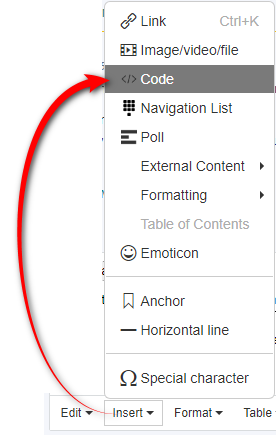
In the mean time, what happens when you press Ctrl+S? Can you save the file and your progress? Have you saved your translations into a translation memory? If you have then just kill the application with the task manager and restart.
Paul Filkin | RWS
Design your own training!
You've done the courses and still need to go a little further, or still not clear?
Tell us what you need in our Community Solutions Hub
<SDLErrorDetails time="10/02/2023 22:46:12"> <ErrorMessage>Δεν έχει οριστεί αναφορά αντικειμένου σε μια παρουσία αντικειμένου.</ErrorMessage> <Exception> <Type>System.NullReferenceException, mscorlib, Version=4.0.0.0, Culture=neutral, PublicKeyToken=b77a5c561934e089</Type> <HelpLink/> <Source>Sdl.TranslationStudio.Common</Source> <HResult>-2147467261</HResult> <StackTrace> < σε Sdl.TranslationStudio.Editor.EditorService.CloseAllDocuments() σε Sdl.TranslationStudio.Editor.EditorService.Window_Closing(IStudioWindow window, CancelEventArgs e) σε Sdl.Desktop.Platform.StudioWindowCancelEventHandler.Invoke(IStudioWindow window, CancelEventArgs cancel) σε Sdl.Desktop.Platform.Implementation.StudioWindow.OnClosing() σε Sdl.Desktop.Platform.Implementation.StudioWindow._form_Closing(Object sender, CancelEventArgs e) σε System.Windows.Forms.Form.OnClosing(CancelEventArgs e) σε System.Windows.Forms.Form.WmClose(Message& m) σε System.Windows.Forms.Form.WndProc(Message& m) σε Sdl.Desktop.Platform.WinForms.StudioWindowForm.WndProc(Message& message) σε System.Windows.Forms.Control.ControlNativeWindow.OnMessage(Message& m) σε System.Windows.Forms.Control.ControlNativeWindow.WndProc(Message& m) σε System.Windows.Forms.NativeWindow.Callback(IntPtr hWnd, Int32 msg, IntPtr wparam, IntPtr lparam) ]]> </StackTrace> </Exception> <Environment> <ProductName>Trados Studio</ProductName> <ProductVersion>Studio16</ProductVersion> <EntryAssemblyFileVersion>16.2.12.9338</EntryAssemblyFileVersion> <OperatingSystem>Microsoft Windows 10 Home</OperatingSystem> <ServicePack>NULL</ServicePack> <OperatingSystemLanguage>1032</OperatingSystemLanguage> <CodePage>1252</CodePage> <LoggedOnUser>DESKTOP-6F0NMMI\User</LoggedOnUser> <DotNetFrameWork>4.0.30319.42000</DotNetFrameWork> <ComputerName>DESKTOP-6F0NMMI</ComputerName> <ConnectedToNetwork>True</ConnectedToNetwork> <PhysicalMemory>8277168 MB</PhysicalMemory> </Environment> </SDLErrorDetails>
Galatia Shiacola This looks like a problem with the licensing service... it's a bit odd and I haven't seen this before... so I have logged a support case on your behalf. We do prioritise customers who have a support contract so please keep in mind it could take up to 48 hours, especially over a weekend, but rest assured we will contact you as soon as we can. You will be contacted at the email address used for this Community. Support Case Id : 00775822 .
Paul Filkin | RWS
Design your own training!
You've done the courses and still need to go a little further, or still not clear?
Tell us what you need in our Community Solutions Hub
