
 Translate



Hello everyone:
I've been experiencing a some issues with SDL MultiTerm 2017 SR1. I am unable to run the program, I click on it, it looks as if it was going to open and then nothing. Also, when working on a project on SDL Trados, the Term Recognition doesn't show me any values (Hitlist Setting is all click; show termbase, language name, etc,). This last one issue, appear only on the last two projects I've been working on.
I think this is all due to an upgrade on SDL Trados 2017 SR1, because I had a similar issue a couple of months before. At the end I had to do a "restore from a system restore point" to go back before the upgrade, and then all good, excluding the fact that MultiTerm that stop working...
So now I wanted to delete "MultiTerm suite of products" and reinstall everything again. But I get this error message:
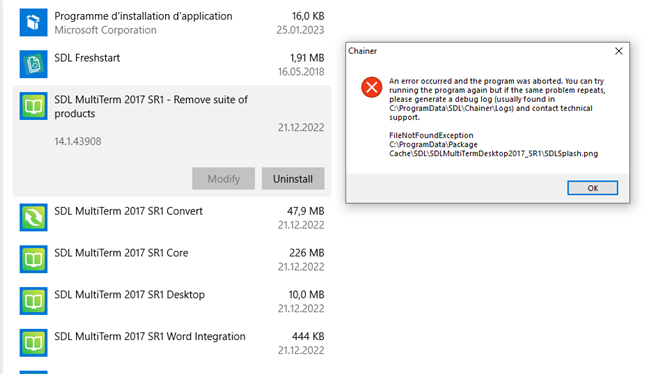
"An error occurred and the program was aborted. You can try running the program again but if the same problem repeats, please generate a debug log (usually found in C:\ProgramData\SDL\Chainer\Logs) and contact technical support.
FileNotFoundException
C:\ProgramData\SDL\SDLMultiTermDesktop2017_SR1\SDLSplash.png"
I've tried, without any success, the following resolution:
https://gateway.rws.com/csm?id=kb_article_view&sysparm_article=KB0034508

Can anyone help me?
Has anyone experience the same issue and was able to solved it?
Thank you very much.
Generated Image Alt-Text
[edited by: Trados AI at 2:04 PM (GMT 0) on 4 Mar 2024]


