


Error message: "Higher version" of Multiterm already installed

Hi,

I have unistalled Multiterm 17.2.3. because the terminology verification didn't work in Trados Studio 17.2.9 (see https://community.rws.com/product-groups/trados-portfolio/trados-studio/f/studio/51825/term-recognition-does-not-work-in-certain-termbases-after-latest-update) 

When I try to install Multiterm 17.2.2. I get the following message: Setup did not complete. The error is: Setup has detected a higher version of this product already installed.
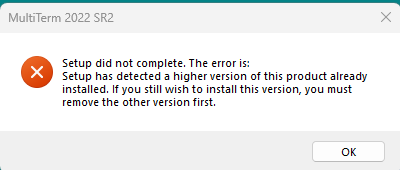
Error message from MultiTerm 2022 SR2 setup stating 'Setup did not complete. The error is: Setup has detected a higher version of this product already installed. If you still wish to install this version, you must remove the other version first.' with an OK button.

Of course before reinstalling, I followed these instructions: community.rws.com/.../03-6-uninstalling-trados-studio-multiterm-from-your-system

and restarted my PC.

Please provide assistance as we need to use Multiterm.

Thank you very much in advance,

kind regards

Beatrice - interbrian srl


Generated Image Alt-Text
[edited by: RWS Community AI at 8:21 AM (GMT 0) on 15 Nov 2024]

emoji
Parents Reply
  • Via a remote session we managed to solve the issue by installing the latest version of Multierm 2022, then Uninstalling Multiterm 2022 CU3 and Studio 2022 CU10 because you mentioned you wanted to work in previous versions. After the Uninstall was complete, we restarted the computer and then proceeded to install Multiterm 2022 CU2 and Studio 2022 CU9.

    You had an additional question regarding the Term Verifier and terms stored in the termbase that are composed terms. The term Verifier doesn't issue a Warning if for example the first term is exactly the same as in the termbase but the second on is different. This is a defect, CRQ-37231, that was fixed in Studio 2024.

    emoji
Children

