
 Translate



Hello,
I am unable to deactivate my license on my old computer to transfer it to a new one. I tried the Offline Activation on the new computer, which worked, except that instead of activating my perpatuate license, I just got a 30 day trial version on my new computer. The license was not properly or at all deactivated on my old computer. So I tried to deactivate it again on my old computer, but this error message appeared:
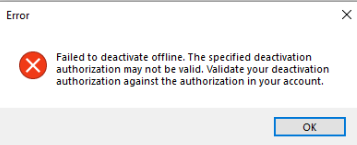
How should I proceed now? Please let me know how to solve this problem so I can use Trados on my new computer.
Thank you!
Generated Image Alt-Text
[edited by: RWS Community AI at 1:49 PM (GMT 0) on 10 Dec 2025]



