 Translate



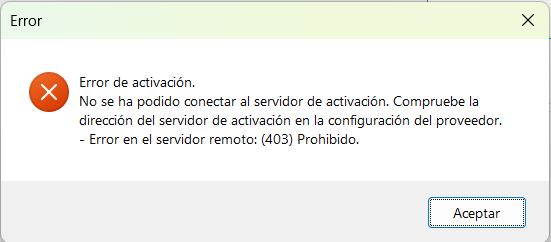
I have one Trados Studio 2019 license available, which I want to activate on a new device. When I attempt to do so, I get the following 403 error:
Generated Image Alt-Text
[edited by: RWS Community AI at 8:12 PM (GMT 0) on 22 Jan 2026]


I have one Trados Studio 2019 license available, which I want to activate on a new device. When I attempt to do so, I get the following 403 error:
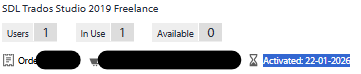
The license appears In Use in your account.
You need to reset it first and then activate it.
https://gateway.rws.com/csm?id=kb_article_view&sysparm_article=KB0038545
Also, please use offline activation with Trados 2019.
https://www.youtube.com/watch?v=xVQZyX3tbsg&list=PLeCTib6EEYZHfZBaRI2ZsRm3r8bKGq-Qz&index=4
And you also have an available upgrade from Trados 2019 to Trados 2021, unprocessed, in your account.
Kind regards,
Anca
Anca Stoian | RWS Group

The license appears In Use in your account.
You need to reset it first and then activate it.
https://gateway.rws.com/csm?id=kb_article_view&sysparm_article=KB0038545
Also, please use offline activation with Trados 2019.
https://www.youtube.com/watch?v=xVQZyX3tbsg&list=PLeCTib6EEYZHfZBaRI2ZsRm3r8bKGq-Qz&index=4
And you also have an available upgrade from Trados 2019 to Trados 2021, unprocessed, in your account.
Kind regards,
Anca
Anca Stoian | RWS Group
