Reply functionality is temporarily impacted due to a platform issue. We’re working on a fix and appreciate your understanding and patience throughout this process.

How to create a translator-compatible package (tublic22 )?

Hello, 

We are currently using SDL Passolo 2022 – Professional Edition and have created a localization package that we need to share with a translator.

In older Passolo versions, we were able to create translator bundles using formats like .tbulc11 via the Export Manager. However, in Passolo 2022, we are unable to find an option to generate a translator-compatible package in a similar format (for example, .tublic22,).

Could you please clarify:

  1. What is the correct translator-compatible package format in Passolo 2022?

  2. Is there an equivalent to the old Export Manager / tbulc bundles in Passolo 2022?

  3. What format should be shared with a translator using Passolo Translator Edition 2022?

Any guidance or best practices for sharing Passolo 2022 projects with translators would be highly appreciated.

emoji
Parents
  • Hi  ,

    we're using Passolo version 22.0.254.0. As Collaboration Edition. And we're still creating exports, e. g. as .tbulic22 files, for our translators with the "Export" function.
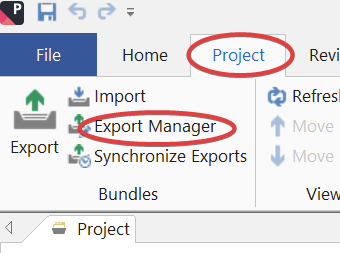
    The "Export Manager" is located under the "Project" tab.

    Unfortunately, I'm not sure, if and what kind of exports can be created with the Professional Edition, too. My apologies.

    It could be helpful, if you'd let would add the exact version number of Passolo, which you're using.
    And possibly, a screenshot of the "Project" tab, as shown below, could be helpfuul, too, if you're missing the "Export" and "Export Manager" buttons.

    You could also compare the Passolo functions between the Professional and the Collaboration Edition. I'd assume, there should be an information, if and what kind of exports can be created with the Professional Edition, too.

    Hopefully, these informations will help you, to solve the issue.

    Best regards and have a nice day.
    Nils

    Screenshot of the Passolo interface showing the 'Project' tab selected. The 'Export' and 'Export Manager' buttons are circled in red.

    emoji


    Generated Image Alt-Text
    [edited by: RWS Community AI at 11:27 AM (GMT 0) on 22 Jan 2026]
Reply
  • Hi  ,

    we're using Passolo version 22.0.254.0. As Collaboration Edition. And we're still creating exports, e. g. as .tbulic22 files, for our translators with the "Export" function.
    The "Export Manager" is located under the "Project" tab.

    Unfortunately, I'm not sure, if and what kind of exports can be created with the Professional Edition, too. My apologies.

    It could be helpful, if you'd let would add the exact version number of Passolo, which you're using.
    And possibly, a screenshot of the "Project" tab, as shown below, could be helpfuul, too, if you're missing the "Export" and "Export Manager" buttons.

    You could also compare the Passolo functions between the Professional and the Collaboration Edition. I'd assume, there should be an information, if and what kind of exports can be created with the Professional Edition, too.

    Hopefully, these informations will help you, to solve the issue.

    Best regards and have a nice day.
    Nils

    Screenshot of the Passolo interface showing the 'Project' tab selected. The 'Export' and 'Export Manager' buttons are circled in red.

    emoji


    Generated Image Alt-Text
    [edited by: RWS Community AI at 11:27 AM (GMT 0) on 22 Jan 2026]
Children