Trados / Star Transit: Adding a space at the end of every sentence

Dear Community,

I recently started working for a client who uses Star CLM/Transit as CAT-Tool, whereas I use Trados Studio.

Using the Star Transit Package Handler plugin, I am able to import the Transit packages my client sends me, translate it in Trados, et send back a Transit return package.

My client has now told me that everytime they import my return package, they need to manually add an empty space at the end of every sentence, as Star CLM/Transit doesn't automatically add an empty space between each sentence/segment (which is standard for other CAT Tools like Trados).

I was hoping someone could help me find a solution, since my client is asking me to fix this as they don't want to perform this manual action each time I deliver a translation?

Adding an empty space when I'm translating in Trados also isn't a suitable solution for me, as it will populate my TM with "faulty" segments (and I also believe that it wouldn't work).

Thanks in advance for any help.

emoji
Parents
  •  this is the first that I have heard of this!

      as I believe you both with Star Transit Packages have you any idea?

    In the meantime what you can do is the following:

    • Translate as you have been (correctly)
    • Ensure your TM is up to date (correctly)
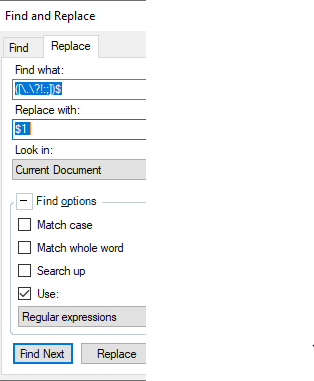
    • Perform a batch find "." and replace with ". " <- ignoring the "

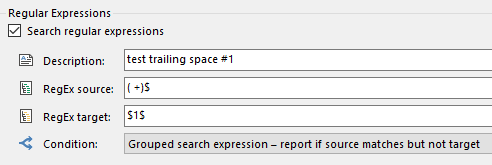
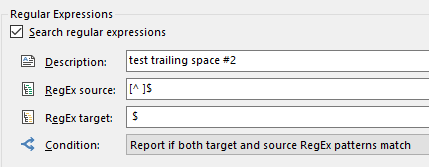
    This could be done in Studio via using Ctrl+F or my preference would be using the SDLXLIFF toolkit  as its allows you to do multiple changes under specific conditions. It also allows you to trace your commands safely before you select "apply" because understandably you dont want to make a mess of your translations.

    • Once you have accommodated for their request (odd??) then you create your return packages.

    In the meantime I hope the wider community can help clarify a few points

    Lyds


    Oana Nagy | Developer Experience | QA Engineer | RWS Group

    emoji
Reply
  •  this is the first that I have heard of this!

      as I believe you both with Star Transit Packages have you any idea?

    In the meantime what you can do is the following:

    • Translate as you have been (correctly)
    • Ensure your TM is up to date (correctly)
    • Perform a batch find "." and replace with ". " <- ignoring the "

    This could be done in Studio via using Ctrl+F or my preference would be using the SDLXLIFF toolkit  as its allows you to do multiple changes under specific conditions. It also allows you to trace your commands safely before you select "apply" because understandably you dont want to make a mess of your translations.

    • Once you have accommodated for their request (odd??) then you create your return packages.

    In the meantime I hope the wider community can help clarify a few points

    Lyds


    Oana Nagy | Developer Experience | QA Engineer | RWS Group

    emoji
Children