 Translate



Hi! I was wondering if the new DeepL glossary function is available to use in Trados 2021 and how would I go about that?
Thank you!
Dani
[locked by: Paul at 7:26 AM (GMT 1) on 24 Oct 2023]


Hi! I was wondering if the new DeepL glossary function is available to use in Trados 2021 and how would I go about that?
Thank you!
Dani
Daniela Wittmeier Kai Piontek Olaf Tonn Izabela Radomska Marta Bartnicka
We have been discussing a few things with the DeepL team and I wanted to make sure you understood that this feature will not be available to you if you only have a Pro account?
It will only be available to users with a "DeepL API for Business" subscription. This is because of what DeepL support, not because of anything we are restricting.
To quote the information we were provided with:
"However, in case of additional development to your plugin, it should be noted that customers with a DeepL Pro Advanced or Ultimate subscription (the prerequisites for CAT Tool integration) are not allowed to create the glossaries themselves via direct API request.
Direct access to our API by customers who do not have a DeepL API subscription counts as a violation of our Terms and Conditions and may result in a corresponding suspension for these customers."
So this means you have to have a DeepL API subscription of which they offer three types:
Of these three only one includes CAT tool integration and that's "DeepL API for Business".
We are currently investigation with DeepL how we are able determine the style of subscription a user has as this is not clear. But this is likely to be news for some users, possibly like you, who have a Pro subscription and believed this meant you can work with glossaries.
You should also be aware that there are glossaries, and there are glossaries! The glossaries you create using the API are not the same as the glossaries you create manually. So you will not be able to use the ones you created in your account as they cannot be accessed via the API... and vice versa. This means a lot of synching between the two if you wish to keep them in synch... something you will have to do manually.
Also, the DeepL API does not support an ability to change a glossary. So if you need to make changes you would have to delete the existing one and recreate a new one.
All in all possibly not a particularly attractive option. I would be very interested to learn your view on this information if you were not aware of it already?
Paul Filkin | RWS
Design your own training!
You've done the courses and still need to go a little further, or still not clear?
Tell us what you need in our Community Solutions Hub


Paul I am really surprised by the information you provided about glossary function not available in DeepL Pro API.
According to DeepL documentation (https://support.deepl.com/hc/en-us/articles/360021638100), "You can create glossaries with your DeepL API (Free and Pro) subscription". To confirm, I successfully added another glossary, and used it in translation from Polish to English, with my DeepL Pro account and DeepL plug-in to memoQ 9.14. (I had used this function before, today I wanted to ensure it was not withdrawn by DeepL for Pro accounts, and it was not.)
The limitation about glossaries not being directly portable between web DeepL Pro and CAT DeepL Pro plug-in is known, and there is also a known work-around documented (https://support.deepl.com/hc/en-us/articles/4405021321746): "Please note that glossaries created via the DeepL API are distinct from glossaries created via the DeepL website and DeepL desktop apps. This means that API glossaries can't be used on the DeepL website and DeepL desktop apps and vice versa. It is, however, possible to download your glossary created via the DeepL website or DeepL desktop apps as a CSV file, which you can upload to create a new glossary in the API."
The also-known inconvenience of deleting the existing glossary and adding a new one whenever we need to update a glossary - no need to "recreate", just re-upload the updated CSV file - is relatively small, compared to how nicely the glossary function works in DeepL and how it helps ensure correct terminology, consistency, and do-not-translate, all within a singe-user Pro license. Nb. the glossary works well for languages with flexion (you only add nominative form and DeepL takes care of all derivative forms!).
To sum up: DeepL glossary is a particularly attractive option, and I am positive that it still works for DeepL Pro API.

I think you have just clarified why there is so much confusion around this. The DeepL team advised us today that "Direct access to our API by customers who do not have a DeepL API subscription counts as a violation of our Terms and Conditions and may result in a corresponding suspension for these customers."
Their website says that DeepL API Free/Pro does not include CAT tool integration or the web translator.
https://www.deepl.com/pro#developer
I also know that we currently don't have a way to determine what kind of API account a user has. Make of that what you will.
The limitation about glossaries not being directly portable between web DeepL Pro and CAT DeepL Pro plug-in is known, and there is also a known work-around documented
I'm perfectly aware of the workaround and if users are happy with this then that's fine. My point is I want people to understand what they will be getting as it may not be exactly what many users think based on my discussions with many translators so far who only work with Pro.
I am positive that it still works for DeepL Pro API.
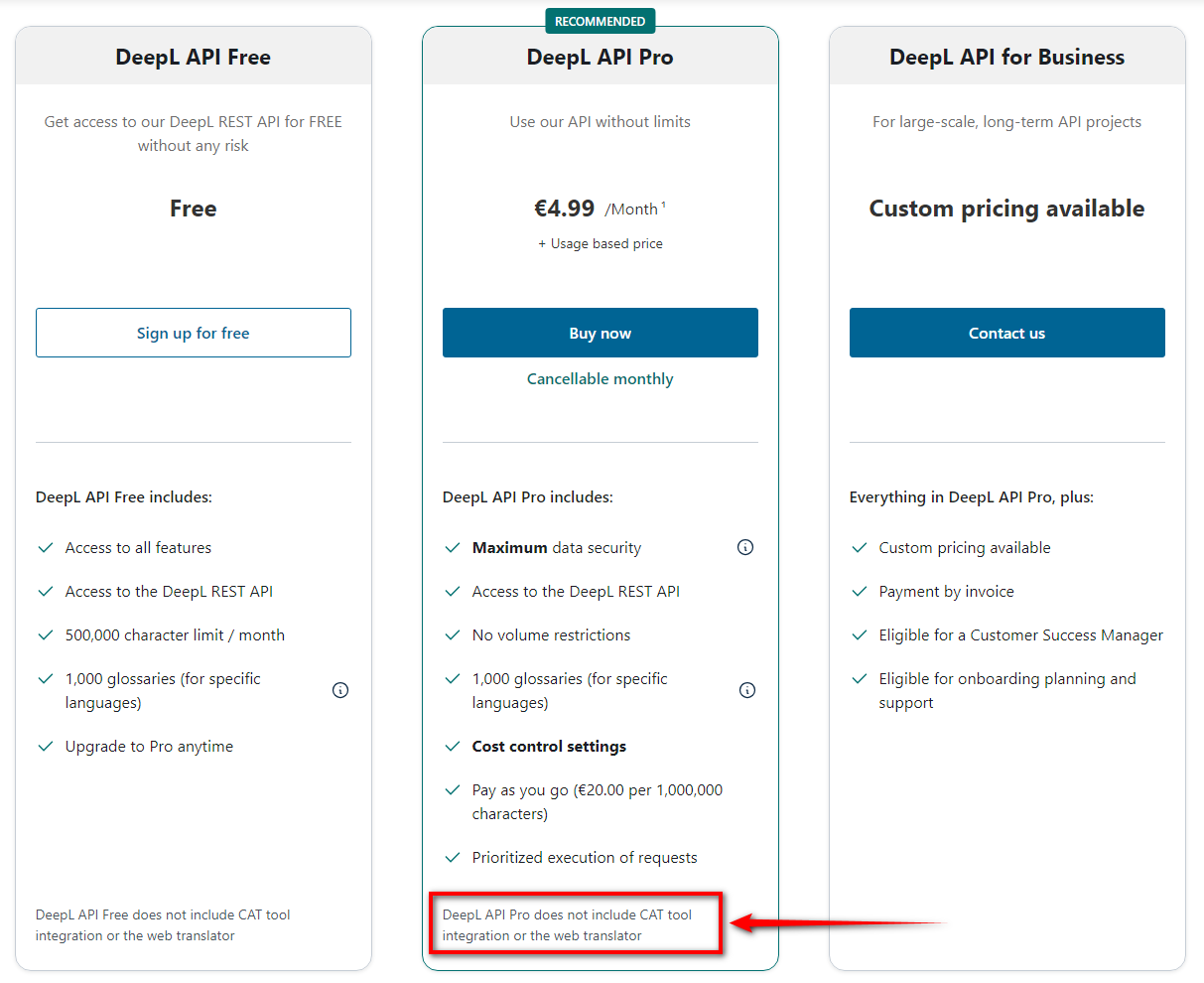
It may be that in order to use this you would at least need Ultimate or Advanced AND DeepL API Pro, or DeepL API for Business. It's not clear for me yet either. I only know that you cannot use DeepL Pro API on its own without violating the DeepL Terms and Conditions.
Paul Filkin | RWS
Design your own training!
You've done the courses and still need to go a little further, or still not clear?
Tell us what you need in our Community Solutions Hub
I think you have just clarified why there is so much confusion around this. The DeepL team advised us today that "Direct access to our API by customers who do not have a DeepL API subscription counts as a violation of our Terms and Conditions and may result in a corresponding suspension for these customers."
Their website says that DeepL API Free/Pro does not include CAT tool integration or the web translator.
https://www.deepl.com/pro#developer
I also know that we currently don't have a way to determine what kind of API account a user has. Make of that what you will.
The limitation about glossaries not being directly portable between web DeepL Pro and CAT DeepL Pro plug-in is known, and there is also a known work-around documented
I'm perfectly aware of the workaround and if users are happy with this then that's fine. My point is I want people to understand what they will be getting as it may not be exactly what many users think based on my discussions with many translators so far who only work with Pro.
I am positive that it still works for DeepL Pro API.
It may be that in order to use this you would at least need Ultimate or Advanced AND DeepL API Pro, or DeepL API for Business. It's not clear for me yet either. I only know that you cannot use DeepL Pro API on its own without violating the DeepL Terms and Conditions.
Paul Filkin | RWS
Design your own training!
You've done the courses and still need to go a little further, or still not clear?
Tell us what you need in our Community Solutions Hub
Now, that's getting interesting! If DeepL API Pro does not include CAT tools integration, how does Trados DeepL plug-in ever work (with or without the Glossary function)?
Because you don't need that subscription for a CAT tool integration. It's enough to use Ultimate or Advanced.
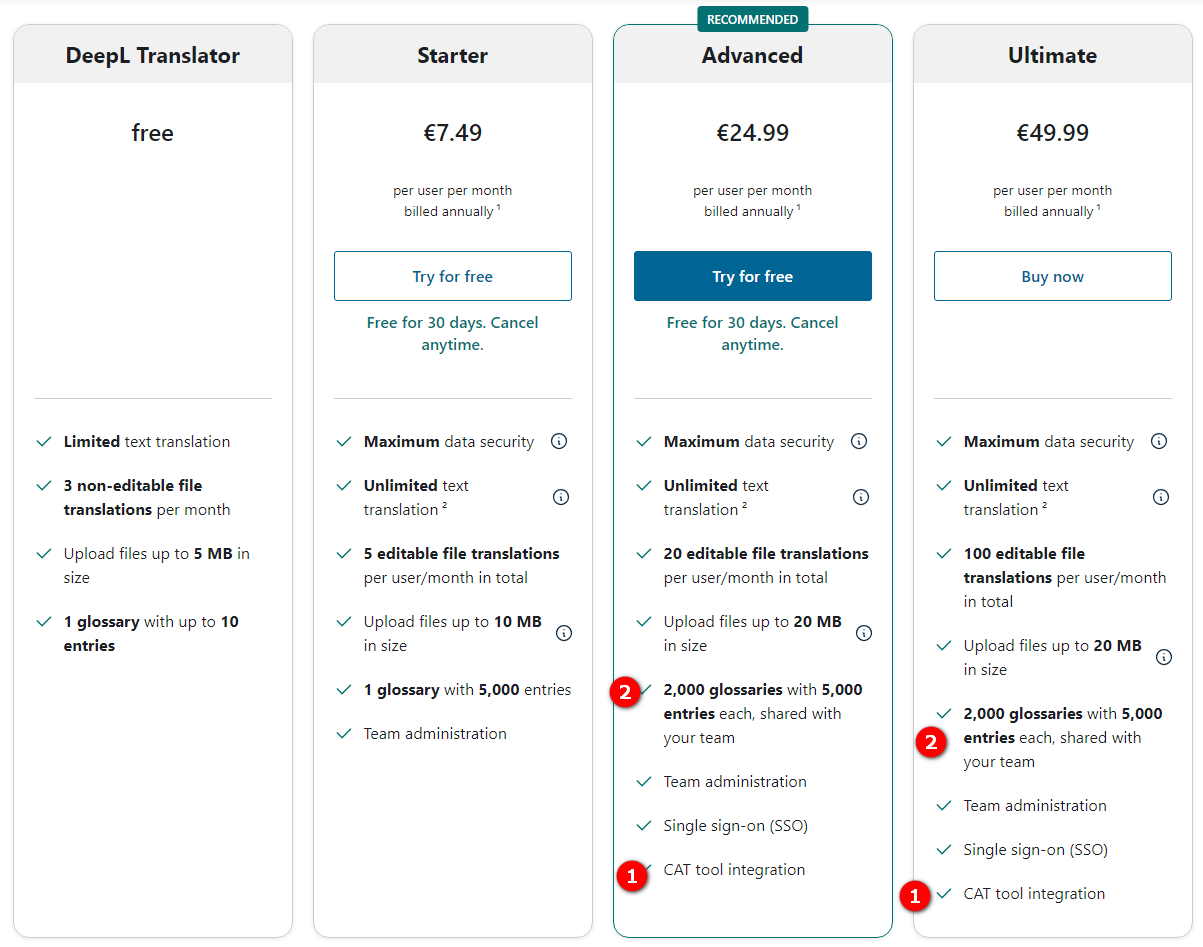
It is a little complicated.
Paul Filkin | RWS
Design your own training!
You've done the courses and still need to go a little further, or still not clear?
Tell us what you need in our Community Solutions Hub

I am wondering why they might do this limitation. It is clearly lowering the productivity of Trados.
Hi all, thanks for the important discussion. Reading all the posts I was trying to get out all the basic information.
My main question: SDL Trados is still working on the glossary function in its plugin, right? So it is not yet available but will be in the near future, correct?
Thanks in advance!
Well so probably for now it is on hold, due to the licence issues. Right now it seems like users have to have two subscriptions, one for the cat tool and one for the api to get the workflow automated. What I am wondering, other cat providers at least state, that they managed this kind of integration: https://phrase.com/news/deepl-rozetta/
Paul Maybe the link above would be worth sending to the deepL team and asking how they did it then, or if they require each user to have two accounts.
Well so probably for now it is on hold, due to the licence issues.
Nope... we have not stopped working on this.
I have been continuing the discussion with the DeepL team and think I now understand how this works. I asked for final confirmation before sharing this a few days ago so once they come back to me and confirm I'll clarify the situation.
Paul Filkin | RWS
Design your own training!
You've done the courses and still need to go a little further, or still not clear?
Tell us what you need in our Community Solutions Hub
Daniela Wittmeier Kai Piontek Olaf Tonn Izabela Radomska Marta Bartnicka
I have tried to summarise the situation now after several conversations with DeepL and have put it into the wiki we have for the plugin here: DeepL Translation Provider
We have been working on the plugin anyway and will release an update to both the plugin (Trados Studio) and add-on (Language Cloud) in due course that provides glossary support.
Paul Filkin | RWS
Design your own training!
You've done the courses and still need to go a little further, or still not clear?
Tell us what you need in our Community Solutions Hub
Thank you Paul!

Dear Paul, thank you very much. What is not clear for me:
If a user is using one of the Cat Tool Subscriptions DeepL Pro Advanced / Ultimate to use DeepL in Trados, he/she is not allowed to create Glossaries with the API:
"However, in case of additional development to your plugin, it should be noted that customers with a DeepL Pro Advanced or Ultimate subscription (the prerequisites for CAT Tool integration) are not allowed to create the glossaries themselves via direct API request.
Direct access to our API by customers who do not have a DeepL API subscription counts as a violation of our Terms and Conditions and may result in a corresponding suspension for these customers."
How is the plugin going to create the glossaries, if not with the Api? Do our users need two subscriptions then?
Best regards,
Kai
It is confusing because they have two types glossaries. If you use a CAT tool subscription then you can only use glossaries created by the integration in the CAT tool. So if you use glossaries with the DeepL windows application for example they are not going to be accessible via a CAT tool, and neither can you create them via the API unless you have a DeepL API subscription.
Does that help?
Paul Filkin | RWS
Design your own training!
You've done the courses and still need to go a little further, or still not clear?
Tell us what you need in our Community Solutions Hub
