
 Translate



Hello, dear community!
I just downloaded the trial version of Trados 2022 to be able to work with the Multilingual Excel filetype. When I tried to import my Excel, everything worked finee, only the translations that I already had could not be imported. Apparently, the input string was not a correct format, but I can't figure out what I have to change to make it work.
Attached is the file I wanted to translate, and below screenshots of my Worksheet Mapping and the full error message.
Thanks in advance for your help!
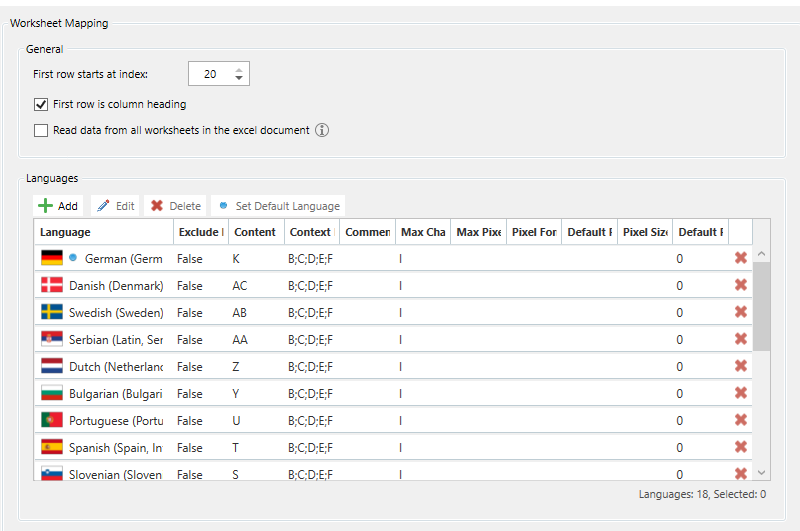
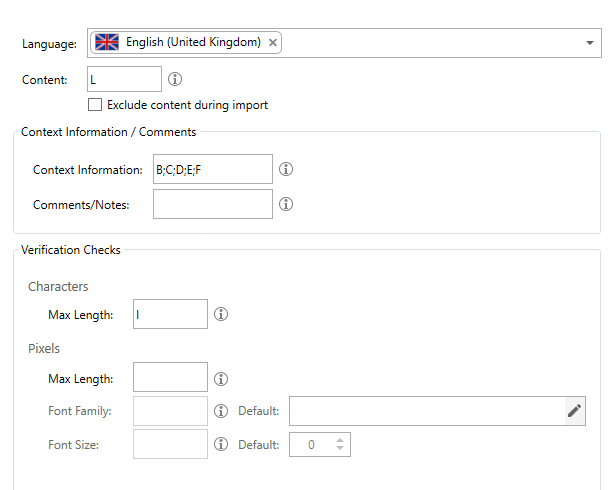
Error Message:

<SDLErrorDetails time="02.02.2023 09:32:50">
<ErrorMessage>Unexpected exception when configuring file multiFileConverter for task 'Import Multilingual Translations (Excel)': Input string was not in a correct format..</ErrorMessage>
<Exception>
<Type>Sdl.ProjectApi.ProjectApiException, Sdl.ProjectApi, Version=17.0.0.0, Culture=neutral, PublicKeyToken=c28cdb26c445c888</Type>
<HelpLink/>
<Source>Sdl.ProjectApi.Implementation</Source>
<HResult>-2146233088</HResult>
<StackTrace>
<![CDATA[ at Sdl.ProjectApi.Implementation.TaskExecution.ContentProcessingTaskImplementation.TaskFileExecuter.ConfigureConverter(IMultiFileConverter multiFileConverter, Language targetLanguage) at Sdl.ProjectApi.Implementation.TaskExecution.ContentProcessingTaskImplementation.TaskFileExecuter.CreateMultiFileConverter(IProjectFile tf, String filePath) at Sdl.ProjectApi.Implementation.TaskExecution.ContentProcessingTaskImplementation.TaskFileExecuter.Parse(String targetFilePath) ]]>
</StackTrace>
<InnerException>
<Type>System.FormatException, mscorlib, Version=4.0.0.0, Culture=neutral, PublicKeyToken=b77a5c561934e089</Type>
<HelpLink/>
<Source>mscorlib</Source>
<HResult>-2146233033</HResult>
<StackTrace>
<![CDATA[ at System.Number.StringToNumber(String str, NumberStyles options, NumberBuffer& number, NumberFormatInfo info, Boolean parseDecimal) at System.Number.ParseInt32(String s, NumberStyles style, NumberFormatInfo info) at System.Convert.ToInt32(String value) at Multilingual.Excel.FileType.Services.ContentReader.ProcessParagraphUnit(IParagraphUnit paragraphUnit) at Sdl.FileTypeSupport.Framework.Integration.AbstractBilingualProcessorContainer.ProcessParagraphUnit(IParagraphUnit paragraphUnit) at Sdl.FileTypeSupport.Framework.BilingualApi.AbstractBilingualContentProcessor.ProcessParagraphUnit(IParagraphUnit paragraphUnit) at Sdl.FileTypeSupport.Framework.Integration.LocationMarkerLocator.ProcessParagraphUnit(IParagraphUnit paragraphUnit) at Sdl.FileTypeSupport.Framework.Integration.AbstractBilingualProcessorContainer.ProcessParagraphUnit(IParagraphUnit paragraphUnit) at Sdl.FileTypeSupport.Framework.Integration.FileExtractor.ProcessParagraphUnit(IParagraphUnit paragraphUnit) at Sdl.FileTypeSupport.Framework.Core.Utilities.BilingualApi.ParagraphUnitBuffer.ProcessParagraphUnit(IParagraphUnit pu) at Sdl.FileTypeSupport.Bilingual.SdlXliff.XliffFileReader.OutputParagraphUnit(IParagraphUnit pu) at Sdl.FileTypeSupport.Bilingual.SdlXliff.XliffFileReader.ParseLocalizableParagraphUnit(transunit transunit, LockTypeFlags lockFlags) at Sdl.FileTypeSupport.Bilingual.SdlXliff.XliffFileReader.ParseTransUnit(transunit transunit) at Sdl.FileTypeSupport.Bilingual.SdlXliff.XliffFileReader.ParseGroup(group group) at Sdl.FileTypeSupport.Bilingual.SdlXliff.XliffFileReader.OnGroup(XmlElement group) at Sdl.FileTypeSupport.Bilingual.SdlXliff.SdlXliffFeeder.<ContinueScanning>b__14_11(ISdlXliffStreamContentHandler handler) at System.Collections.Generic.List`1.ForEach(Action`1 action) at Sdl.FileTypeSupport.Bilingual.SdlXliff.SdlXliffFeeder.ContinueScanning() at Sdl.FileTypeSupport.Bilingual.SdlXliff.XliffFileReader.ContinueParsing() at Sdl.FileTypeSupport.Bilingual.SdlXliff.XliffFileReader.ParseNext() at Sdl.FileTypeSupport.Framework.Integration.FileExtractor.ParseNext() at Sdl.FileTypeSupport.Framework.Integration.MultiFileConverter.ParseNext() at Sdl.FileTypeSupport.Framework.Integration.MultiFileConverter.Parse() at Multilingual.Excel.FileType.Services.SdlxliffReader.ParseFile(String filePathInput) at Multilingual.Excel.FileType.Services.SdlxliffReader.GetParagraphUnitInfos(String filePathInput) at Multilingual.Excel.FileType.BatchTasks.ImportBatchTask.EnsureDocumentSegmented(ProjectFile projectFile) at Multilingual.Excel.FileType.BatchTasks.ImportBatchTask.ConfigureConverter(ProjectFile projectFile, IMultiFileConverter multiFileConverter) at Sdl.ProjectApi.Implementation.TaskExecution.ContentProcessingTaskImplementationAdapter.ConfigureConverter(IExecutingTaskFile executingTaskFile, IMultiFileConverter multiFileConverter) at Sdl.ProjectApi.Implementation.TaskExecution.ContentProcessingTaskImplementation.TaskFileExecuter.ConfigureConverter(IMultiFileConverter multiFileConverter, Language targetLanguage) ]]>
</StackTrace>
</InnerException>
</Exception>
<Environment>
<ProductName>Trados Studio</ProductName>
<ProductVersion>Studio17</ProductVersion>
<EntryAssemblyFileVersion>17.0.4.13209</EntryAssemblyFileVersion>
<OperatingSystem>Microsoft Windows 10 Enterprise</OperatingSystem>
<ServicePack>NULL</ServicePack>
<OperatingSystemLanguage>1031</OperatingSystemLanguage>
<CodePage>1252</CodePage>
<LoggedOnUser>MEWO\skat</LoggedOnUser>
<DotNetFrameWork>4.0.30319.42000</DotNetFrameWork>
<ComputerName>PC-AT11-008</ComputerName>
<ConnectedToNetwork>True</ConnectedToNetwork>
<PhysicalMemory>8274236 MB</PhysicalMemory>
</Environment>
</SDLErrorDetails>
Replaced the error pasted as text (gets picked up by the automated spam filter) and embedded as a code snippet using the "insert -> code" feature when you create or reply to a post.
[edited by: Paul at 9:41 AM (GMT 0) on 2 Feb 2023]


