


studioViews - split is your new merge and other oddities

Merging (aka "Split") files

As you might have guessed from the subject line: I had some trouble understanding that in order to merge several xliffs into 1 you had to "Split the selected files".
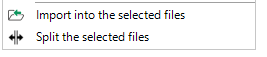
Two buttons: 'Import into the selected files' with an arrow pointing down, and 'Split the selected files' with arrows pointing left and right.

I got there in the end, last not least by reading up on it in the manual at https://community.rws.com/product-groups/trados-portfolio/rws-appstore/w/wiki/5620/studioviews#mcetoc_1h64975943

I discovered though that setting the option Split by equal parts to 1 had not the desired effect but always resulted in 2 files. I opted for setting Split by word count to 10000 instead.
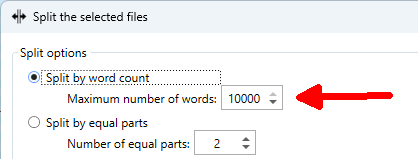
Split options dialog with 'Split by word count' selected and 'Maximum number of words' set to 10000, and 'Split by equal parts' option showing 'Number of equal parts' set to 2.

Reverse the Merge (aka Import)

This worked almost flawlessly weren't it for the fact the progress seemed endless since the progress window never disappeared.
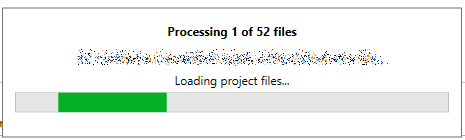
Progress window showing 'Processing 1 of 52 files' with a green progress bar and text 'Loading project files...' below a row of illegible text.

After a long wait I had a peek at my files' folder. From the modified dates and the log file I gathered that the actual operation had indeed finished some time ago.

studioViews is one of my favourite plugins but I have to say that the UI for the splitting/merging of files is very confusing and in need of a serious redesign.

Experienced on Trados Studio 2022 SR2.


Generated Image Alt-Text
[edited by: RWS Community AI at 4:39 PM (GMT 0) on 14 Nov 2024]

emoji
  •  

    Thanks Angela... it's one of my favourite too.  We'll investigate the problems and if we can reproduce will create a ticket for these things:

    1. Rename the UI a little so it’s more clear that merge operations also work.  We could rename to “Split/Merge the selected files” for example.  So an easy one.
    2. Fix the current behaviour (if we can reproduce) so we only get one file when using this to merge several files into one.
    3. Resolve the import problem of a never ending process (if we can reproduce).

    Paul Filkin | RWS

    Design your own training!
    You've done the courses and still need to go a little further, or still not clear? 
    Tell us what you need in our Community Solutions Hub

    emoji