


Microsoft Translator Plug in Error "The request is not authorized because the credentials are missing or invalid."

Hi,

We recently upgraded to Trados Studio 2022 SR2 - 17.2.10.19084
I installed the Microsoft Translator Provider 1.1.5.0 version. I am able to pull translations just fine using the Microsoft plugin for smaller files. For bigger files, we received this error. "The request is not authorized because credentials are missing or invalid". I'm sure that our credentials are working properly as I am able to pull translations for smaller files and call the API directly outside Studio. 
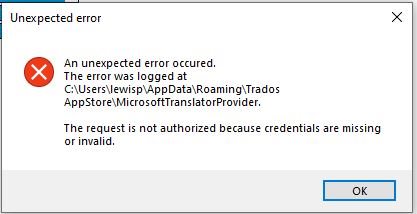
Screenshot of an 'Unexpected error' dialog box with a message stating 'An unexpected error occurred. The error was logged at C:UsersewislAppDataRoamingTrados AppStoreMicrosoftTranslatorProvider. The request is not authorized because credentials are missing or invalid.' with an 'OK' button.

I regenerate a new key from MS Azure, it tooks a few minutes and it is completely random but the message appeared again. Everything is fine for 30-45 minutes and sometimes 1 hour and then it comes back later. I restart everything and no error for a few minutes and then suddenly it starts again.
The language set I am using French(Canada) - English(Canada), see my Settings :
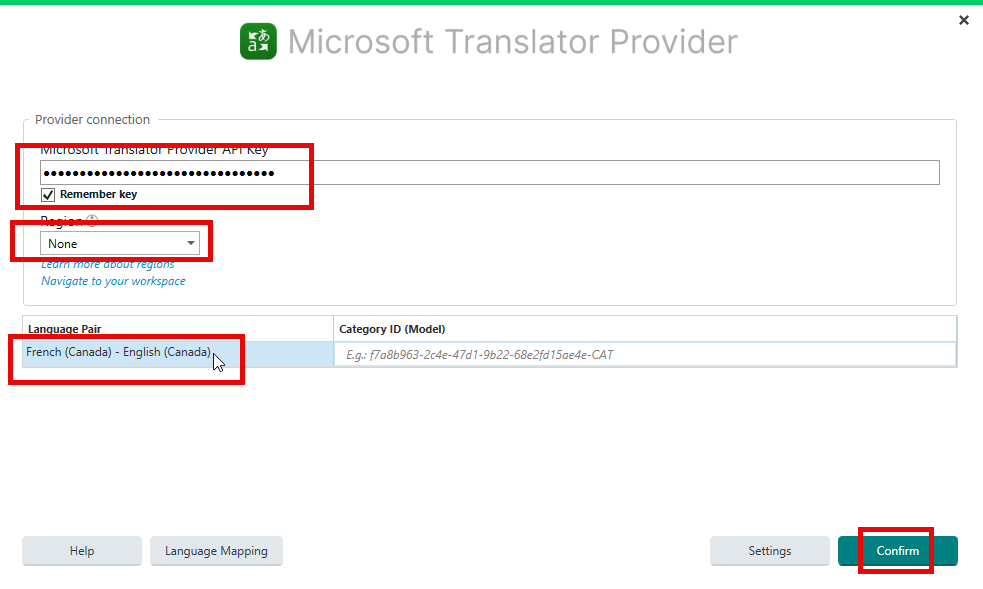
Screenshot of Microsoft Translator Provider settings with API key entered, 'Remember key' checked, 'Region' set to 'None', and 'Language Pair' set to 'French (Canada) - English (Canada)'.
I let Region option at "None", because neither "Canada" nor "Canada Central, Canada East" is functional, we received this : 
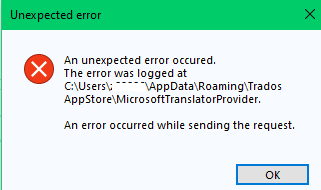
Error message dialog box stating 'Unexpected error. The error was logged at C:Users...AppDataRoamingTrados AppStoreMicrosoftTranslatorProvider. An error occurred while sending the request.'
Could you please help, my testing is blocked.

Regards

Belkacem


Generated Image Alt-Text
[edited by: RWS Community AI at 8:11 PM (GMT 1) on 23 Aug 2024]
emoji
Parents
  • Hello Belkacem,

    I understand that you're experiencing an issue with the Microsoft Translator Provider plugin in Trados Studio 2022 SR2. This issue seems to occur with larger files and is related to the authorization credentials. Here are some steps you can take to troubleshoot this issue:

    Step 1: Ensure you have the latest version of Trados Studio and the Microsoft Translator Provider plugin installed. You can check for updates within Trados Studio (Help > Check for updates).

    Step 2: If you have the latest versions and the problem persists, try uninstalling and reinstalling the Microsoft Translator Provider plugin. You can uninstall the plugin under Add-Ins > RWS AppStore > Installed plug-ins. Then, download the latest version of the plugin from the RWS AppStore and install it.

    Step 3: Check your Microsoft Azure credentials and ensure they are correctly entered in the plugin settings. Even though you're able to pull translations for smaller files, there might be a different authorization process for larger files.

    Step 4: If the issue persists, it might be related to the region settings. Although you've set the region to "None", try setting it to a specific region that matches your Microsoft Azure settings.

    If after following these steps the issue still persists, it might be a more complex issue that requires further investigation.

    Remember, it's important to keep your software and plugins up to date to ensure optimal performance and to benefit from the latest features and improvements.

    Best regards,

    RWS Community AI

    emoji
  • Hi Everyone,

    I've had this problem since a while as well. Yesterday I opened an issue at the plugin developer's page (github.com/.../1665) but not sure if they often read the issues (as somebody already opened what seems to be a related issue back in February). Maybe Paul or someone from RWS knows those guys in person and could ask them to have a look at it?

    Best
    Alex

    emoji
  •  ,  ,

    We've released new versions on AppStore, please check and see if you get the same error messages.

    Also, it may sound unnecessary, but I'd also recommend creating a new API key, and try with it. 

    If you still have issues, paste the logs here.

    Thank you,

    Oana


    Oana Nagy | Developer Experience | QA Engineer | RWS Group

    emoji
  • Hi Oana,

    This updated version, 1.2.1.0, cannot be even added to a Trados project. The error trace is below. Anyway, if the code on github is the one that you use, it doesn't seem, at first glance, to refresh the access token regularly, so the token expires after 10 minutes and the main error which is the subject of this thread is thrown. That's a guess though, there might be more or other issues as well, I suppose. Best regards

    MicrosoftTranslatorProvider.Helpers.ErrorHandler: 2024-10-11 16:31:06.7651 Error HandleError: Newtonsoft.Json.JsonReaderException: Unexpected character encountered while parsing value: <. Path '', line 0, position 0.
    at Newtonsoft.Json.JsonTextReader.ParseValue()
    at Newtonsoft.Json.JsonTextReader.Read()
    at Newtonsoft.Json.JsonReader.ReadForType(JsonContract contract, Boolean hasConverter)
    at Newtonsoft.Json.Serialization.JsonSerializerInternalReader.Deserialize(JsonReader reader, Type objectType, Boolean checkAdditionalContent)
    at Newtonsoft.Json.JsonSerializer.DeserializeInternal(JsonReader reader, Type objectType)
    at Newtonsoft.Json.JsonConvert.DeserializeObject(String value, Type type, JsonSerializerSettings settings)
    at Newtonsoft.Json.JsonConvert.DeserializeObject[T](String value, JsonSerializerSettings settings)
    at Newtonsoft.Json.JsonConvert.DeserializeObject[T](String value)
    at MicrosoftTranslatorProvider.Studio.TranslationProvider.MicrosoftApi.TryGetSupportedLanguages()
    at MicrosoftTranslatorProvider.Studio.TranslationProvider.MicrosoftApi.GetSupportedLanguages()
    MicrosoftTranslatorProvider.Helpers.ErrorHandler: 2024-10-11 16:31:10.9094 Error HandleError: System.NullReferenceException: Object reference not set to an instance of an object.
    at MicrosoftTranslatorProvider.Studio.TranslationProvider.MicrosoftApi.TrySetSupportedLanguages()
    at MicrosoftTranslatorProvider.Studio.TranslationProvider.MicrosoftApi.SetSupportedLanguages()
    MicrosoftTranslatorProvider.Helpers.ErrorHandler: 2024-10-11 16:32:15.6689 Error HandleError: Newtonsoft.Json.JsonReaderException: Unexpected character encountered while parsing value: <. Path '', line 0, position 0.
    at Newtonsoft.Json.JsonTextReader.ParseValue()
    at Newtonsoft.Json.JsonTextReader.Read()
    at Newtonsoft.Json.JsonReader.ReadForType(JsonContract contract, Boolean hasConverter)
    at Newtonsoft.Json.Serialization.JsonSerializerInternalReader.Deserialize(JsonReader reader, Type objectType, Boolean checkAdditionalContent)
    at Newtonsoft.Json.JsonSerializer.DeserializeInternal(JsonReader reader, Type objectType)
    at Newtonsoft.Json.JsonConvert.DeserializeObject(String value, Type type, JsonSerializerSettings settings)
    at Newtonsoft.Json.JsonConvert.DeserializeObject[T](String value, JsonSerializerSettings settings)
    at Newtonsoft.Json.JsonConvert.DeserializeObject[T](String value)
    at MicrosoftTranslatorProvider.Studio.TranslationProvider.MicrosoftApi.TryGetSupportedLanguages()
    at MicrosoftTranslatorProvider.Studio.TranslationProvider.MicrosoftApi.GetSupportedLanguages()
    MicrosoftTranslatorProvider.Helpers.ErrorHandler: 2024-10-11 16:32:18.6589 Error HandleError: System.NullReferenceException: Object reference not set to an instance of an object.
    at MicrosoftTranslatorProvider.Studio.TranslationProvider.MicrosoftApi.TrySetSupportedLanguages()
    at MicrosoftTranslatorProvider.Studio.TranslationProvider.MicrosoftApi.SetSupportedLanguages()

    emoji
  • Thank you   for your input.

    It works fine for me, though, and I cannot reproduce the errors.

    I'll pass your comments to Development to check further.

    Thank you,

    Oana


    Oana Nagy | Developer Experience | QA Engineer | RWS Group

    emoji
Reply Children
No Data
