
 Translate



Hi,
I'm testing the Apply Studio Project Template plugin in 2024 SR1, and it has a bug.
To reproduce:
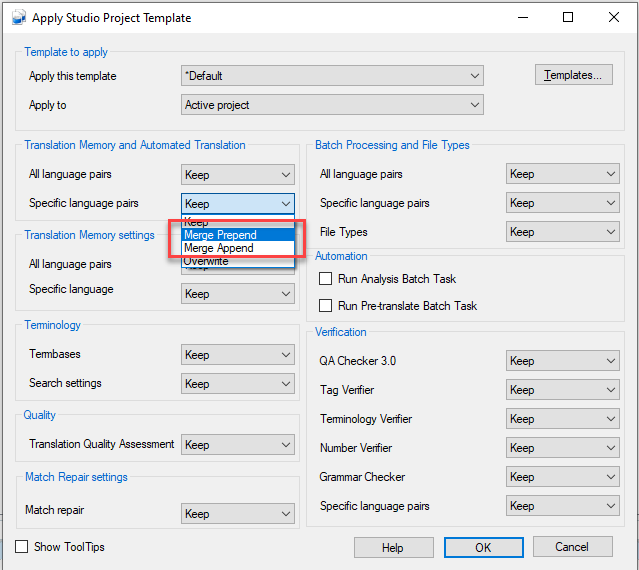
1. Open the Translation Memory and Automated Translation -> Specific Language Pairs dropdown and select Merge Append or Merge Prepend:
2. The following error is shown:
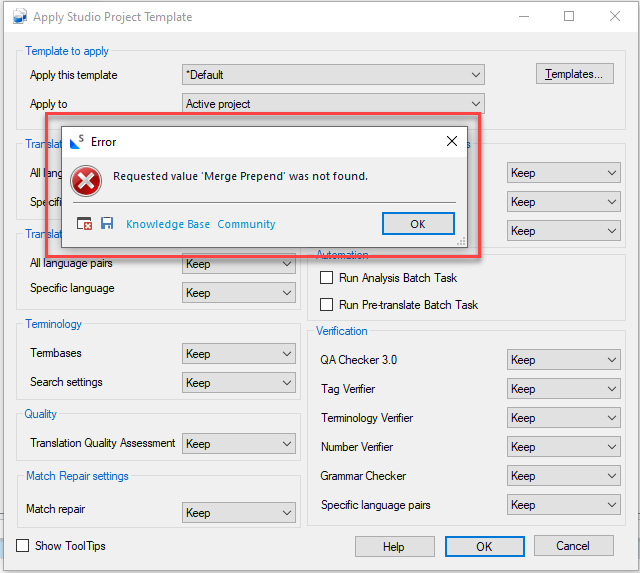
The cause of the error is in the following file: https://github.com/RWS/Sdl-Community/blob/master/Apply%20Studio%20Project%20Template/Sdl.Community.ApplyStudioProjectTemplate/ApplyTemplateForm.cs
Specifically, the following method needs to be changed:
private void TranslationProvidersSpecificLanguages_SelectedIndexChanged(object sender, EventArgs e) { if (SelectedTemplate.SelectedItem is ApplyTemplate applyTemplate) { applyTemplate.TranslationProvidersSpecificLanguages = (ApplyTemplateOptions)Enum.Parse(typeof(ApplyTemplateOptions), TranslationProvidersSpecificLanguages.SelectedItem.ToString()); } }
The method should be like this, with ToEnumString() added:
        private void TranslationProvidersSpecificLanguages_SelectedIndexChanged(object sender, EventArgs e)
        {
            if (SelectedTemplate.SelectedItem is ApplyTemplate applyTemplate)
            {
                applyTemplate.TranslationProvidersSpecificLanguages =
                    (ApplyTemplateOptions)Enum.Parse(typeof(ApplyTemplateOptions),
                        TranslationProvidersSpecificLanguages.SelectedItem.ToString().ToEnumString());
            }
        }
ToEnumString() removes the space from Merge Prepend/Append, making it possible to parse it as the enum member (in other dropdowns where Merge Prepend/Append have been added, ToEnumString is already used).
I would appreciate if this could be fixed as soon as possible, as it is blocking a potential upgrade to Trados 2024 SR1.
Generated Image Alt-Text
[edited by: RWS Community AI at 9:52 AM (GMT 1) on 21 Oct 2025]



