Tokens interpretation (OpenAI)

Dear Community!

Currently testing Chat-gpt 3.5 turbo (OpenAI) and there are so many questions rising....

How are tokens calculated? I need to assess approximate costs, but something is definitely wrong:

Example: 

I have performed a pretranslation of 2549 words; 36829 tokens were counted, corresponding to (x4) 147316 characters....while the entire text had 14230 characters....how come?

Ok, the numbers are always doubled since it´s not only the origin (output) text that is counted, but the input as well. But then it could be around 4000 tokens (30000 characters) tokens, not 37 000 tokens (147 000 characters)...

Completely lost ...and then, in the breakdown, the OpenAI account shows 5 times higher input than output....

For this test I have not activated neither the terminology-aware, nor the multiple-translation options. I guess these may lead to a considerable increase of the input tokens...Would they?

If someone controls the issue, please, clarify.

It is obvious that exact token calculation and estimation is not possible. But at least, the numbers should be more o less clear...

Thank you in advance!


Removed AI Suggestion
[edited by: Yulia Kovalskaya at 4:19 PM (GMT 0) on 29 Oct 2025]
emoji
Parents
  •  

    Here's the answer from asking the very tool you're using :-)  Perhaps that helps to explain somewhat?


    Tokens and cost estimation in GPT models

    This confusion is quite common — token counts rarely align neatly with word or character counts. Here’s what’s happening:

    1. What tokens actually are
      Tokens are not characters or words. They are chunks of text that represent how the model processes language. On average:

      • 1 token ≈ 4 characters in English text, or

      • 1 token ≈ ¾ of a word.

      However, this varies depending on the language, punctuation, spacing, and formatting. For example, “don’t” counts as two tokens (don + ’t), and numbers, markup, or special characters can multiply token counts quickly.

    2. Why your count seems inflated
      If your text had ~2,500 words or ~14,000 characters, 36,000–37,000 tokens does sound high — but likely includes prompt and system text automatically sent with your request.
      Many interfaces (such as translation tools or connectors) send extra metadata or instructions under the hood, often tripling or quadrupling the visible text length. That means what you see as “input” is only part of what the model actually receives.

    3. Input vs. output
      OpenAI charges separately for input (your prompt) and output (the model’s response).
      If you see 5× more input than output, it usually means your application sends a large prompt (context, settings, memory, translation pairs, etc.) each time. You can check this in your developer console or logs if available.

    4. Terminology and multi-translation features
      Yes, those would increase input tokens further, since they expand the prompt with additional instructions or examples.

    5. Estimating cost
      For GPT-3.5-Turbo, you can approximate:

      • 1,000 tokens ≈ 750 words (roughly).

      • To estimate cost, divide total tokens by 1,000 and multiply by the model’s rate.

      Example: 37,000 tokens × $0.0005 (input) ≈ $0.0185 for that request.

    6. Practical takeaway
      You can’t directly map tokens to visible characters because the model processes much more than what’s displayed. The only reliable measure is the token count shown in your OpenAI usage dashboard.


    Paul Filkin | RWS

    Design your own training!
    You've done the courses and still need to go a little further, or still not clear? 
    Tell us what you need in our Community Solutions Hub

    emoji
  • Dear Paul!

    Thank you, very useful for general understanding of the issue. 

    If your text had ~2,500 words or ~14,000 characters, 36,000–37,000 tokens does sound high — but likely includes prompt and system text automatically sent with your request.

    As for this, I have not modified the promp...in that case, it was the general one "default translation". So, yes, it does have some descriptive text, but not that long (or maybe it does not depend on the text length directly..)

    Many interfaces (such as translation tools or connectors) send extra metadata or instructions under the hood,

    Under translation tools you mean Studio itself, right? But then:

    If you see 5× more input than output, it usually means your application sends a large prompt (context, settings, memory, translation pairs, etc.) each time

    Settings??? You mean the general Studio settings? 

    Memory??? You refer to the translation memory?? It is not supposed to "participate" in the process.

    As for point 4: if I indicate to apply the terminology database, will the plugin process and count ALL the terms available in it?

    The only reliable measure is the token count shown in your OpenAI usage dashboard.

    Exactly, but that can be consulted only a posteriori:). 

    Thank you for your explanations, always very useful, Paul!

    Best wishes!

    emoji
  •  

    I guess the best way to see what is being used would be use a tool like Fiddler.  If you do that you'll be able to see exactly what gets sent with every call, and also what gets sent back.  Then you can spend time analysing with your data to  understand it better.

    I don't know if it's free anymore, but this should be helpful:

    05 What is Fiddler and how to use it

    The article is in the dev community so you might need to request access first if you can't see it:

     Trados Studio Developers 

    Paul Filkin | RWS

    Design your own training!
    You've done the courses and still need to go a little further, or still not clear? 
    Tell us what you need in our Community Solutions Hub

    emoji
  • Depending on the plugin settings, segments may be sent multiple times; however, I assume that option is not enabled. I suspect the discrepancy is mainly caused by the wrapper prompt the plugin includes with each segment, which is normal for API calls (in contrast to chats).

    emoji
  •  

    You inspired me to look closer at this being able to see the tokens question... you're not the only one asking.  Perhaps this is worth a look: https://multifarious.filkin.com/2025/11/11/trados-ai-monitor/

    Paul Filkin | RWS

    Design your own training!
    You've done the courses and still need to go a little further, or still not clear? 
    Tell us what you need in our Community Solutions Hub

    emoji
Reply Children
  •   Many thanks, I will check it out more deeply the coming days (being a bit short on time right now). I'll give you more feedback in the coming days but I love your approach as described in your blog!

    Yeah, we can now achieve things with coding LLMs and coding agents which seem unbelievable. And in a fraction of time.

    Because as an avid LLM user I felt too restricted in Trados, I built a whole personal local Laravel/Statamic/PHP-App which let me export the bilingual files, extract the XM, put that in a database segment by segment with some meta data, wrap all that in my own prompt engineering, far exceeding any possible options within.the AI plugin itself and send that in chunks to whatever LLM or provider I like, put it back into the XML, and re-import to Trados.

    It is not a hundred percent production-ripe but works for me. :-) It gives me better results as far as I can only export termbases to my app and incorporate it, as well as any other instructions and project information (I usually translate IT books and need it to know more about the general subject).

    It would be better of course If I could work on the Trados files itself, but that seemed too difficult.

    (BTW, my own book about prompting and a lot of tricks around it is due on December 11 here in Germany as my first own IT book since the mid-90's, being published by O'Reilly Germany. No prompt collection of course, but teaching helpful knwoledge about LLMs, prompting and some tools and peripheral things.)

    May I ask which AI coding tools you used?

    emoji
  •  After installing the monitor, I looked for the "AI" option to add the proxy server but couldn't find it in Trados Studio 2024 Freelance via File -> Options. Is it supposed to work with the Freelance edition?

    emoji
  •   

    It should work with any version. But you’re looking for a non-existent option. What makes you think there is one?

    On the coding tool… mostly Claude but I dip into others depending on the context of the problem I’m trying to solve.

    Paul Filkin | RWS

    Design your own training!
    You've done the courses and still need to go a little further, or still not clear? 
    Tell us what you need in our Community Solutions Hub

    emoji
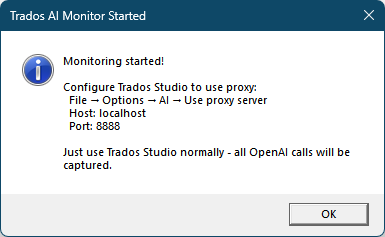
  •  Your app makes me think there is one:

    A dialog box titled 'Trados AI Monitor Started' with a message: 'Monitoring started! Configure Trados Studio to use proxy: File -> Options -> AI -> Use proxy server. Host: localhost. Port: 8888. Just use Trados Studio normally - all OpenAI calls will be captured.' An OK button is at the bottom right.

    I'm not familiar with proxy servers, I must admit ...

    emoji


    Generated Image Alt-Text
    [edited by: RWS Community AI at 11:08 AM (GMT 0) on 12 Nov 2025]
  •   

    Right! Something I forgot to remove!  That’s only text. I stopped reading it and forgot to remove the original approach.

    The proxy server starts once you start monitoring.

    Paul Filkin | RWS

    Design your own training!
    You've done the courses and still need to go a little further, or still not clear? 
    Tell us what you need in our Community Solutions Hub

    emoji
  •   I really like it! I personally never thought much about the token count because I knew enough about the way such prompts are engineered, but I find it very interesting to be able to see the complete messages to better understand what exactly happens.

    I believe that your tool will become even more important the more direct API calls are made from Trados Studio itself or whatever plugin is using LLMs in the future.

    Another curious coder question (if I may): Which kind of licensing and registering system did you use for this app?

    emoji
  • BTW, one small detail ... I would change the following German translations:

    Überwachung start -> Überwachung starten (even better: Überwachung beginnen)

    Überwachung stopt -> Überwachung stoppen (even better: Überwachung beenden)

    emoji
  •  

    Another curious coder question (if I may): Which kind of licensing and registering system did you use for this app?

    Good question... I actually built my own.  In the spirit of being able to do so much with AI I extended that principle into my Wordpress installation and built several plugins that allow me to do many things I wanted without having to pay for them :-)

    So the licensing is there for two reasons:

    1. I was interested to see if I could create a reasonably secure licence without the need for server checks that recognised the user in the about box as you will have seen.
    2. the reason for the recognition is that's how I wanted to control support.  I also have a support platform (just a simple one) in my Wordpress platform and I'll support questions from licensed users on my apps.

    In reality, it's a bit of fun, I learned a lot... and in practice I think it works quite well.

    Überwachung start -> Überwachung starten (even better: Überwachung beginnen)

    Überwachung stopt -> Überwachung stoppen (even better: Überwachung beenden)

    Thank you for that... will be in the next release :-)

    Paul Filkin | RWS

    Design your own training!
    You've done the courses and still need to go a little further, or still not clear? 
    Tell us what you need in our Community Solutions Hub

    emoji
  •  

    Thanks for sharing! I think that licensing system is quite cool.:-)

    I build most of my own websites (and client websites together with some colleagues) nowadays with the CMS Statamic in Laravel, as I’m a fan of that framework. I’m moving away from WordPress (felt mostly too limited there and the bunch of plugins overwhelming) and also enjoy the increased power I get by leveraging AI and AI agents (mostly using Windsurf in PhpStorm and as a standalone editor, mainly with Claude 4.5).

    Do you think we will see more and increased usage of LLMs in Trados Studio and/or plugins soon? And more grades of freedom re. model choice and prompt engineering?

    emoji
  •  

    I build most of my own websites (and client websites together with some colleagues) nowadays with the CMS Statamic in Laravel

    Looks pretty interesting.  I've had a wordpress platform for my blog for over a decade now and transitioned from Wordpress to a hosted version where I have more control, so I'll stick with that for my own needs for now.  The number of plugins is overwhelming and you rarely get exactly what you need... or you get far too much and it's bloat and advertising.  So I started using Code Snippets to bend them and eventually realised it was simpler to build your own complete plugin and I've slowly but surely been replacing the ones I had with my own plugins to do only what I need.

    Do you think we will see more and increased usage of LLMs in Trados Studio and/or plugins soon? And more grades of freedom re. model choice and prompt engineering?

    I think it’s important to separate what Trados Studio itself is responsible for from the level of freedom you’re looking for.  Studio is used by very large enterprises as well as individual freelancers, so anything built into the core product has to meet strict requirements around governance, consistency, data protection and long-term support.  That naturally limits how much unconstrained model choice or prompt experimentation we can expose directly in the out-of-the-box features.

    However, this doesn’t mean there’s no flexibility.  Our aim is to provide a solid, reliable platform while enabling far more freedom through the ecosystem.  Third-party developers can already build plugins that offer broader model selection, custom prompts and specialised workflows, and several of these are available today on the AppStore.  That’s where we see the most room for rapid innovation and experimentation.

    At the same time, we are expanding our own AI capabilities in a more controlled, enterprise-grade way.  Features such as batch Generative Translation, Smart Review, Generative Subtitling, Content Analysis etc. already sit on top of a huge selection of modern LLMs with the right safeguards, and this will continue to evolve.

    So yes - I think LLM usage will increase across Studio and the wider ecosystem.  The difference is simply where freedom sits: core Trados features must remain stable and governed, while plugins and integrations can deliver the flexibility and customisation many users want.

    But  can probably provide a better insight than me.

    Paul Filkin | RWS

    Design your own training!
    You've done the courses and still need to go a little further, or still not clear? 
    Tell us what you need in our Community Solutions Hub

    emoji