


DeepL Translation Provider plug-in does not work

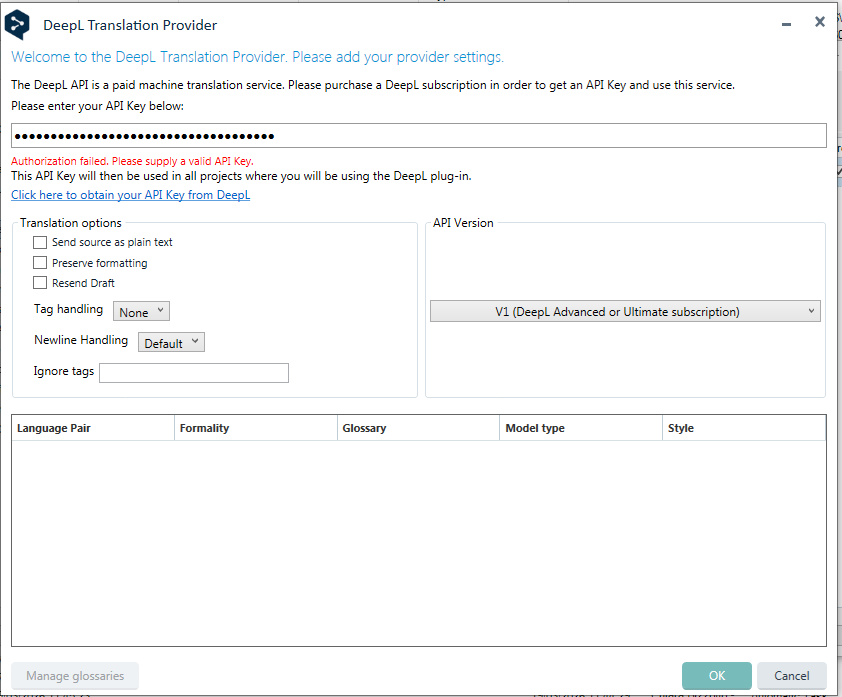
DeepL Translation Provider plug-in does not work. When I select it from the drop-down menu in the Translation Providers wizard, I get this error message: "Authorization failed. Please supply a valid API key".

I use Studio 2024 SR1 and my DeepL subscription is active.

I uninstalled and reinstalled the plugin, but the error persists.

The problem araised 2 days ago.DeepL Translation Provider settings window showing an error message: 'Authorization failed. Please supply a valid API key.' Fields for API key, translation options, and API version are visible.
Thank you


Removed AI Suggestion
[edited by: Technolab Communication srl at 11:16 AM (GMT 0) on 19 Mar 2026]

emoji
Parents
  • Hi  ,  , 

    I’ve tested the DeepL Translation Provider plug-in here locally with Studio 2024 SR1 and I’m not seeing the same issue, so to investigate further could you please send us the log files from both DeepL and Studio?

    DeepL logs C:\Users\[OS USER]\AppData\Roaming\Trados AppStore\DeepL\DeepLLogs

    Trados Studio logs C:\Users\[OS USER]\AppData\Roaming\Trados\Trados Studio\Studio18\logs

    Please include the latest logs for the day the error occurred and the previous day.

    Also, just to confirm: the DeepL plug-in requires a valid DeepL API key from your DeepL account. Please double-check that:

    • the API key has been entered correctly,
    • it hasn’t expired or been revoked,
    • your DeepL subscription/account is still active, and
    • you haven’t reached any usage, quota, or billing limits on the DeepL account.

    Once we have the logs, we can look into it further.

    pls send to phartnett@rws.com, I'll then forward to the team to review and circle back to you asap.

    Patrick Andrew Hartnett | Developer Experience | Team Lead | RWS Group

    emoji
Reply
  • Hi  ,  , 

    I’ve tested the DeepL Translation Provider plug-in here locally with Studio 2024 SR1 and I’m not seeing the same issue, so to investigate further could you please send us the log files from both DeepL and Studio?

    DeepL logs C:\Users\[OS USER]\AppData\Roaming\Trados AppStore\DeepL\DeepLLogs

    Trados Studio logs C:\Users\[OS USER]\AppData\Roaming\Trados\Trados Studio\Studio18\logs

    Please include the latest logs for the day the error occurred and the previous day.

    Also, just to confirm: the DeepL plug-in requires a valid DeepL API key from your DeepL account. Please double-check that:

    • the API key has been entered correctly,
    • it hasn’t expired or been revoked,
    • your DeepL subscription/account is still active, and
    • you haven’t reached any usage, quota, or billing limits on the DeepL account.

    Once we have the logs, we can look into it further.

    pls send to phartnett@rws.com, I'll then forward to the team to review and circle back to you asap.

    Patrick Andrew Hartnett | Developer Experience | Team Lead | RWS Group

    emoji
Children