The Trados cloud platform will be undergoing maintenance on Saturday, 9th May 2026 between 05:00 to 17:00 UTC. During this time, you will not be able to log in to the Trados platform.

SDL studio strange Plugins errors then crash!

I have been using the Plugins I have installed from Appstore and fully compatible only with 2021, but today SDL studio does not want to start and showing those errors as in the movie in the below link! 

Any ideas why this is happening and what to do about it?

Thanks

Sameh

https://we.tl/t-G4axjp2jRp

  • My initial reaction to this is that you have somehow installed old versions of the plugins from somewhere, and I have no idea where from.  Do you have a backup solution running perhaps that might have replaced the plugins you are using with the ones that are there now?  The reason I ask this is that the last few are definitely older versions, possibly from 2019.  That's why you see the API message.

    Or maybe you're running some sort of tool that somehow removed the signatures from these plugins?  The reason I ask this is because if you unzip a plugin, make a change in the manifest for example and rezip them, the signature will be lost.  So it is possible to remove signing.

    I'm not confident I know everything you are doing here Sameh and I know you like to use different tools to help with your productivity.  So perhaps there is something you are doing that you just don't see as relevant so have not told us?

    Please try this:

    1. remove all of your plugins, making sure all your plugin folders are empty
    2. restart Studio and make sure all is well
    3. now install one or two plugins only from the appstore integration
    4. restart Studio

    Does this work without any messages?  If it does then keep adding, again via the appstore integration until you have put them all back.

    Paul Filkin | RWS

    Design your own training!
    You've done the courses and still need to go a little further, or still not clear? 
    Tell us what you need in our Community Solutions Hub

  • <SDLErrorDetails time="9/7/2020 1:49:58 PM">
      <ErrorMessage>Cannot load Third Party plug-in: IntegratedSearchViews.SearchView, IntegratedSearchViews, Version=1.6.0.0, Culture=neutral, PublicKeyToken=2368c1a67978b1ca : C:\Users\Ahmed\AppData\Roaming\SDL\SDL Trados Studio\16\Plugins\Unpacked\Integrated Search Views\IntegratedSearchViews.dll</ErrorMessage>
      <Exception>
        <Type>Sdl.Core.PluginFramework.PluginFrameworkException, Sdl.Core.PluginFramework, Version=1.8.0.0, Culture=neutral, PublicKeyToken=c28cdb26c445c888</Type>
        <HelpLink />
        <Source>Sdl.Core.PluginFramework</Source>
        <HResult>-2146233088</HResult>
        <StackTrace><![CDATA[   at Sdl.Core.PluginFramework.DefaultPluginTypeLoader.LoadType(IPlugin plugin, String typeName)
       at Sdl.Core.PluginFramework.Implementation.Extension.get_ExtensionType()
       at Sdl.Core.PluginFramework.Integration.ExtensionsRepository.GetAssignableInstanceOrDefault[TResult](IExtension extension)
       at Sdl.Core.PluginFramework.Integration.ExtensionBuilderFactory.Build[TResult](IExtension extension, ExtensionArguments arguments, Boolean useCache)
       at Sdl.Core.PluginFramework.Integration.ExtensionBuilderFactory.<>c__DisplayClass4_0`2.<Build>b__0(IExtension extension)
       at System.Linq.Enumerable.WhereSelectEnumerableIterator`2.MoveNext()
       at System.Collections.Generic.List`1..ctor(IEnumerable`1 collection)
       at System.Linq.Enumerable.ToList[TSource](IEnumerable`1 source)
       at Sdl.Core.PluginFramework.Integration.ExtensionBuilderFactory.Build[TAttribute,TResult](ExtensionArguments arguments, Boolean useCache)
       at Sdl.Core.PluginFramework.Integration.ExtensionsFactory.Create[TAttribute,TResult](ExtensionArguments arguments, Boolean useCache)
       at Sdl.Desktop.Platform.Implementation.ViewRegistry.get_ViewDescriptors()
       at Sdl.Desktop.Platform.Implementation.StudioWindow.Init(IEventAggregator eventAggregator)
       at Sdl.Desktop.Platform.Implementation.Studio.CreateWindowInternal(Boolean setActive, IEventAggregator eventAggregator)
       at Sdl.Desktop.Platform.Implementation.Studio.Run(ISplashScreen splashScreen, IEventAggregator eventAggregator)
       at Sdl.TranslationStudio.Application.Launcher.RunApplication()]]></StackTrace>
      </Exception>
      <Environment>
        <ProductName>SDL Trados Studio</ProductName>
        <ProductVersion>Studio16</ProductVersion>
        <EntryAssemblyFileVersion>16.0.1.2917</EntryAssemblyFileVersion>
        <OperatingSystem>Microsoft Windows 10 Pro</OperatingSystem>
        <ServicePack>NULL</ServicePack>
        <OperatingSystemLanguage>1033</OperatingSystemLanguage>
        <CodePage>1256</CodePage>
        <LoggedOnUser>ADMINSAM\Ahmed</LoggedOnUser>
        <DotNetFrameWork>4.0.30319.42000</DotNetFrameWork>
        <ComputerName>ADMINSAM</ComputerName>
        <ConnectedToNetwork>True</ConnectedToNetwork>
        <PhysicalMemory>50276084 MB</PhysicalMemory>
      </Environment>
    </SDLErrorDetails>

  • ok.  Please do the following:

    1. copy this plugin to another folder somewhere on your desktop - Integrated Search Views.sdlplugin
    2. add a .zip to the end of it
    3. unzip it
    4. Open the pluginpackage.manifest.xml inside
    5. tell me what version number is inside the <version> element please

    Paul Filkin | RWS

    Design your own training!
    You've done the courses and still need to go a little further, or still not clear? 
    Tell us what you need in our Community Solutions Hub

  • I am 100% sure I installed them from SDL Appstore Paul, and they were all compatible with 2021. I unistalled all plugins using the Plugin Manager and installed once again, and now Studio works well without those error messages. I was working fine yesterday and only today I opened my PC only to find this issue. I have no other software that might change any signatures, so that is why I was very surprised. 

  • Please let me know when it would be a good time to look at this problem with you on your machine?

    Paul Filkin | RWS

    Design your own training!
    You've done the courses and still need to go a little further, or still not clear? 
    Tell us what you need in our Community Solutions Hub

  • sure, Paul will let you know as i have to deliver a project shortly.

  • In the meantime a couple of important questions.  Please can you give me an answer to each one?

    1. Did you change the system date for your computer at all?

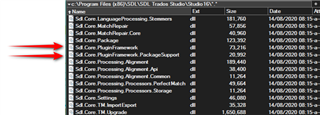
    2. Please can you send me the Sdl.Core.PluginFramework.dll and the Sdl.Core.PluginFramework.PackageSupport.dll files from the Studio folder
      c:\Program Files (x86)\SDL\SDL Trados Studio\Studio16\
      File Explorer window showing contents of SDL Trados Studio Studio16 folder with two files highlighted: Sdl.Core.PluginFramework.dll and Sdl.Core.PluginFramework.PackageSupport.dll.

    Thank you.

    Paul Filkin | RWS

    Design your own training!
    You've done the courses and still need to go a little further, or still not clear? 
    Tell us what you need in our Community Solutions Hub

    emoji


    Generated Image Alt-Text
    [edited by: Trados AI at 10:35 PM (GMT 0) on 28 Feb 2024]
  • See attached, but please note that I have uninstalled the Plugins this morning based on your recommendation and installed them once again, so now Studio is working Ok. I really have no idea what caused this issue this morning, very very strange indeed, knowing that I am 100% sure I installed the 2021 version, and if you remember couple of days ago, there was one plugin only that was not working correctly and upon your advice I removed it, and just installed the Multitrans plugin from the MSI setup.

    Keep me posted.

    Sameh

    1440.files.zip