What is the best way to translate an updated user guide with Studio 2019?

Hello everyone!

I work in a software company. Each year, our team must translate the updated user guide. I've aligned the previous versions of the user guide and pretranslated the 2020 version. I thought that Studio would pretranslated the guide and only let empty the segments concerning the new features i.e. the text to be translated. But the match rate isn't as high as I expected, because of the tags. 

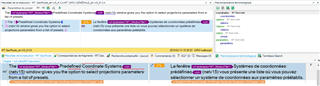
Trados Studio segment with a 93-99% match rate highlighted, showing tags and text to be confirmed manually.

I have to confirm a lot of 93-99 % match segments manually. It's really time consuming. How could I avoid that?

Precision : the format of the source file has not been changed, since the previous version, so I don't understand why the tags aren't the same.

Thanks for your help!


Generated Image Alt-Text
[edited by: Trados AI at 11:35 PM (GMT 0) on 28 Feb 2024]
emoji
  • Sorry, I wanted to show segments that come from the memory and not from the alignment. Here is a screen shot of the segment in the editor and one of the sentence in FM, if it can help.

    Screenshot of Trados Studio editor showing a segment with text from the translation memory, no visible errors or warnings.Screenshot of Trados Studio with a segment open, displaying highlighted text from the translation memory and a warning about multiple translation units found.

    emoji


    Generated Image Alt-Text
    [edited by: Trados AI at 11:36 PM (GMT 0) on 28 Feb 2024]
  • No need to be sorry, I am trying to find out, what's happening and this is why I have so many questions.

    So, it looks like within the previous translation, showing in your TM view, segments with missing tags have been confirmed. On the left, in source, you see tags surrounding the text, while on the target side these tags are missing.

    There are multiple reasons for that. First: Studio does NOT show tags by default, just formatting. So when the translator seen the segments last time, there was no visible difference between the segment in source and target. Bold was bold and the font looked identical or at least similar. Second: Studio does NOT report missing formatting tags by default. So there were no errors in the process and no one noticed missing tags.

    Solution: confirm all the segments again, create a new TM and import only the last translation there. Next time the process should work as expected.

    Possible solution to make it faster: remove penalty for missing formatting and different formatting within your current project. Use pretranslate, this should insert all segments as 100%, even with different or missing tags. When done, revert these settings to default. Go to verification settings, tag verifier and change the settings to not ignore formatting tags and not to report spacing around tags. Run the verification for tags, repair any possible errors. When done, create a new TM, attach it to this project, remove the old one. Update the new TM with the new project and keep the project for future reference.

    _________________________________________________________

    When asking for help here, please be as accurate as possible. Please always remember to give the exact version of product used and all possible error messages received. The better you describe your problem, the better help you will get.

    Want to learn more about Trados Studio? Visit the Community Hub. Have a good idea to make Trados Studio better? Publish it here.

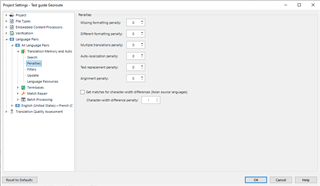
  • I've removed the penalty for missing or different formatting penalty, as you can see in the screen shot :

    Trados Studio Project Settings window showing penalties section with 'Different formatting penalty' set to 0.

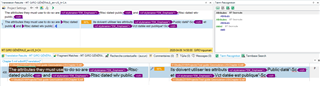
    So, why do I still have some 99% segments after the pretranslation with missing tags? Is there another setting that I must adjust?

    Trados Studio translation results with 99% match segments highlighted, indicating missing tags despite penalty adjustments.

    emoji


    Generated Image Alt-Text
    [edited by: Trados AI at 11:36 PM (GMT 0) on 28 Feb 2024]
  • Unfortunately not. There is a tag missing, which is not formatting. I'm afraid you will need to manually confirm all segments.

    _________________________________________________________

    When asking for help here, please be as accurate as possible. Please always remember to give the exact version of product used and all possible error messages received. The better you describe your problem, the better help you will get.

    Want to learn more about Trados Studio? Visit the Community Hub. Have a good idea to make Trados Studio better? Publish it here.