Formatting issue in Studio Editor - Studio 2019

Hello everybody,

Quite recently, we are encountering issued in the Editor with the formatting in documents (see example below).

The formatting in the source segment is wrong, only some terms should be bold. It seems as if Studio places e.g. the bold end tag at the very end of the sentence before the next opening tag in row and not just around individual terms. This is a nuisance since we need to check every instance in the source document and correct it in the target segment. And even if it is corrected, the formatting might be incorrect in the target document again, not always but increasingly frequently.

Screenshot of Trados Studio Editor showing incorrect bold formatting in the source segment, with the bold end tag placed at the end of the sentence.

This happens with bold, italic, superscript etc. And it happen on all our installations.

Does this have to do with any new trick in Office versions and is there anthing we can do about it?

Thanks and regards,

Angelika


Generated Image Alt-Text
[edited by: Trados AI at 1:48 AM (GMT 0) on 29 Feb 2024]

emoji
  • I see… Also the segment #8 is wrong.

    I'd always recommend to use the latest Service Release available.

    How did you create the project above that failed as well. I mean, did you translate it as a single document, did you use a project template or the default SDL template…? Maybe you're using old or corrupted templates… This might be the problem, based on the fact that the problem doesn't seem isolated. Also SDL recommends creating project templates from scratch with every new version of Trados Studio installed. So if you don't follow this guideline, you can end up with old project templates… The way to prove this is creatings new project templates and use them everytime. Test the new project template and if the issue doesn't show up, then the problem was the project template.

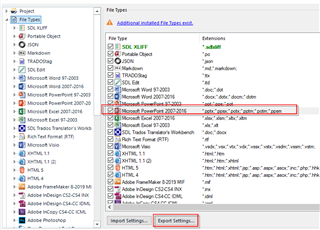
    This is the last thing I can try, I guess. Could you please send me your PowerPoint file type in your project settings?

    Trados Studio project settings window showing file types list with Microsoft PowerPoint 97-2003 selected and an error message indicating additional file type exists.

    P. S.: If the Export settings buttons is greyed out, it means that you've got he default settings, so never mind.

    emoji


    Generated Image Alt-Text
    [edited by: Trados AI at 1:49 AM (GMT 0) on 29 Feb 2024]
  • The project above was created with default SDL template. We only use templates for some customer projects, but not this customer and not this project.. But this is certainly something we could check, whether the templates we use are updated to the latest version or new.

    The PowerPoint file type is the default one, so changes to the settings made (export button is greyed out).

    So we will have to do some more testing to find out what the problem is.

    Thanks anyway for your help so far.

  • You can start with your default templates. They are in:

    C:\Users\[user]\Documents\Studio 2019\Project Templates\

    Close Trados Studio, rename this folder Project Templates to Project Templates FOO and restart Trados Studio (new fresh templates will be created). And try again…