
 Translate



Your users are already in your portal. Now Genius can be too.
In the previous Onyx release, we introduced role-based access so you can control which content each user sees. We teased that our next update would bring Genius as an embeddable widget - and here it is. With the Ruby release, you can embed Genius directly inside your own web application, giving users a focused chat and documentation experience without ever leaving your portal.
Genius Widget
Until now, Genius ran as a standalone portal. That works well for many customers, but others need something lighter - a way to surface AI-assisted documentation inside their existing product or support site without sending users to a separate URL.
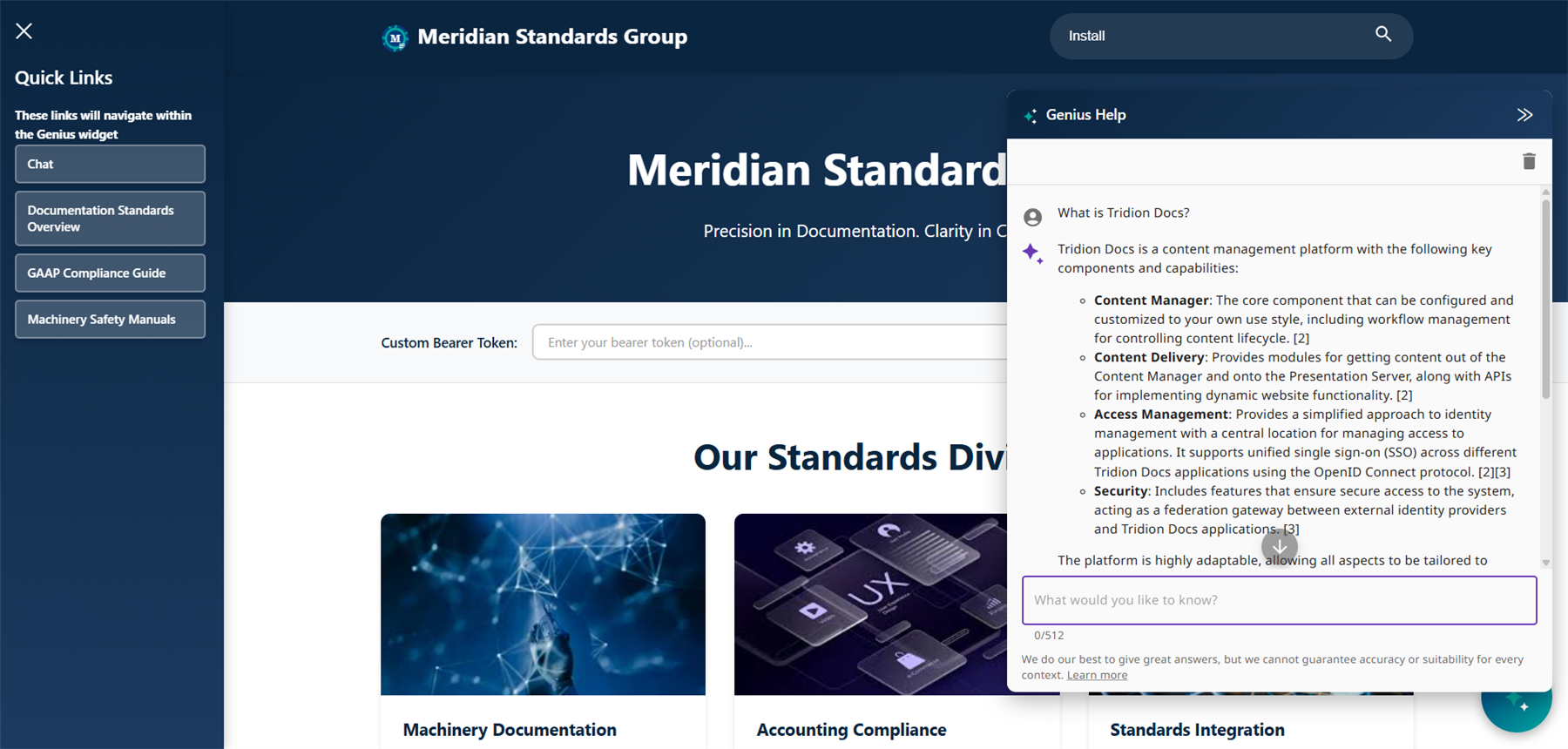
The Genius Widget makes this possible. It's an embeddable, JavaScript-based version of Genius that you integrate directly into your parent application. Users get the core Genius experience - AI chat, topic navigation, and search results - in a compact interface that lives inside your product.
A cleaner interface, built for embedding
The widget strips away the elements that don't make sense in an embedded context. There is no header bar, no customer logo, no language switcher, and no breadcrumb navigation - just the content your users need.
What remains is a clean, full-screen chat interface with improved scrolling and input layout, and a full-screen topic view when users navigate from a chat answer to source documentation. A Back button lets users return to the chat from any topic, keeping the experience fluid and focused.
Internal documentation links open within the widget. External links and downloadable binaries open in a new browser tab, so users are never unexpectedly taken away from your application.
Search driven by your portal
The widget does not include its own search bar. Instead, search is driven externally: your parent application handles the search input and passes the query to Genius, which renders the results page - including pagination and back navigation - inside the widget.
This gives you full control over the search experience in your portal while letting Genius handle the documentation results.
Powered by Tridion AI
With the Ruby release, the Genius chat model has been migrated to the RWS Tridion AI assistant, built on the newly developed Tridion AI platform. This brings Genius chat in line with the broader Tridion AI strategy, laying the groundwork for deeper integration and future capabilities across the platform.
For end users, this means noticeably improved results. The new Tridion AI assistant uses an agent-based approach, delivering more accurate and contextually relevant answers from your published documentation.
Language follows your users
There is no language selector in the widget. Instead, the widget automatically inherits the language of the currently logged-in user in the parent portal, ensuring a consistent experience without requiring any additional user action.
Authentication and content permissions
The widget supports secure login within the embedded context and honours the content permissions configured in Genius Admin. Users will only see the documentation they are authorised to access, based on their group membership - exactly as configured in the Onyx role-based access setup.
No action needed
Since Tridion Docs Genius is fully SaaS, there is no need to contact Cloud Operations to install this update. It will be pushed automatically.
Please contact your sales representative if you are interested in a demo or in embedding Genius in your existing portal.