 Translate



The Forgot Password (reset password) link is no longer on the Organize Space login page


The Forgot Password (reset password) link is no longer on the Organize Space login page
... in some versions on the product. Do you mind sharing the version you are on? 
And also indicate if you using the built-in username/password system or if you have set up an enterprise external identity (think Microsoft Azure Active Directory, Cognito, Auth0, or alike)?


We are using the built-in username/password system. No SSO. We are on 15.1.2. (We just upgraded and I don't see the reset password link anymore... wondering if it is a setting somewhere).

Starting Tridion Docs 15.0.0 we introduced Modern Authentication (OpenIdConnect), which means that all authentication flows in the product respect this paradigm. This goes for the external SSO systems like Azure AD etc but the same goes for built-in 'Tridion Docs Identity Provider' (ISHID)
Rereading your issue, to my knowledge the standard product never had a "Forgot Password" option, the only option was a 'Change Password' (for which you need to know your earlier password). Below screenshot comes from 15.1.3 environment when authenticated over the built-in 'Tridion Docs Identity Provider' (which controls your password), and for completeness you can also see this link on https://ish.example.com/ISHID/
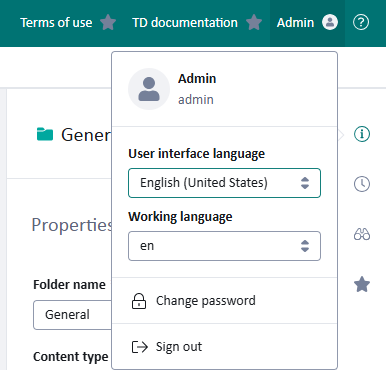
Organize Space enables extension points, like in the above screenshot for "Terms of use". Perhaps in the older web client somebody customized a similar behavior?

Starting Tridion Docs 15.0.0 we introduced Modern Authentication (OpenIdConnect), which means that all authentication flows in the product respect this paradigm. This goes for the external SSO systems like Azure AD etc but the same goes for built-in 'Tridion Docs Identity Provider' (ISHID)
Rereading your issue, to my knowledge the standard product never had a "Forgot Password" option, the only option was a 'Change Password' (for which you need to know your earlier password). Below screenshot comes from 15.1.3 environment when authenticated over the built-in 'Tridion Docs Identity Provider' (which controls your password), and for completeness you can also see this link on https://ish.example.com/ISHID/
Organize Space enables extension points, like in the above screenshot for "Terms of use". Perhaps in the older web client somebody customized a similar behavior?
Thanks Dave! This answers my question 
