Is it possible to create a PDF showing redline changes?

My company has a requirement to be able to compare baselines and then publish a PDF redlining the changes that were made from the previous version of a document. Is this something that can be easily done in Tridion Docs? I am in the process of evaluating CCMS tools for my company. Thanks!!!  Slight smile

emoji
  • Hi Mel,

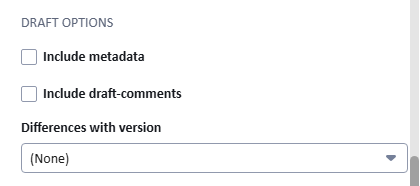
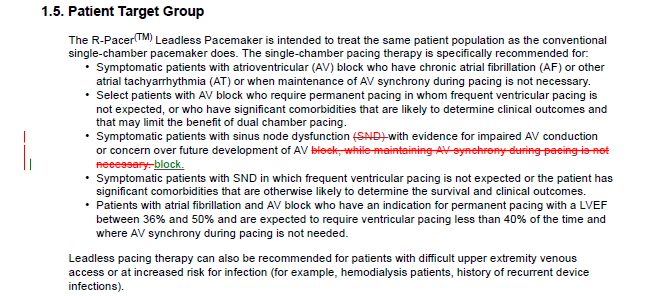
    Yes, this functionality is available with several of the out-of-the-box PDF output types that ship with Tridion Docs. Examples include PDF (A4 Manual), PDF (A5 Booklet) and PDF (letter Manual) - plus this same or similar functionality can be added into your own custom output formats by your stylesheet administrator (or RWS Professional Services). You should be able to try this out in your Tridion instance unless these output formats were removed as part of your deployment. Just add them for the publication you wish to use. The screenshot below is taken from the Properties for one of these outputs formats, shown here in Organize Space but the same info shows in Publication Manager of course. If you scroll down to the Draft Options section, each of those stylesheets include options to Include metadata (which inserts a block of metadata like status, GUID, etc. for each component in the PDF), Include draft-comments and then most interesting for your inquiry, is Differences with version, which allows you to select an earlier version of the publication with which to compare with your current version. That option creates the redlines PDF showing all changes between the two versions, also as shown below.

    Screenshot of the Draft Options section showing checkboxes for 'Include metadata' and 'Include draft-comments', and a dropdown menu for 'Differences with version' set to '(None)'.Screenshot of a document section titled '1.5. Patient Target Group' with text describing patient recommendations for the R-Pacer Leadless Pacemaker. Some text is highlighted in red with strikethrough.

    emoji


    Generated Image Alt-Text
    [edited by: RWS Community AI at 10:42 PM (GMT 1) on 13 May 2026]