 Translate



Hi,
We did and upgarde to Trados Studio 2021 a couple of months ago. The last friday, i did an upgrade of TM and only today we get this error "translation provider threw exception"
can someone can give a help please?
Regards
Marcello

Hi,
We did and upgarde to Trados Studio 2021 a couple of months ago. The last friday, i did an upgrade of TM and only today we get this error "translation provider threw exception"
can someone can give a help please?
Regards
Marcello
Hello Marcello Barone ,
The issue is perhaps related to upgrading an older TM.
This article should help you resolve this.
Oana Nagy | QA Engineer | RWS Group

Hello Steven,
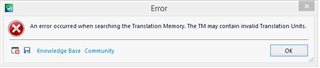
Thanks for your quick reply. I already did the upgrade as mentioned here: How to upgrade a translation memory from an older version to a newer one? (sdl.com). When i try to open the file, i also get this error


Hello Marcello Barone ,
Please provide the full error stack as this often contains useful information
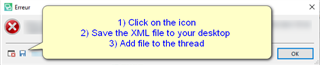
There are also further articles in relation to the latest error- depending on the status of the TM's
Oana Nagy | QA Engineer | RWS Group
Hello Marcello Barone ,
Please provide the full error stack as this often contains useful information
There are also further articles in relation to the latest error- depending on the status of the TM's
Oana Nagy | QA Engineer | RWS Group
Thanks for your help. Find the xml file
<SDLErrorDetails time="27.07.2021 16:13:10">
  <ErrorMessage>An error occurred when searching the Translation Memory. The TM may contain invalid Translation Units.</ErrorMessage>
  <Exception>
    <Type>Sdl.LanguagePlatform.Core.LanguagePlatformException, Sdl.LanguagePlatform.Core, Version=1.6.0.0, Culture=neutral, PublicKeyToken=c28cdb26c445c888</Type>
    <HelpLink />
    <Source>Sdl.LanguagePlatform.TranslationMemoryApi</Source>
    <HResult>-2146233088</HResult>
    <StackTrace><![CDATA[   at Sdl.LanguagePlatform.TranslationMemoryApi.FileBasedTranslationMemoryLanguageDirection.GetTranslationUnits(RegularIterator& iterator)
   at Sdl.TranslationStudio.TranslationMemoryManager.RegularTmSearcher.RegularSearchJobRequest.Execute(IJobExecutionContext context)
   at Sdl.Desktop.Platform.Implementation.Services.Job.<_worker_DoWork>b__47_0()
   at Sdl.Desktop.Logger.Log.Resources(Object message, Action action)
   at Sdl.Desktop.Platform.Implementation.Services.Job._worker_DoWork(Object sender, DoWorkEventArgs e)
   at System.ComponentModel.BackgroundWorker.OnDoWork(DoWorkEventArgs e)
   at System.ComponentModel.BackgroundWorker.WorkerThreadStart(Object argument)]]></StackTrace>
  </Exception>
  <Environment>
    <ProductName>SDL Trados Studio</ProductName>
    <ProductVersion>Studio16</ProductVersion>
    <EntryAssemblyFileVersion>16.1.4.4184</EntryAssemblyFileVersion>
    <OperatingSystem>Microsoft Windows Server 2012 R2 Datacenter</OperatingSystem>
    <ServicePack>NULL</ServicePack>
    <OperatingSystemLanguage>1033</OperatingSystemLanguage>
    <CodePage>1252</CodePage>
    <LoggedOnUser>xxx</LoggedOnUser>
    <DotNetFrameWork>4.0.30319.42000</DotNetFrameWork>
    <ComputerName>xxxx</ComputerName>
    <ConnectedToNetwork>True</ConnectedToNetwork>
    <PhysicalMemory>10485172 MB</PhysicalMemory>
  </Environment>
</SDLErrorDetails>
Hi Steven,
Did you find something wrong in the xml file? or maybe the SDLTM Repair will be a solution?