Studio 2022 - Plug-in doesn't load, and Studio refuses to start

I recently installed Studio 2022, and after some discussion here on the forum, managed to install some plug-ins.

When I tried to start Studio after this, I was shown this message:
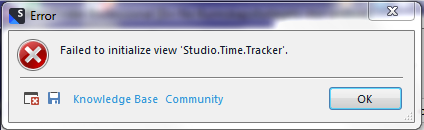
Error message dialog box from Trados Studio 2022 displaying 'Failed to initialize view 'Studio.Time.Tracker'.' with an OK button.

and then the Studio refused to start, and the icon-button disappeared from the bottom of the screen.

I can probably do without the timetracker, but I do need to be able to start Studio 2022.

Hope someoone can help.

Jon

Stack attached

<SDLErrorDetails time="22.08.2022 14:00:14">
  <ErrorMessage>Failed to initialize view 'Studio.Time.Tracker'.</ErrorMessage>
  <Exception>
    <Type>Sdl.Desktop.Platform.StudioException, Sdl.Desktop.Platform, Version=17.0.0.0, Culture=neutral, PublicKeyToken=c28cdb26c445c888</Type>
    <HelpLink />
    <Source>Sdl.Desktop.Platform</Source>
    <HResult>-2146233088</HResult>
    <StackTrace><![CDATA[   at Sdl.Desktop.Platform.Implementation.StudioWindow.EnsureViewSite(IViewReference viewReference)
   at Sdl.Desktop.Platform.Implementation.StudioWindow.GetController(String viewId)
   at Sdl.Desktop.IntegrationApi.Internal.ExtensionBuilders.AbstractViewControllerBuilder.Build(IExtension extension, Object defaultInstance, ExtensionArguments arguments)
   at Sdl.Core.PluginFramework.Integration.ExtensionsRepository.AddExtension[TResult](IExtension extension, ExtensionArguments arguments, Func`4 instanceCreator)
   at Sdl.Core.PluginFramework.Integration.ExtensionBuilderFactory.Build[TResult](IExtension extension, ExtensionArguments arguments, Boolean useCache)
   at Sdl.Core.PluginFramework.Integration.ExtensionBuilderFactory.<>c__DisplayClass4_0`2.<Build>b__0(IExtension extension)
   at System.Linq.Enumerable.WhereSelectEnumerableIterator`2.MoveNext()
   at System.Collections.Generic.List`1..ctor(IEnumerable`1 collection)
   at System.Linq.Enumerable.ToList[TSource](IEnumerable`1 source)
   at Sdl.Core.PluginFramework.Integration.ExtensionBuilderFactory.Build[TAttribute,TResult](ExtensionArguments arguments, Boolean useCache)
   at Sdl.Core.PluginFramework.Integration.ExtensionsFactory.Create[TAttribute,TResult](ExtensionArguments arguments, Boolean useCache)
   at Sdl.Desktop.Platform.Implementation.ViewRegistry.InitializeIntegrationControllers()
   at Sdl.Desktop.Platform.Implementation.ViewRegistryOperator.InitializeIntegrationControllers()
   at Sdl.Desktop.Platform.Implementation.StudioWindow.Init(IEventAggregator eventAggregator)
   at Sdl.Desktop.Platform.Implementation.Studio.CreateWindowInternal(Boolean setActive, IEventAggregator eventAggregator)
   at Sdl.Desktop.Platform.Implementation.Studio.Run(ISplashScreen splashScreen, IPluginLoaderService pluginLoaderService, ICommandLineParsingService commandLineParsingService, IUserSettingsService userSettingsService, IEnumerable`1 startUpActions)
   at Sdl.TranslationStudio.Application.Launcher.RunApplication()]]></StackTrace>
    <InnerException>
      <Type>System.Exception, mscorlib, Version=4.0.0.0, Culture=neutral, PublicKeyToken=b77a5c561934e089</Type>
      <HelpLink />
      <Source>Sdl.Community.Studio.Time.Tracker</Source>
      <HResult>-2146233088</HResult>
      <StackTrace><![CDATA[   at Sdl.Community.Studio.Time.Tracker.Structures.SettingsSerializer.ReadSettings()
   at Sdl.Community.Studio.Time.Tracker.Panels.Main.StudioTimeTrackerViewController.Initialize(IViewContext context)
   at Sdl.Desktop.IntegrationApi.AbstractViewController.Sdl.Desktop.IntegrationApi.Internal.IViewController.Initialize(IViewContext context)
   at Sdl.Desktop.IntegrationApi.Internal.Adaptors.InternalDockingViewAdaptor.OnInit(IViewSite site, ISettingsGroup settings)
   at Sdl.Desktop.Platform.AbstractView.Init(IViewSite site, ISettingsGroup settings)
   at Sdl.Desktop.Platform.Implementation.StudioWindow.EnsureViewSite(IViewReference viewReference)]]></StackTrace>
    </InnerException>
  </Exception>
  <Environment>
    <ProductName>Trados Studio</ProductName>
    <ProductVersion>Studio17</ProductVersion>
    <EntryAssemblyFileVersion>17.0.0.11594</EntryAssemblyFileVersion>
    <OperatingSystem>Microsoft Windows 7 Professional </OperatingSystem>
    <ServicePack>Service Pack 1</ServicePack>
    <OperatingSystemLanguage>1033</OperatingSystemLanguage>
    <CodePage>1252</CodePage>
    <LoggedOnUser>JonPrecision14\Jon</LoggedOnUser>
    <DotNetFrameWork>4.0.30319.42000</DotNetFrameWork>
    <ComputerName>JONPRECISION14</ComputerName>
    <ConnectedToNetwork>True</ConnectedToNetwork>
    <PhysicalMemory>33476472 MB</PhysicalMemory>
  </Environment>
</SDLErrorDetails>
:


Generated Image Alt-Text
[edited by: Trados AI at 1:30 PM (GMT 0) on 4 Mar 2024]
Parents
  •  

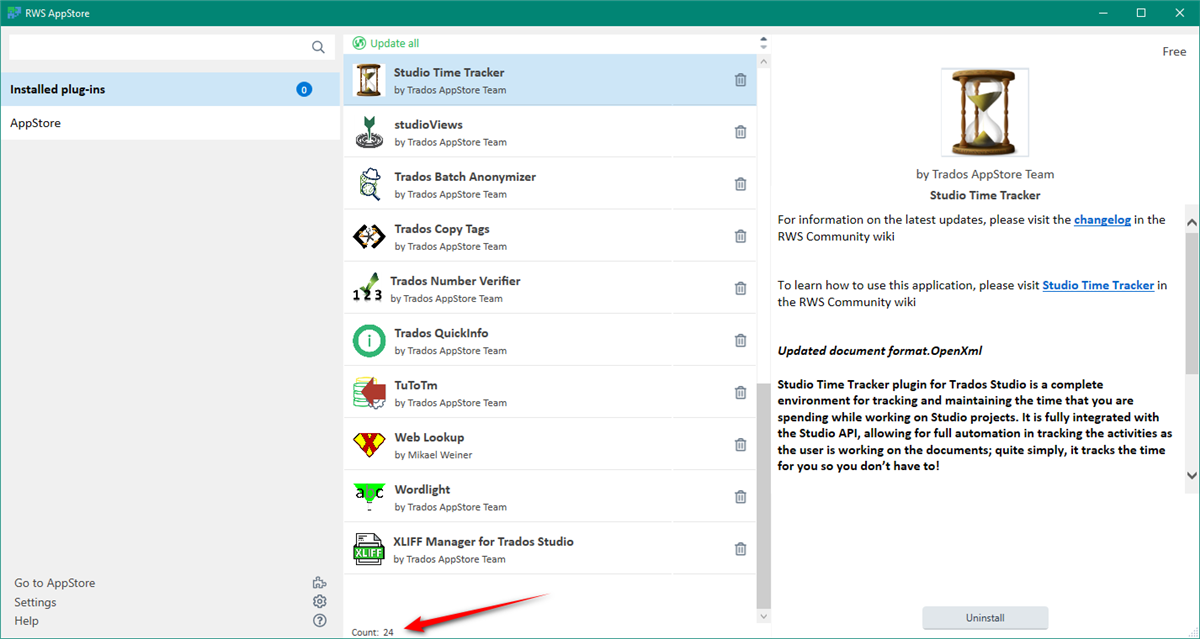
    You could update Studio as you are running an older version of 2022, but I doubt that's the problem.  Certainly I am not having a problem as I'm running 24 plugins in addition to the time tracker:

    Trados Studio AppStore window showing a list of installed plugins with a total count of 24. Highlighted is the Studio Time Tracker plugin by Trados AppStore Team with a description and changelog link.

    So I think you are either running an old plugin that's conflicting with this one, or you just need to reset Studio as the error isn't specific to a plugin, just to the window layout.  So try this first to see if you can keep your plugins.  

    Rename this folder (just add _old to the end or something, it's not important what you rename it to) and restart Studio:

    c:\Users\[USERNAME]\AppData\Roaming\Trados\Trados Studio\Studio17

    So the path would become this:

    c:\Users\[USERNAME]\AppData\Roaming\Trados\Trados Studio\Studio17_old

    If you can't find this folder then you need to unhide your hidden files/folders:

    https://www.howtogeek.com/howto/windows-vista/show-hidden-files-and-folders-in-windows-vista/

    If that still fails then I suggest you remove all your plugins and then reinstall them.  To do that please close Trados Studio, delete these folders, restart Trados Studio and then reinstall your apps using the integrated appstore:

    c:\Users\[USERNAME]\AppData\Roaming\Trados\Trados Studio\17\Plugins
    c:\Users\[USERNAME]\AppData\Local\Trados\Trados Studio\17\Plugins
    c:\ProgramData\Trados\Trados Studio\17\Plugins

    Paul Filkin | RWS

    Design your own training!
    You've done the courses and still need to go a little further, or still not clear? 
    Tell us what you need in our Community Solutions Hub

    emoji


    Generated Image Alt-Text
    [edited by: Trados AI at 1:30 PM (GMT 0) on 4 Mar 2024]
Reply
  •  

    You could update Studio as you are running an older version of 2022, but I doubt that's the problem.  Certainly I am not having a problem as I'm running 24 plugins in addition to the time tracker:

    Trados Studio AppStore window showing a list of installed plugins with a total count of 24. Highlighted is the Studio Time Tracker plugin by Trados AppStore Team with a description and changelog link.

    So I think you are either running an old plugin that's conflicting with this one, or you just need to reset Studio as the error isn't specific to a plugin, just to the window layout.  So try this first to see if you can keep your plugins.  

    Rename this folder (just add _old to the end or something, it's not important what you rename it to) and restart Studio:

    c:\Users\[USERNAME]\AppData\Roaming\Trados\Trados Studio\Studio17

    So the path would become this:

    c:\Users\[USERNAME]\AppData\Roaming\Trados\Trados Studio\Studio17_old

    If you can't find this folder then you need to unhide your hidden files/folders:

    https://www.howtogeek.com/howto/windows-vista/show-hidden-files-and-folders-in-windows-vista/

    If that still fails then I suggest you remove all your plugins and then reinstall them.  To do that please close Trados Studio, delete these folders, restart Trados Studio and then reinstall your apps using the integrated appstore:

    c:\Users\[USERNAME]\AppData\Roaming\Trados\Trados Studio\17\Plugins
    c:\Users\[USERNAME]\AppData\Local\Trados\Trados Studio\17\Plugins
    c:\ProgramData\Trados\Trados Studio\17\Plugins

    Paul Filkin | RWS

    Design your own training!
    You've done the courses and still need to go a little further, or still not clear? 
    Tell us what you need in our Community Solutions Hub

    emoji


    Generated Image Alt-Text
    [edited by: Trados AI at 1:30 PM (GMT 0) on 4 Mar 2024]

Children