Trados 2021 and Trados 2022 crashes

1. Trados 2021 crashes without warning time to time and always when trying to open a GroupShare project. Because of that I have never had possibility to work on a GroupShare project.

2.Trados 2022 crashes without warning when trying to open any kind of translation project, both offline and GroupeShare.

3. Could you help with any suggestions how can I claim my money back for the upgrade? I've been struggling with Trados already couple of years, I am getting so angry, that I feel deserving some compensation for the problems and financial losses I've encountered during this time.

emoji
Parents
  •  

    Have you run a Windows Repair on Trados? This should help... See Repairing your installation of Trados Studio

    For anyone experiencing speed problems or crashes in Trados...

    I keep several functions that I rarely use turned OFF, which for me always prevents Trados Studio being slow or crashing. Even if you have no speed or stability problems normally, they can still happen occasionally with a big/old/complex project. Here's what works for me:

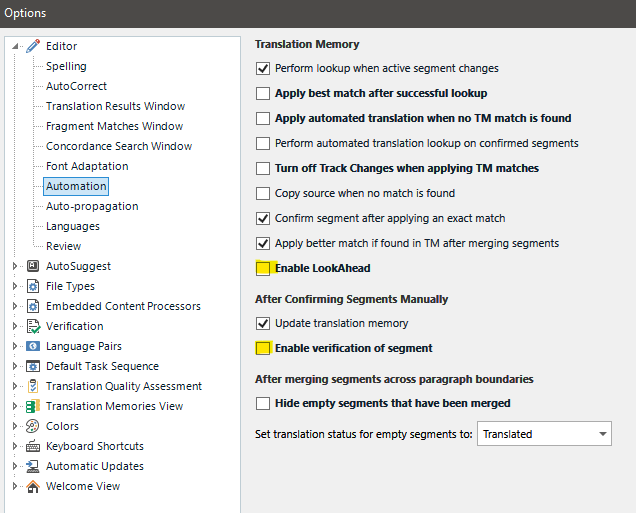
    1) Go to File > Options > Editor > Automation then UNtick 'Enable LookAhead' under 'Translation Memory' and UNtick 'Enable verification of segment' under 'After Confirming Segments Manually'

    Trados Studio Options menu with 'Enable LookAhead' and 'Enable verification of segment' options unchecked to improve speed.

    Both these options should help speed things up. You can then verify the file after you've finished working on it all in one go via the Review tab > Verify or by clicking F8.

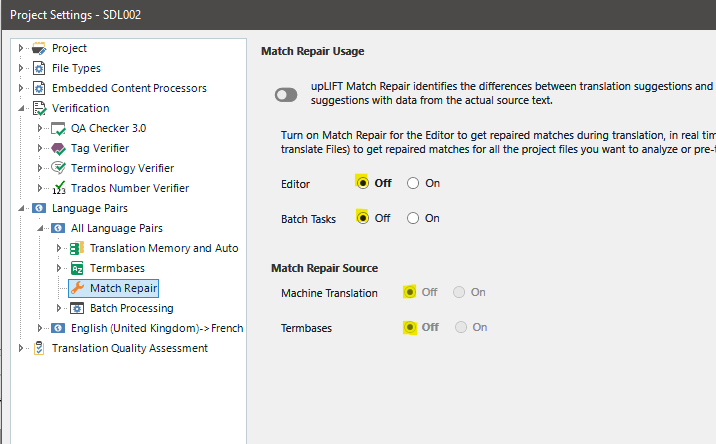
    Then, in the Project Settings (or via File>Options if you create your own projects from scratch or work via Translate Single File), turn OFF upLift Match Repair:

    Trados Studio Project Settings showing 'upLIFT Match Repair' turned off for the Editor to stabilize files and enhance speed.

    Turning this setting OFF in each project I receive helps stabilise files that for some reason cause Studio to crash. I am sure it helps with speed too.

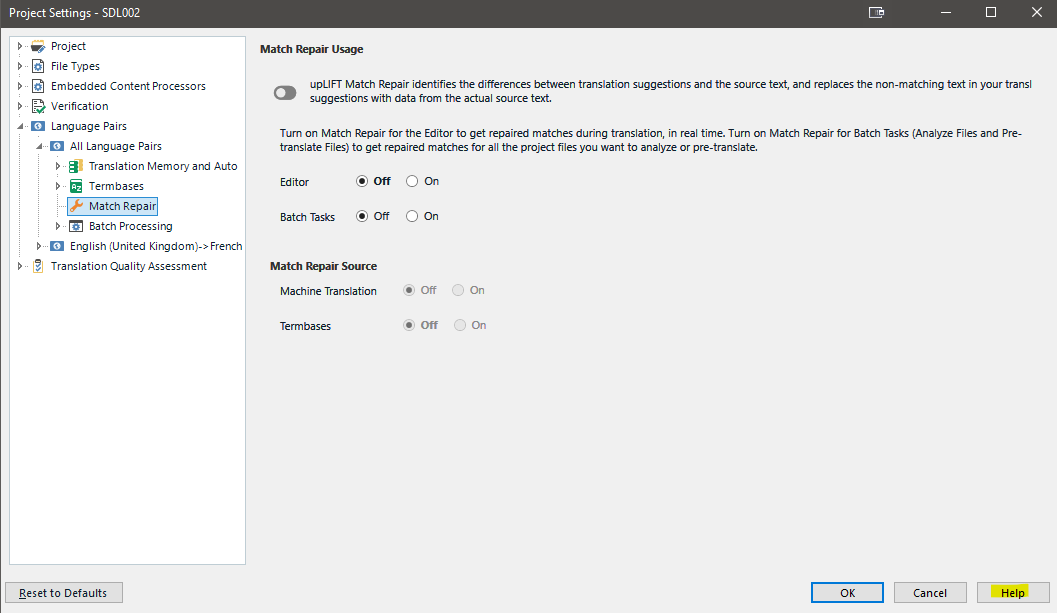
    If you want to know what any setting means under File > Options or under Project Settings, click the Help button bottom right of the settings window:

    Trados Studio Project Settings with Match Repair options for Editor and Batch Tasks turned off, and sources for Machine Translation and Termbases also off.

    Keeping these settings turned on if you need them should work fine if you have a hi-spec fast computer and an excellent broadband connection. However, in less than perfect scenarios or with huge slow projects, it can help to turn one or all of them off.

    If the above isn't enough, I also keep Fragment Matching turned off, here:

    As most of my work is proofreading in Review mode, I don't need fragment matching turned on. I even have the Fragment Matches window closed in the Editor view.

    I always have them all turned off until I need them, and Studio works well for me...

    I hope this helps,

    All the best,

    Ali Slight smile

    emoji


    Generated Image Alt-Text
    [edited by: Trados AI at 1:35 PM (GMT 0) on 4 Mar 2024]
  • Thank you, but I already replied you on my previous post I cannot find now, that it is not working form me.

    emoji
  •  

    Sorry Viola, I didn't see that reply, your post is here: Trados immediate crush

    In your previous post here: Trados Studio 2121 crushes  suggested a support engineer take a look at your setup and sent you a Support Case ID: 00658669

    Did that happen?

    Trados crashing is usually prevented by turning off Match Repair in both your profile settings via File>Options AND in any incoming project settings.

    It is worth noting that Project Settings ALWAYS overrule the same setting under File>Options.

    Sorry I haven't been able to help, someone from RWS needs to help you with this. For this request, please send an email to trados@rws.com

    All the best,

    Ali Slight smile

    emoji
Reply Children
  • Thank you!

    No, I haven't received any notification about Support Case nor any support engineer has contacted me.
    I will try to send the e-mail tomorrow, but I am kind of lost any hope and trust in this company.

    emoji
  •  

    I think Ali is referring to your case from 8-months ago so I'm not surprised you don't recall.  I just reviewed the notes from that case and can see the support engineer was very helpful and left you with some actions after carrying out some repairs for you:

    • Make your TMs smaller by exporting them based on date created on
    • Install any updates for Windows 10
    • Try to repair the Microsoft Visual C++ installed in Control Panel, including the Fresco USB driver.

    You said you'd address this when you had time.  Did you manage to do any of this?

    Paul Filkin | RWS Group

    ________________________
    Design your own training!

    You've done the courses and still need to go a little further, or still not clear? 
    Tell us what you need in our Community Solutions Hub

    emoji
  • Yes, she was very nice and spent long time on my problem, but didn't resolved it completely. The crashing with the Trados 2021 became less often, so, I somehow managed to work. At that time I think I hadn't bought Trados 2022 upgrade yet, I don't remember.

    The TMSs are divided in smaller TMSs,  Windows 10 updates most likely are installed, no new updates are pending last time I checked a week ago, I don't understand what to do with these C++ programs, I am not so good in computers, so, I am afraid to delete something from the computer, but regarding the Fresco USB driver most likely it is the only one possibility to work with my additional Desktops, however the Trados 2022 hasn't worked even a minute even the time I was working just on my PC desktop with everything else deconnected. Waste of money.

    The main question is – should this program really cause so many problems and additional work and changes in ones computer and daily work routine knowing how much it costs?

    emoji