 Translate



Until the last update I could use Cloud. Since I installed it I cannot. How can I use it again?


Until the last update I could use Cloud. Since I installed it I cannot. How can I use it again?
Hello Annamária Szabó
Please add a screenshot of the login window? Do you happen to be part of multiple Cloud accounts?
If you are part of an account with MFA
A solution is to downgrade to the previous version of Trados Studio. So uninstall the current version ( Trados Studio 2024 SR1 (Build 18.1.3.6657) and install Trados Studio 2024 SR1.
https://downloadcentercdn.sdl.com/TP/Trados/T2024/Studio/CUs/SR1/TradosStudio2024_SR1_6370.zip
Let me know if it works.
Radu
Annamária Szabó We will be pleased to help you with this problem so have logged a support case on your behalf. We do prioritise customers who have a support contract so please keep in mind it could take up to 48 hours, especially over a weekend, but rest assured we will contact you as soon as we can. You will be contacted at the email address used for this Community. Support Case Id : CS0033131.
Elisa Maxim| RWS Group
Design your own training!
You've done the courses and still need to go a little further, or still not clear?
Tell us what you need in our Community Solutions Hub


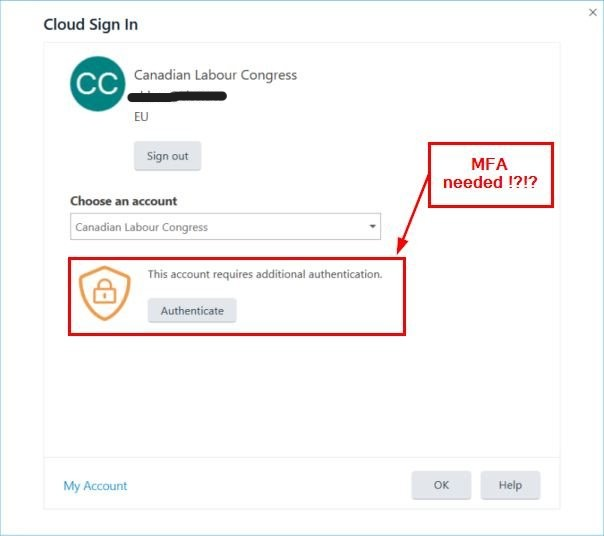
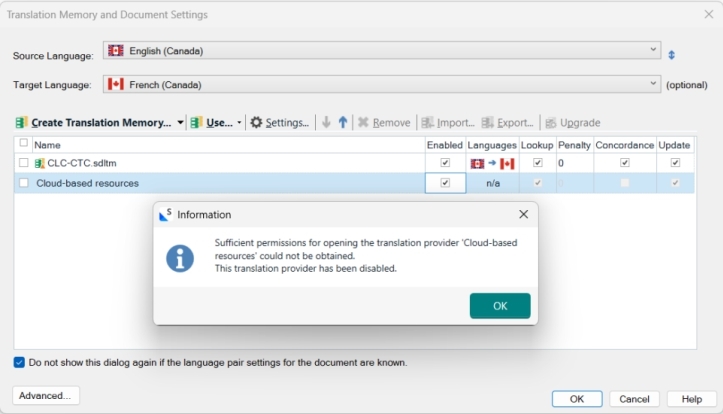
Hi. We seem to have the same problem right after installing the latest patches Trados Studio 2024 SR1 - 18.1.3.6657, our user, Annick, could not login the cloud-based resources anymore (I guess that's now called Language Weaver!?) as it is asking for multi-factor authentication (MFA or 2FA). Everything else works.
Nowhere have we found where to control the multi-factor authentication on your platforms.
We are stuck as to how to proceed next to get this resolved.
See screenshots. Please advise. Thank you.
Eric Labelle, IT Coordinator.
Hi Eric Labelle ,
Please make a separate post of your issue - we cannot open a case for you from another user's post.
Kind regards,
Anca
Anca Stoian | RWS Group

