Post-editing with AI

Hi Community,

I wonder if there is a way to instruct GPT within Trados to post-edit the target translations, already translated with NMT (another provider). I am aware that you can perform this task segment by segment, using different prompts, like "Refine translations", which changes (but not always, which is annoying) the translated segment according to the project terms from the Multiterm.

But I am looking for a way to do it for the whole project at once. In batch tasks, I see the option "Pre-translate Files with AI Professional", but I don't want to resend  to a NMT engine what is already pre-translated. I just need to post-edit the destination.

Is this option possible somehow?

Best regards,

Almudena

emoji
Parents Reply
  • Hi Jesse,

    Yes, it handles inline tags, both in Translate and Proofread mode (under Batch operations, in the Supervertaler Assistant window). 

    Translate mode allows you to run batch translation on your entire project, taking the entire context term base and any TM matches into account. 

    Proofread mode creates a report in the Reports tab with numbered items, numbered according to the relevant segment. Clicking on these will take you to the corresponding segment. Once each of them is done in the Reports tab, you can also click them away, just like the QA system.  

    For example, I just AI translated the following segment (via Ctrl+T), and it automatically inserted all the tags correctly:

    A screenshot showing a bilingual text editor with English and Dutch text. Inline tags are visible in purple, and a segment is highlighted with a red box.

    I'm currently working on a third, post-edit mode, but this is still in a development branch. This mode will apply AI to improve, if necessary, already translated segments and show everything with tracked changes.  

    As you can see from the link I posted, quite a few people are working on similar solutions. However, my thinking with Supertranslator for Trados was to keep everything as simple as possible by not asking the user to import and export all kinds of bilingual files (into and out of their CAT tools), whether Word tables or SDLXLIFF files, like CotranslatorAI and TransAide. 

    The beauty of my plugin is that Trados does the heavy lifting while offering an improved terminology experience and a boatload of AI tricks.   

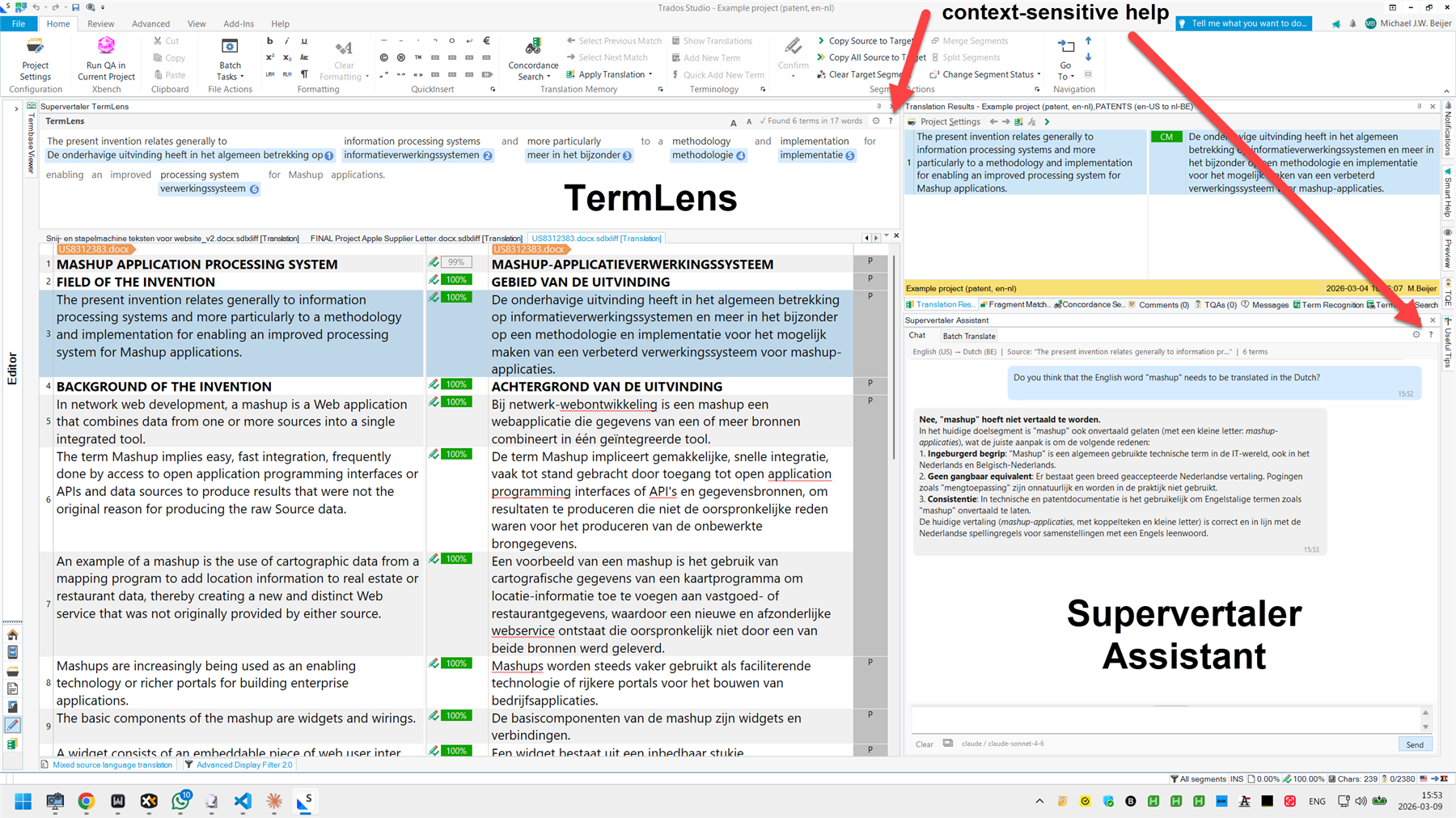
    I have also implemented a context-sensitive help system. If you click the little question marks in the plugin UI, they will take you to the corresponding sections in an online help system that is constantly updated:

    supervertaler.gitbook.io/trados 

    A screenshot of the Supervertaler Assistant interface in Trados Studio. It includes a context-sensitive help section, bilingual text, and highlighted terms in the TermLens panel.

    emoji


    Generated Image Alt-Text
    [edited by: RWS Community AI at 10:55 AM (GMT 0) on 24 Mar 2026]
Children
No Data