No matches found or lookup performed with AI Professional

I've been trying to get AI Professional in Trados Studio 2022 SR2 - 17.2.12.19268 working reliably. However, it always misses some segments and I can't look up the AI Professional translation for them. In this case, it's connecting to OpenAI and the connection is working as I just successfully batch translated the project with it. 

Furthermore, sometimes the segments fill with the custom prompt I made for the project instead of an actual translation.

Any ideas on how I can get this working so the batch task does not miss anything and if it does, the lookup can be performed? 

Thanks so much!
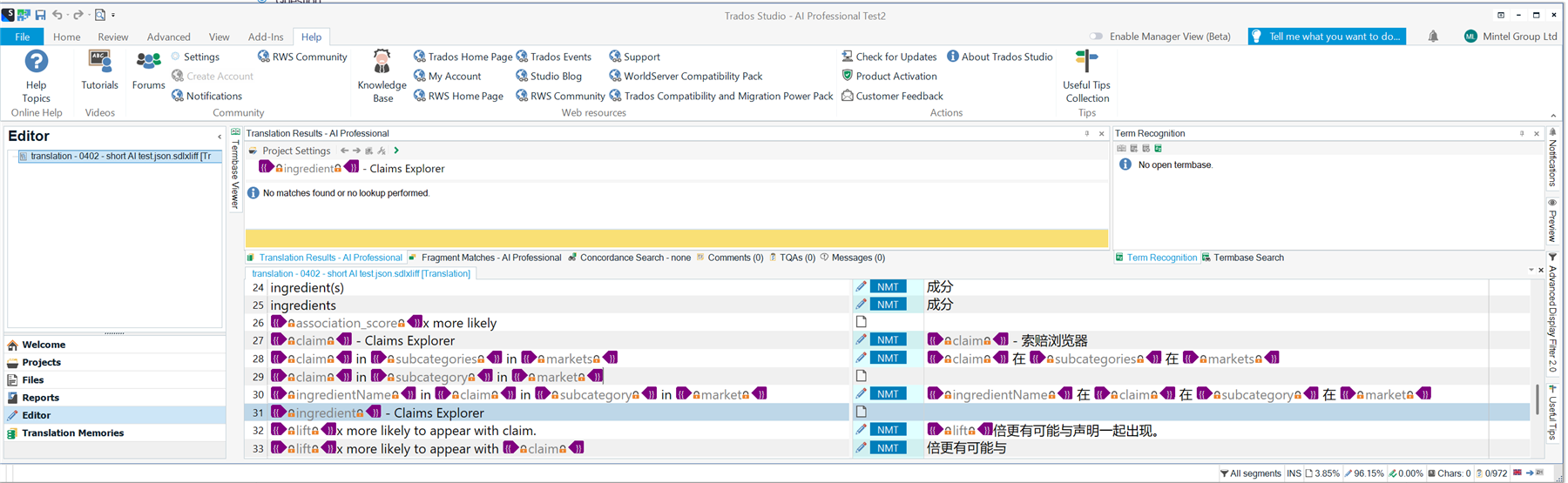
Screenshot of Trados Studio 2022 SR2 interface showing the Editor and Translation Results panels. The AI Professional plugin is active, but no matches or lookups are performed.


Generated Image Alt-Text
[edited by: RWS Community AI at 2:30 PM (GMT 0) on 4 Feb 2026]
emoji
  • "Probability score": 0.6

    "Question improvement suggestion": Please clarify if you are receiving any specific error messages when attempting to perform lookups or if there are particular segments that consistently fail to provide translations. Additionally, mention if you have tried any troubleshooting steps already.

    In the meantime, based on the information you have provided, here is a suggested answer to your question:

    Hello,

    It sounds like you're experiencing some challenges with the AI Professional feature in Trados Studio 2022 SR2. Here are some steps you can take to troubleshoot the issue:

    **Step 1:** **Check Connection Settings**  

    Ensure that your connection to OpenAI is properly configured. Since you mentioned that batch translation works, this may not be the issue, but it's worth double-checking.

    **Step 2:** **Review Custom Prompts**  

    If segments are filling with your custom prompt instead of translations, review the prompts you have set up. Make sure they are correctly formatted and that they align with the segments you are translating.

    **Step 3:** **Adjust MT Penalty Settings**  

    As a workaround, consider applying a penalty to the MT user. This can help ensure that unchecked MT results do not appear as 100% matches, which may be causing some segments to be skipped.

    **Step 4:** **Pre-translate the Project**  

    Before running the batch task, try using the "Pre-translate" option to ensure that the latest translation results are available. This can help in reducing the number of missed segments.

    **Step 5:** **Check for Updates**  

    Make sure you are using the latest version of Trados Studio 2022. Updates often include fixes for known issues, including those related to AI Professional.

    **Step 6:** **Test on a Different Project**  

    If possible, create a new project and test the AI Professional feature there. This can help determine if the issue is project-specific.

    If you continue to experience issues after trying these steps, please provide any specific error messages or behaviors you observe, as this will help in diagnosing the problem further.

    I hope this answer addressed your question. If not, please reject the answer, add the question improvement suggestion information, and click the RWS Community AI checkbox on the right to try again.

    RWS Community AI

    emoji
  • More information: 
    There is no other TM for this project

    The project was pre-translated first, but anyway no TM

    It seems to be related to having tags, but other segments with tags translate just fine

    emoji