
 Translate



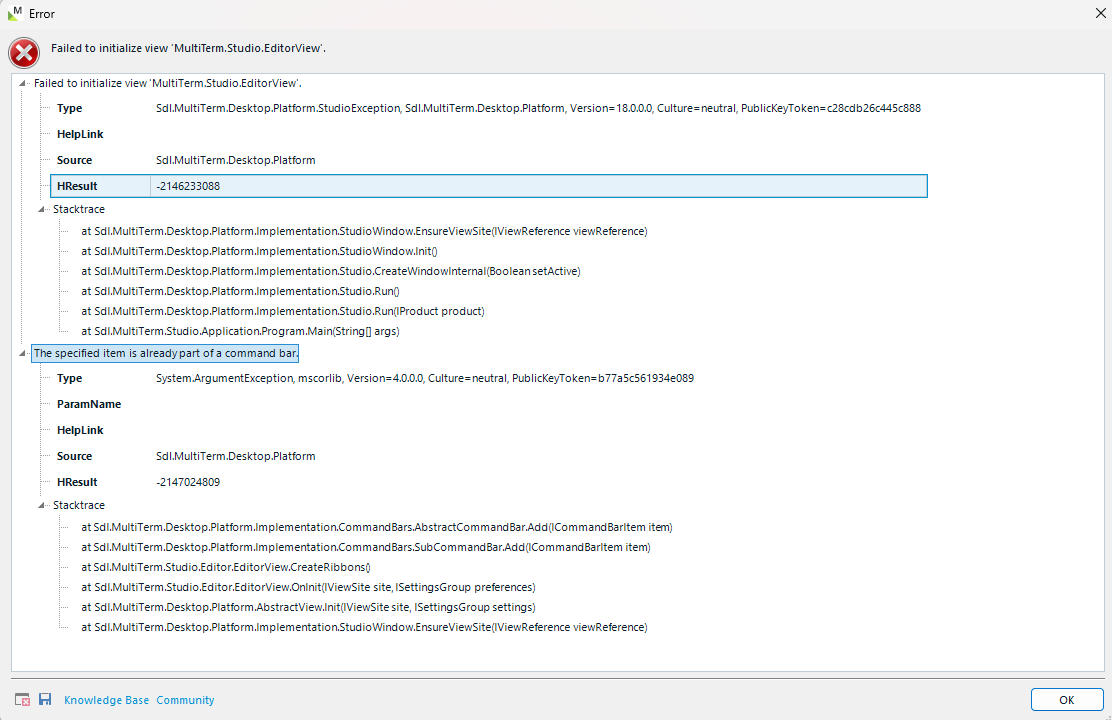
Hi! I have a problem launching MultiTerm 2024. I've tried everything that has been suggested in the forum:
- Changing the name to 'Multiterm18_old'.
- Uninstalling and installing the program several times.
- Changing the name of the file coresettings.xml to settings.xml
- Running the program as an administrator.
- Repairing the program in the Uninstall programs folder.
- Changing the location of the folder when installing it.
- And adding the program to my antivirus whitelist.
Before Multiterm crushed, I tried adding some functions from Create Ribbons, I think it's called. I added them in the Termbases sections and, when I closed the program, it stopped working.
I don't know what else to do to launch the program and have access to the dashboard.
Could you help me with a new unthought solution? Thank you!
Removed AI Suggestion
[edited by: Sofía Galli at 6:22 PM (GMT 1) on 16 Apr 2026]


