


Termbase recognition doesn't work since reinstalling Trados 2022 on a new computer

Dear community,

I hope someone here will be able to help me, since the IT-people from the agency I work with couldn't help me with this problem so far. I had to reinstall Trados 2022 on a new computer (Windows 11) and since then, the termbase recognition doesn't work anymore. Every time I open a project, the translation memory works perfectly, but the termbase is automatically deactivated with a message telling me it's impossible to establish a connexion to the termbase and the term recognition can't be used for this termbase. I've tried a few tricks found on Community Knowledge pages (which don't seem to work anymore though, I just tried to access the page again), but nothing helped. Has anyone encountered the same problem or has any idea how to resolve it? I'd be super grateful!
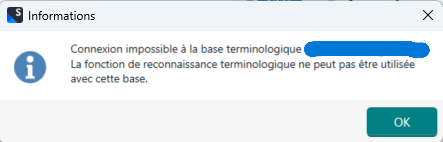
Error message in French stating 'Connexion impossible   la base terminologique. La fonction de reconnaissance terminologique ne peut pas  tre utilis e avec cette base.' with an OK button.


Removed AI Suggestion
[edited by: Elsa Monsch at 10:28 AM (GMT 1) on 20 Apr 2026]

emoji
  • Probability score: 0.7  

    Question improvement suggestion: Provide specific details about the termbase setup, including whether it's local or server-based, and any error messages received.  

    In the meantime, based on the information you have provided, here is a suggested answer to your question:  

    Hello,  

    It sounds like you're experiencing a frustrating issue with termbase recognition in Trados Studio 2022 after reinstalling on a new computer. Here are some steps you can take to troubleshoot and hopefully resolve the problem:  

    **Step 1:** Verify Termbase Path  

    - Ensure that the path to your termbase is correct. If it's located on a network drive, check that you have the necessary permissions to access it.  

    **Step 2:** Check Project Settings  

    - Go to Project Settings > Language Pairs > All Language Pairs > Termbases and confirm that your termbase is correctly added and activated.  

    **Step 3:** Re-register the Termbase  

    - Remove the termbase from your project settings and then add it back again. This can sometimes refresh the connection.  

    **Step 4:** Update Software  

    - Make sure that both Trados Studio and MultiTerm are updated to the latest versions. This can resolve compatibility issues.  

    **Step 5:** Test with a New Project  

    - Create a new project with the same files and termbase to see if the issue persists. This can help determine if the problem is project-specific.  

    **Step 6:** Check for Antivirus Interference  

    - Sometimes, antivirus software can block essential files or processes. Temporarily disable your antivirus to see if that resolves the issue.  

    **Step 7:** Reorganize the Termbase  

    - Open your termbase in MultiTerm and use the Termbase Management feature to reorganize it. This can help improve term recognition.  

    If these steps do not resolve the issue, consider reaching out to RWS Support for further assistance.  

    I hope this answer addressed your question. If not, please reject the answer, add the question improvement suggestion information, and click the RWS Community AI checkbox on the right to try again.  

    RWS Community AI

    emoji
  • One precision: the termbase are sent with the projects from the agency and are server-based.

    emoji
  • We will be pleased to help you with this problem so have logged a support case on your behalf. We do prioritise customers who have a support contract so please keep in mind it could take up to 48 hours, especially over a weekend, but rest assured we will contact you as soon as we can. You will be contacted at the email address used for this Community. Support Case Id : CS0046741.

    Ana Sabo | RWS Group

    ___________________
    Design your own training!

    You've done the courses and still need to go a little further, or still not clear? 
    Tell us what you need in our Community Solutions Hub

    emoji
