Translate



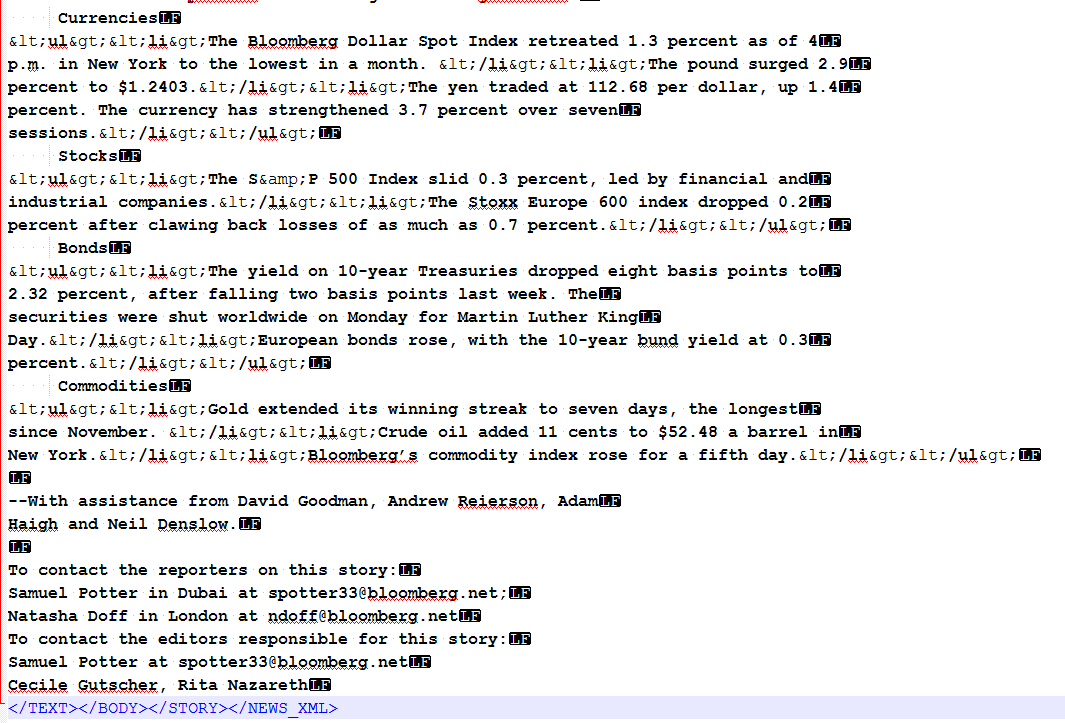
I'm creating a custom xml file type in Trados 2015 using the legacy embedded content option. My files are generally quite straightforward, but one of them has list item tags (specifically <ul> and <li>) that appear escaped within my file. When I process in Trados, the program reads them correctly in between brackets and displays them as text. I successfully managed to tag them using the embedded content option, but that only tags them as in-line. I would rather parse them in the document structure, so that my segments will break when it sees the tags. For example, in the file, where it says "Currencies", I'd like for that to be it's own segment, and then start a new segment when the list starts (The Bloomberg Dollar Spot Index...), then another segment where the period is, with all the tags hidden. Is that possible to do using XPath? I tried adding "ul" and "li" as translatable elements in my parser, which works for all the other tags in the file, but not this one. I'm not sure if it's because they are escaped? I'm afraid my knowledge of XPath is extremely basic and I'm just teaching myself now while I create these file types, so I figured I would defer to you more experienced folks instead.
EDITED TO ADD: I did a test and changed the escaped tags to regular <ul> and <li>, added them as elements in the parser rules, and it broke them exactly how I wanted them. So, it looks like the issue really stems from the escaped html tags. I guess my question ultimately is: is it possible to set these parser rules in a way that it will read them even if they are escaped? I really can't be editing my files every single time I go to process them. This is too time consuming, as we will be processing a large volume per day.