Dependencies file not founded

Dear Colleagues of gateway or translators,

I cannot export the translated files or even open the files to translate, yes I can open them but the trados ask me for browsing for a file, which I do no know where to find and what it is.

The error say dependencies files not founded.

Can anyone of you help me to solve this problem?, please Paul can you help me with this problem?

Thanks before hand.

Parents Reply Children
  • In fact, this particular problem has happened to me for the first time in 7 years of my Studio usage. But there have been other reasons for having to re-create projects, mostly related with Studio crashes without prior saving (the autosaving feature is a bit of a pain in the butt, but I suppose I'll have to enable it after all).

    Happy New Year with less Studio faults indeed.

  • Hi again Adrian,
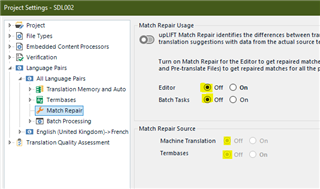
    I have no problem with crashes unless I do something myself to cause them. The reason I don't get crashes is that I systematically turn OFF 'Match repair' as soon as I've opened each package. When I'm proofreading, I don't need fragment matching turned on. Here's where you do it:
    If you're not working with project settings, the above function can also be turned off via File>Options. As I'm sure you know, any setting made via File>Options (your Profile settings) will be overruled by the same setting in Project settings. Very useful when dealing with different clients who have different requirements.
    I also have the 'Fragment matches' window closed in the Editor view.

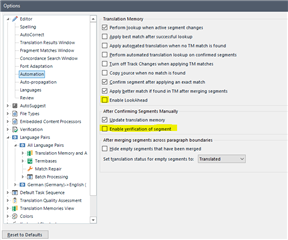
    Then I keep LookAhead turned off, via File>Options, (even when I'm translating) here:
    That speeds things up, as does having 'Enable verification of segment' unticked under 'After Confirming Segments Manually', as marked above.
    I also turn off other features that I don't need, depending on the task in hand. For example if I have a really huge file in any software (not just Studio) then I turn off OneDrive syncing until I've finished working on it. That makes a huge difference to speed and stability.
    Hope this helps!
    All the best,
    Ali Slight smile
  • Alison, thanks a lot for the elaborate description. I get occasional crashes in different situations, but they don't seem related to what you've brought up. The last crash, for instance, was after the "object reference not set to blah blah" thing that's been popping up on me since forever. But that's not the only thing, so let's just skip this issue altogether and focus on the OP, as I wouldn't want to be accused of hijacking the thread.

  • OK, Adrian Slight smile

    In that case, if I had the 'dependencies file' message coming up on projects I'd created myself, I'd run a repair of Studio and MultiTerm.

    I do this with any software that is malfunctioning... For example, I ran a repair on Microsoft Office this morning because Excel has been misbehaving... If that doesn't work, I run a reset. It's the logical way to keep your software environment healthy.

    Enjoy the rest of your day! I will, I'm proofreading, my Favourite Thing ... or at least I should be heheh Wink

    All the best,

    Ali Slight smile